

How To Accept Recurring Donations Online? [3 Proven Approach]


Table of Content
Download Paymattic – it’s Free!

Subscribe To Get
WordPress Guides, Tips, and Tutorials
We will never spam you. We will only send you product updates and tips.
TL;DR:
Nonprofits can accept recurring donations online through three main methods: WordPress donation plugins like Paymattic, dedicated fundraising platforms like Donorbox, or payment processors like Stripe and PayPal.
Key takeaways:
– Recurring donors give 42% more annually and have 80% retention rates
– WordPress plugins offer the lowest costs and full data ownership
– Recurring donations PayPal works, but has limited customization
– A good recurring donation platform should support multiple payment gateways, donor self-service portals, and automated receipts
For nonprofits wanting to receive donations online consistently: Install a plugin like Paymattic, connect to Stripe or PayPal, create a donation form with recurring options, and embed it on your website. The entire setup takes under 10 minutes.
Here’s something most nonprofit guides won’t tell you: one-time donors rarely come back. Studies show that recurring donors give 42% more annually than one-time contributors. Yet I see so many organizations still chasing single donations, burning through resources on constant outreach.
I spent weeks researching the best ways to accept recurring donations online. Talked to nonprofit managers. Tested platforms. Dug into conversion data. And I’ve seen that the gap between struggling nonprofits and thriving ones often comes down to one thing: how they handle recurring giving.
In this guide, I’ll walk you through everything you need to know about accepting recurring donations online.
You’ll learn the different methods available, which platforms actually work, and how to set up a system that brings in steady, predictable funding for your cause.
Let’s get into it.
Why recurring donations matter for your nonprofit?
Before we talk about the “how,” let’s understand the “why.”
Recurring donations create predictable revenue. When you know $5,000 is coming in every month from committed supporters, you can plan programs, hire staff, and budget with confidence. No more guessing if next month’s rent is covered.
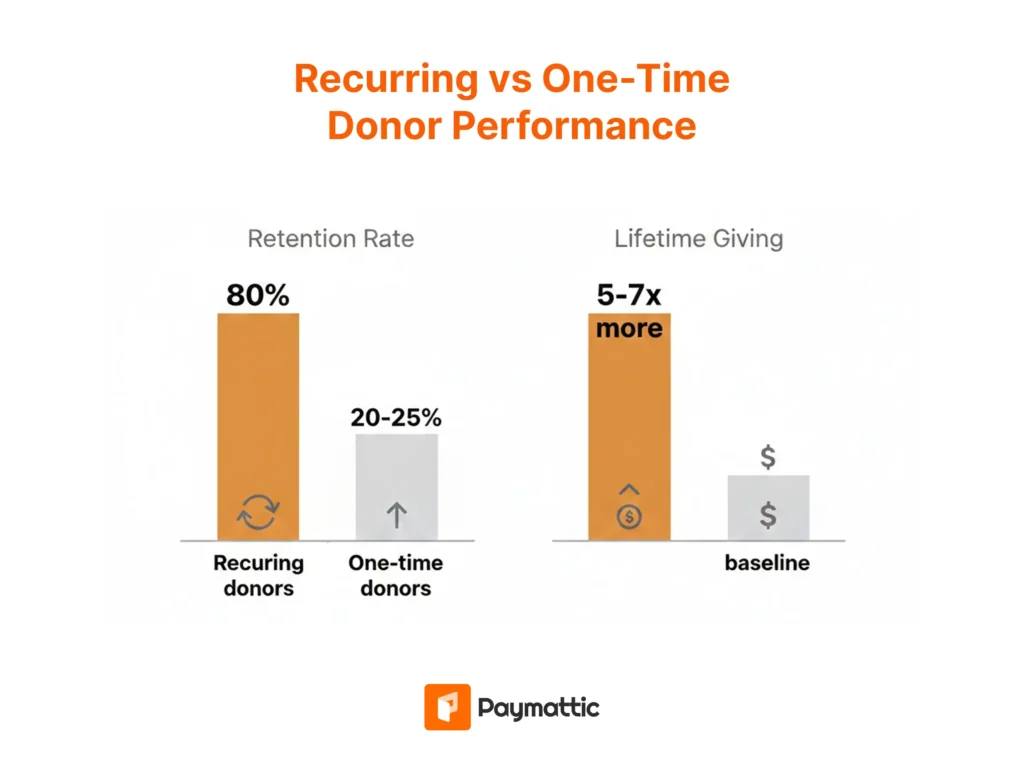
The numbers back this up:
- Recurring donors have a retention rate of around 80%, compared to just 20-25% for one-time donors
- Monthly donors give 5-7 times more over their lifetime than single-gift donors
- Organizations with strong recurring programs spend less on donor acquisition
For small fundraising teams and solo nonprofit organizers, this stability is everything. You stop living campaign to campaign and start building something sustainable.
What About Payment Processing Fees?
Let’s talk about the elephant in the room. Every online donation involves processing fees.
Standard rates are around 2.9% + $0.30 per transaction. Some recurring donation payment processors offer nonprofit discounts. Stripe, for example, has programs that reduce rates for verified nonprofits.
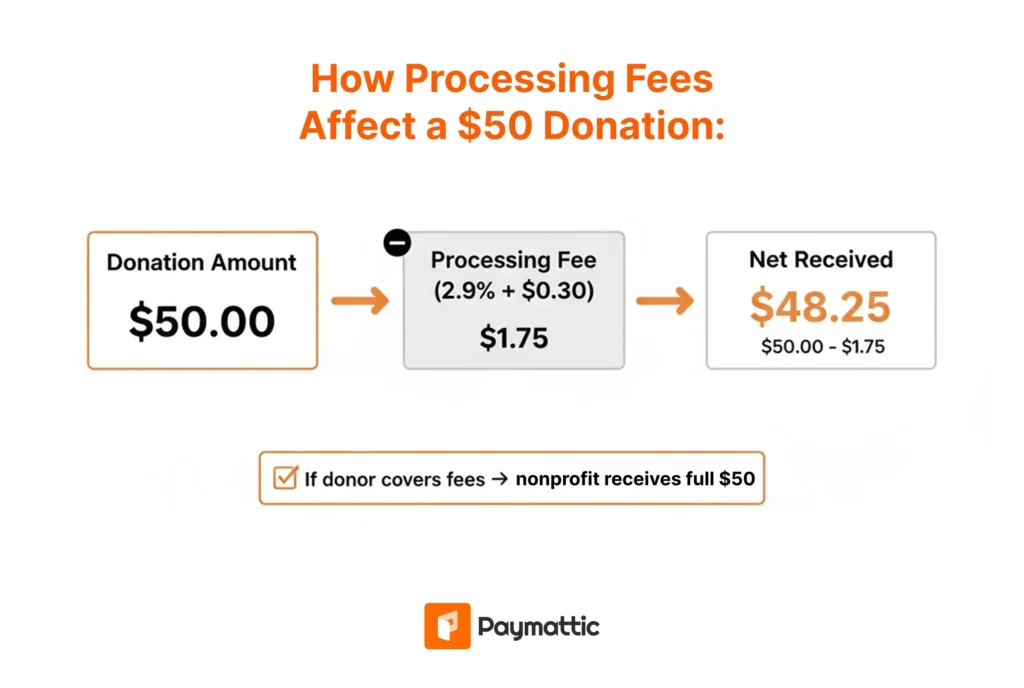
Some organizations ask donors to cover fees. This is a personal choice. Data suggests about 70% of donors will opt to cover fees when asked, but it does add friction to the process.
Recurring donation payment processors
Choosing the right payment processor matters. Each has different strengths for recurring donations, and the one you pick affects your fees, reliability, and donor experience.
Stripe
Stripe is the go-to for most nonprofits handling recurring donations. It handles subscription billing natively, has excellent retry logic for failed payments, and works seamlessly with most donation plugins.
Stripe processing fees sit around 2.9% + $0.30 per transaction, though nonprofits can apply for discounted rates. The payment processor dashboard gives you clear visibility into active subscriptions, failed charges, and revenue breakdown.
PayPal
PayPal recurring donations work through their subscription system. The advantage is donor familiarity. Many people already have PayPal accounts and trust the checkout experience.
The downside is less control over branding and a slightly clunkier subscription management experience for donors. Fees are similar to Stripe. If your audience skews older or less tech-savvy, PayPal’s recognition can boost donation conversions.
PayPal fees for nonprofits follow a similar structure to Stripe, though the rate varies depending on whether your organization has confirmed charity status.
Square
Square has expanded beyond point-of-sale into online payments. Square’s recurring billing features work well, and fees are competitive. Square is a solid choice if you already use their ecosystem for in-person donations at events.
Authorize.net
This is an older payment processor that some established nonprofits still use. Authorize supports recurring billing but requires more technical setup. Monthly gateway fees apply on top of transaction fees. Generally not recommended for new organizations when simpler options exist.
For most nonprofits, Stripe is the best default. It’s reliable, well-supported by WordPress donation plugins like Paymattic, and offers the smoothest donor experience. Add PayPal as a secondary option to capture donors who prefer it.
The key is picking processors that your donation platform supports well. With Paymattic, you can connect multiple gateways and let donors choose their preferred payment method at checkout.
Subscribe Newsletter
Subscribe to our newsletter for updates, exclusive offers, and news you won’t miss!

How to accept recurring donations online?
There are several paths to setting up recurring donations. Your choice depends on your technical comfort level, budget, and where your audience lives online.
Here are three proven approaches:
1. WordPress website with a donation plugin
If you run a WordPress website (and roughly 43% of all websites do), this is often the most cost-effective and flexible option.
With a WordPress donation plugin like Paymattic, you can create custom donation forms directly on your site. Donors never leave your website. You control the experience. And you’re not paying platform fees on every transaction.
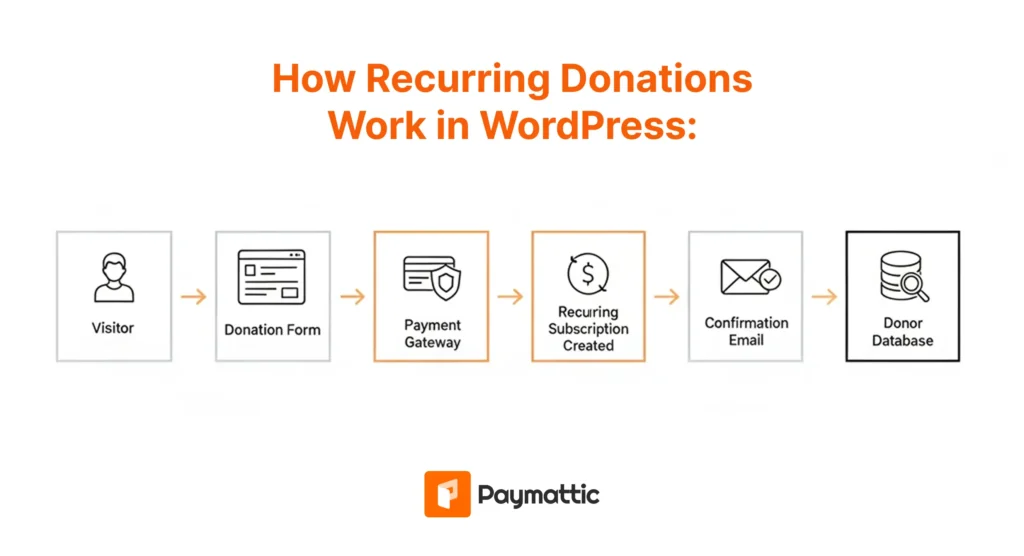
Why this works well:
- Full ownership of your donor data
- No ongoing platform fees beyond payment processing
- Complete customization of your donation forms
- Integration with your existing website and branding
- Accept recurring donations via PayPal, Stripe, and other global payment gateways
Best for: Organizations with WordPress websites that want control and lower long-term costs.
2. Dedicated fundraising platforms
Platforms like Donorbox, GoFundMe, or Givebutter offer hosted recurring donation options. You sign up, configure your donation campaign, and share the donation link. They handle the technical side.
The tradeoffs:
- Monthly subscription fees (often $50-300/month for serious features)
- Platform fees per transaction (typically 1-5% on top of payment processing)
- Donors see the platform’s branding, not just yours
- Your donor data lives on their servers
Why some choose this route:
- No technical setup required
- Built-in reporting and analytics
- Mobile-optimized out of the box
- Quick to launch
Best for: Organizations without a website or technical resources that need to launch fast.
3. Payment processor direct integration
Services like PayPal and Stripe offer their own recurring payment tools. PayPal has payment buttons. Stripe has Payment Links and Checkout.
Important considerations:
- PayPal recurring donations are simple to set up but limited in customization
- Stripe requires more technical knowledge but offers more flexibility
- Both charge standard processing fees (around 2.9% + $0.30 per transaction)
- You’ll need to handle donor management separately
These tools weren’t built specifically for nonprofits. You miss out on features like donor receipts, campaign tracking, and integration with your CRM.
Best for: Very small operations or those already heavily invested in a specific payment ecosystem.
Paymattic: WordPress recurring donation plugin
If you’re running a nonprofit on WordPress and want to accept recurring donations without the complexity, Paymattic is worth a look.
Paymattic is a WordPress plugin that lets you create donation forms with built-in features for recurring payments. You connect your Stripe or PayPal account, design your form, and start collecting monthly, quarterly, or annual donations. The cherry on top is that there’s no platform fee in Paymattic.
Here’s what makes Paymattic stand out for nonprofits:
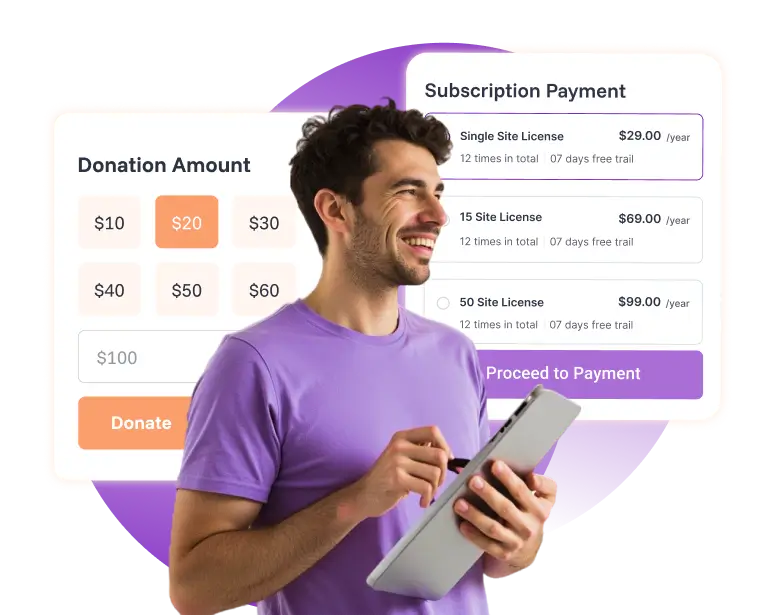
- Flexible recurring options: Donors can choose their own amount and frequency. You can offer suggested amounts or let them enter a custom figure. Weekly, monthly, quarterly, yearly. It’s all configurable.
- Multiple payment gateways: Paymattic supports Stripe, PayPal, and all the major payment gateways. Donors can pay with cards, bank transfers, or digital wallets, depending on what you enable.
- Donor management: You get a dashboard showing all your subscribers, their payment history, and their status. When a payment fails, you know about it.
- Customizable donation forms: Paymattic gives a simple, fast, and customizable donation form builder. Add custom fields, conditional logic, and branding. Your donation form looks like it belongs on your site.
- No platform fee: Unlike hosted platforms that take a cut of every donation, Paymattic charges zero platform fee. Your payment processor fees are the only transaction costs.
- Donor dashboard: Paymattic features a donor dashboard where your donors can see their donations and manage recurring donations if you allow them to.
If you want to keep things simple while maintaining full control, Paymattic handles recurring donations for nonprofits without the overhead of enterprise platforms.
Start Your Journey for Free!
With Paymattic free, you get a full suite of features to manage transactions from the moment you are in.
How to accept recurring donations online with Paymattic?
Paymattic is an incredibly simple plugin when it comes to accepting recurring donations in WordPress. Let me walk you through the actual setup, assuming you have a WordPress website running.
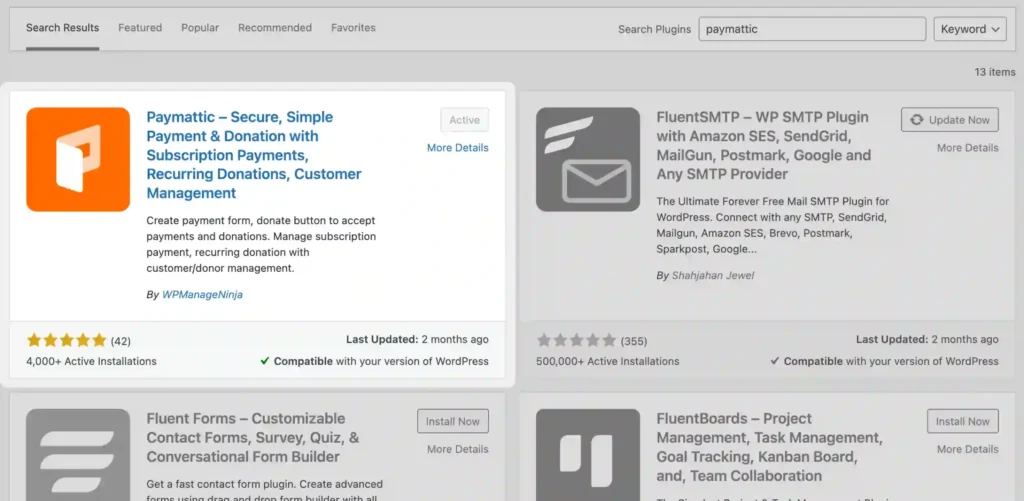
Step 1: Install and activate Paymattic
- Go to your WordPress dashboard. Navigate to Plugins > Add Plugin.
- Search for “Paymattic” and install it. Click Activate.
Step 2: Connect your payment gateway
- Head to Paymattic > Payment Gateways.
- Enter your API keys for the preferred payment gateway.
- Test the connection.
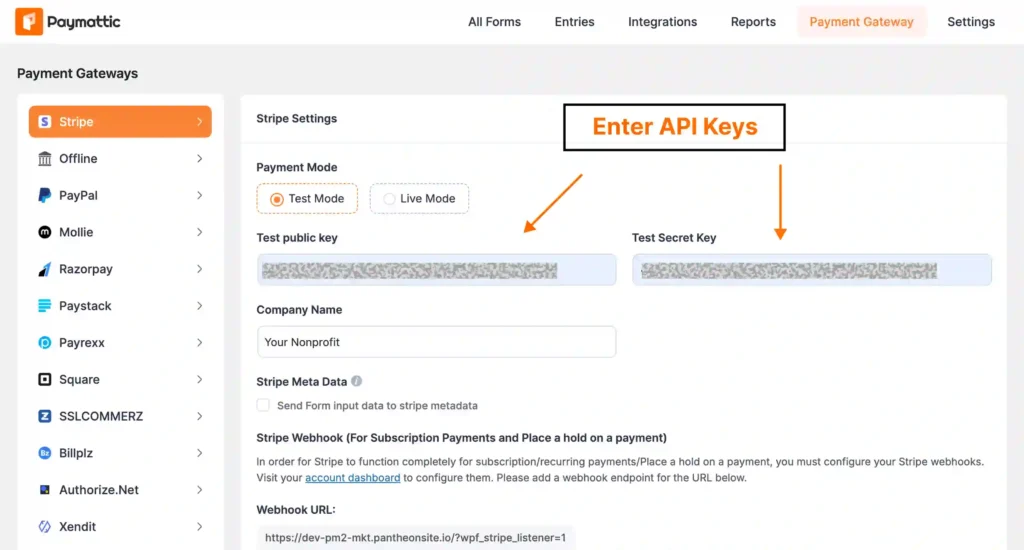
For recurring donations, Paymattic currently supports these payment gateways: Stripe, PayPal, Square, Moneris, and Authorize.net.
You’ll want to connect Stripe or PayPal (or both). Stripe is generally recommended for recurring payments because of its reliability and lower failure rates on subscription renewals.
Step 3: Create your donation form
- Go to Paymattic > All Forms > Add New.
You can start from a template or build from scratch.
For a recurring donation form, you’ll want:
- Donor information fields (name, email)
- Donation Progress Bar field (with suggested amounts)
- A payment gateway field that supports recurring donations
- Optional form fields you want to add
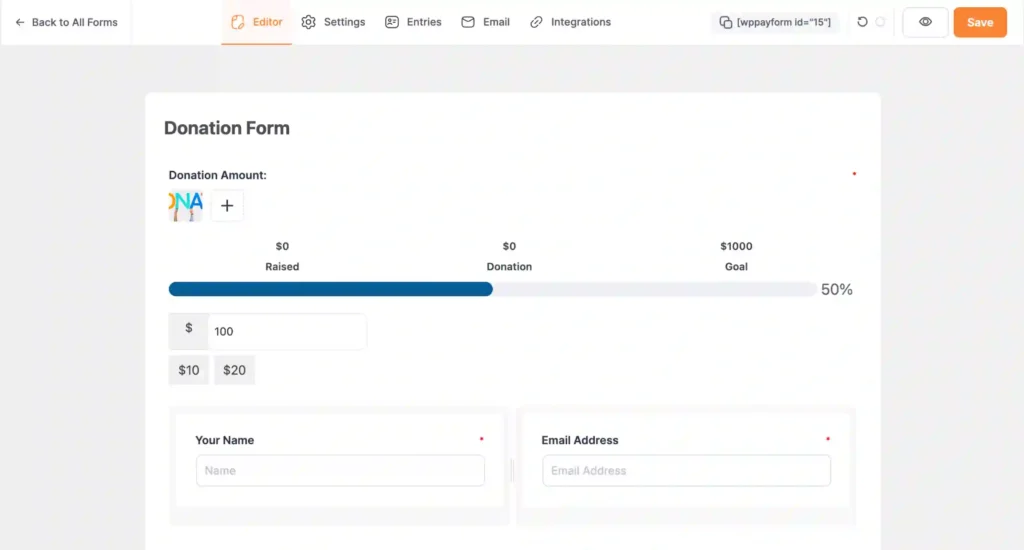
Click Save to save the form.
Step 4: Configure recurring donation options
- Go to the settings of the Donation Progress Item and enable Collect recurring donation.
- Pick your interval, maximum billing time, pick interval style, and check the interval elements.
- Click save
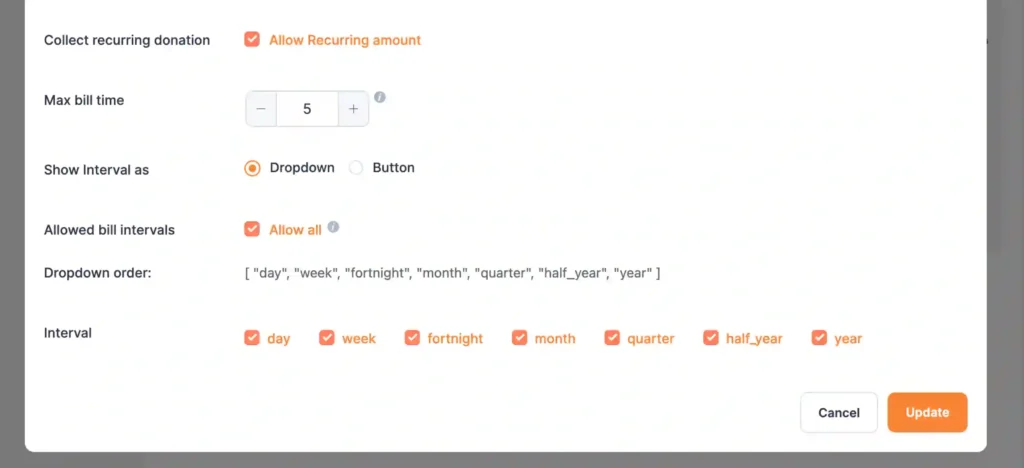
And your recurring donation form is ready to embed with a shortcode.
Step 5: Embed the donation form and test
You can add the donation form with the shortcode. Copy the shortcode from the top of the donation form and paste it into your page.
Publish the page and test if the transaction is working.
If everything works smoothly, you are ready to accept recurring donations with Paymattic.
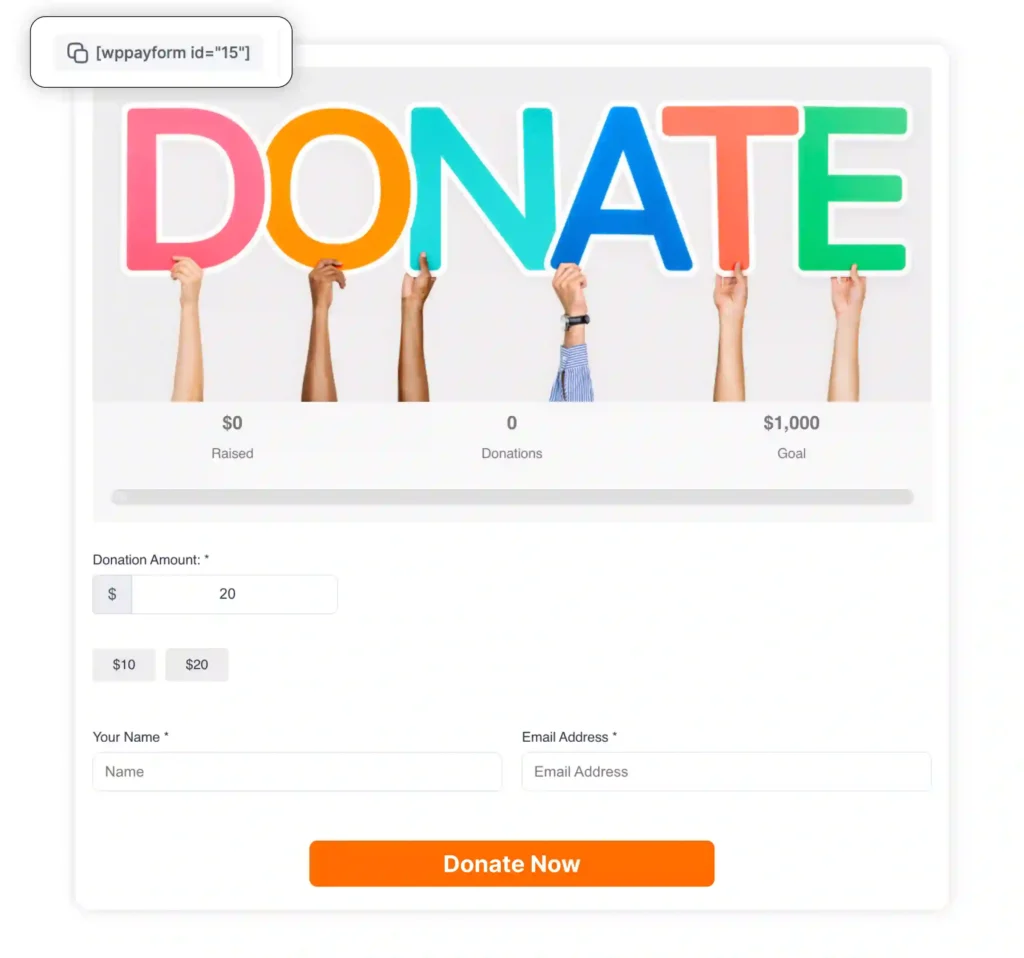
Here’s a demo donation form I created with Paymattic:
Increasing your recurring donation conversions
Setting up the system is step one. Getting people to actually commit to recurring giving is step two.
- Make the recurring option prominent. Some organizations hide it. Don’t. Lead with recurring and offer one-time as the alternative.
- Show the impact of monthly giving. “$25/month provides meals for a family of four” hits harder than “donate any amount.”
- Offer suggested amounts. Three to four options work best. Too many creates decision paralysis.
- Reduce friction. Every extra field costs you conversions. Ask only for what you truly need.
- Follow up personally. New recurring donors deserve a personal thank you. Not just an automated email. A real message.
Read: Ultimate Donor Engagement Guide: Strategies, KPIs, Actions
Wrapping up
Accepting recurring donations online doesn’t have to be complicated or expensive. The key is choosing an approach that fits your organization’s resources and technical comfort.
If you have a WordPress site, a plugin like Paymattic gives you the most control and lowest ongoing costs. If you need something faster with zero technical work, hosted platforms work but cost more over time.
Whatever you choose, the important thing is to start. Every month you delay is predictable revenue you’re leaving on the table.
Your cause deserves sustainable funding. Your team deserves budget stability. Your donors want to give regularly. Connect those dots, and you’ll build something that lasts.
Good day.
Read: How To Keep Your Donors For Life Using The Donor Engagement Cycle?
Frequently asked questions
Can I set up recurring donations with PayPal?
Yes, you can accept recurring donations PayPal offers through their Subscribe or Donate button. However, PayPal’s native options have limited customization. Many nonprofits prefer using a WordPress recurring donation plugin like Paymattic that integrates PayPal while offering more flexibility and better donor management.
What’s the best recurring donation platform for small nonprofits?
For small nonprofits with WordPress websites, plugins like Paymattic offer the best value. You get full control, no monthly fees, and multiple payment options. If you need a hosted solution, platforms like Donorbox or Givebutter let you accept recurring donations online for nonprofits without technical setup.
Can donors cancel or change their recurring donations anytime?
Yes, donors can typically cancel or modify their recurring donations anytime. Most recurring donation platforms provide a donor portal where supporters can update payment methods, change amounts, pause, or cancel subscriptions. Paymattic offers a donor dashboard where your donors can manage their subscriptions if you allow them.
Are recurring donations tax deductible?
Yes, recurring donations to registered 501(c)(3) nonprofits are tax deductible. Each monthly payment counts as a separate contribution for that tax year. Donors should keep receipts from the recurring donation platform for their records. Most platforms automatically send annual giving summaries for tax purposes.
Why should nonprofits focus on recurring donations?
Recurring donations provide predictable, stable revenue that helps nonprofits plan budgets and programs confidently. Monthly donors have higher retention rates and give more over their lifetime than one-time donors. Setting up a system to accept recurring donations online reduces fundraising costs and builds stronger donor relationships.
Join the thousands already enjoying Paymattic Pro!

Mahfuzur Rahman Nafi
Mahfuzur Rahman Nafi is a Marketing Strategist at WPManageNinja. With 4 years of experience in Product Marketing, he has developed marketing strategies, launched products, written content, and published websites for WordPress products. In his free time, he loves to read geeky stuffs.
Leave a Reply