

Manage Multiple WordPress Sites from One Dashboard


Table of Content
Download Paymattic – it’s Free!

Subscribe To Get
WordPress Guides, Tips, and Tutorials
We will never spam you. We will only send you product updates and tips.
WordPress agencies often include website maintenance as part of the services they offer clients. Because this work is ongoing, it’s usually packaged into care plans and sold as monthly subscriptions.
Care plans are a lucrative revenue stream for agencies. They help turn one-off projects into ongoing business partnerships and keep clients long-term.
But as the number of clients grows, so does the complexity. Managing dozens of sites means dealing with endless plugins, constant updates, backups, security checks, and the pressure to keep everything running 24/7. Without the right automation tools, care plan work can quickly become overwhelming and hard to scale.
One platform that significantly reduces this complexity is WP Umbrella.
It centralizes all WordPress maintenance tasks – updates, backups, monitoring, security, reporting, and portfolio organization – into a single, clean dashboard.
In this article, we’ll break down 5 key features that make WP Umbrella a go-to solution for agencies looking to simplify their maintenance workflow and confidently scale their care plan offering.
1. Website Security, Performance, and Uptime Monitoring
Most clients don’t fully understand what goes into maintaining a WordPress site month after month. And they don’t have to. What they do understand is that their website must always be accessible, load properly, and stay protected from security threats.
To keep an eye on uptime, performance, and security, some WordPress agencies rely on multiple tools.
But for agencies that aim to piece everything together, WP Umbrella helps them centralize everything into an efficient WordPress monitoring system. This gives them a clear view of what’s happening across all their sites in one place.
How does WP Umbrella’s monitoring and alerting system work?
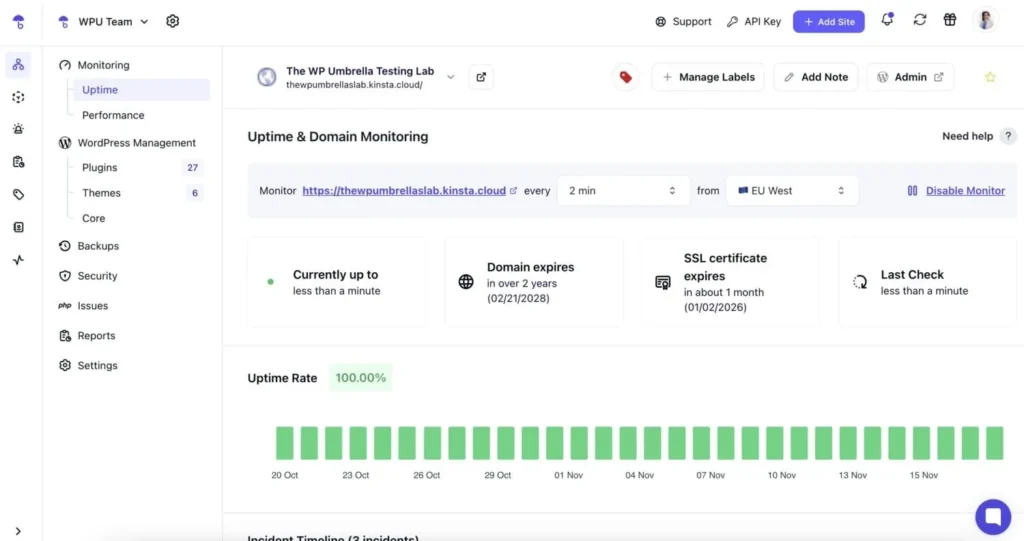
WP Umbrella continuously monitors your WordPress sites so you don’t have to check them manually. When something requires your attention, you’re notified instantly via email or Slack. The monitoring system includes:
- Uptime monitoring every 2 minutes from multiple locations worldwide (EU, US, China, and Australia), so you know immediately if a site goes down.
- Performance monitoring using Google PageSpeed for both desktop and mobile.
- Server response time tracking to spot hosting or infrastructure issues early.
- SSL certificate expiration alerts, as well as domain renewal reminders.
All of this acts as a small operations team watching over your sites – without hiring extra help or installing multiple different plugins.
What about security?
WP Umbrella approaches WordPress security in two layers.
1. Built-in security monitoring and alerts for all sites
Every site you add to WP Umbrella is automatically scanned for security vulnerabilities every 6 hours. If a security risk is spotted, you get clear instant alerts together with actionable insights.
2. Proactive protection with Site Protect (add-on)
For agencies that want to protect their sites with a more proactive approach, WP Umbrella’s Site Protect add-on adds advanced security powered by Patchstack.
It uses virtual patching to block known vulnerabilities in WordPress core, plugins, and themes, even before official updates are available or applied.
It also hardens WordPress by hiding sensitive information, adding essential security headers, and disabling risky behaviors, all without slowing sites down or needing additional heavy security plugins.
Combined, the monitoring, alerts, and security features deliver both peace of mind and centralized operations for all WP Umbrella users.
2. Safe updates for plugins, themes, and WordPress core
Safe updates are one of the most challenging maintenance tasks to get right at all times. Themes, plugins, WordPress core… one wrong click can put a whole site at risk.
That’s why experienced agencies often have an in-house process for how they handle updates. That usually involves a mix of manual and automatic methods that allow them to have control over the process.
Manual vs automatic updates
Both the manual and the automated approach to updates have their pros and cons. The table below gives a quick overview of what some of them are.
| Approach | Pros | Cons |
| Manual Updates | Full control over what updates and when; safer for complex sites; can test before applying permanent changes. | Takes more time; easy to forget; requires some level of technical knowledge. |
| Automatic Updates | Saves time; security patches applied immediately; “set and forget” method. | Less control; can break sites if updates conflict; not ideal for customized, complex setups. |
A mix of both approaches allows for a balance between how much control you have over the process and how much time and energy you invest in it.
How WP Umbrella handles updates safely and effectively
WP Umbrella’s Safe Updates feature lets users choose:
- What to update manually and what to automate;
- What to update in bulk across multiple sites, and what to update one at a time.
- What to permanently exclude from the update process (unless triggered specifically).
The technology also aims to make the updating process as fast as possible while keeping the risk-free factor. Achieving that balance is possible thanks to a couple of safety and time-saving capabilities, such as:
- HTTP status and Compatibility checks (WordPress and PHP);
- Pre-update backup;
- Pre- and post-update page screenshots;
- Automatic rollback upon failed update (screenshots, pixels don’t align);
- Automatic cache clearing after a successful update.
- Update history and logs.
This feature alone cuts hours off the WordPress maintenance workflow and brings the best of both the manual and the automated approaches to updates.
Subscribe Newsletter
Subscribe to our newsletter for updates, exclusive offers, and news you won’t miss!

3. Automated backups with a quick version restore option
Having backups tied into all WordPress maintenance workflows is essential. Clients don’t always care about backups, but if their site ever goes down, they suddenly become the most important part of your service.
3-2-1 backup rule
When it comes to backups, the most experienced WordPress agencies aim to follow the 3-2-1 backup rule, presented below.
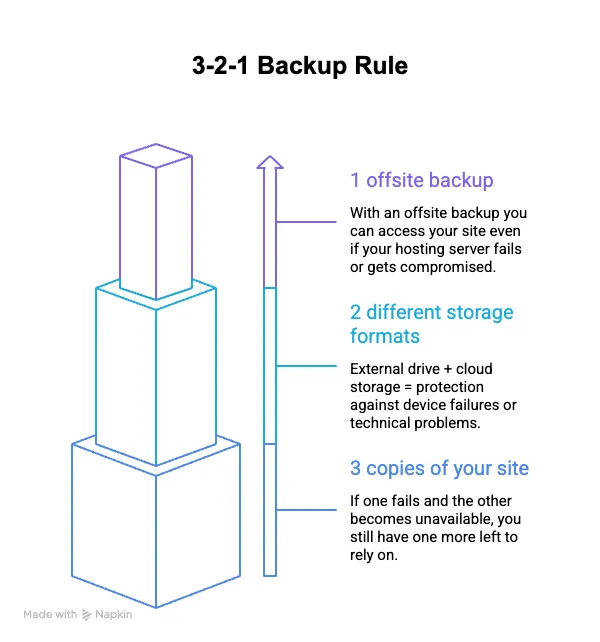
By following this simple backup rule, agencies create a resilient system that protects their digital assets from potential threats.
WP Umbrella as an off-site backup solution
WP Umbrella is a great choice for off-site WordPress backups because it’s reliable, effortless, and safe.
- Reliable and efficient: WP Umbrella’s backup technology uses a mix of full and incremental backups. You get a complete copy of your site first, then frequent incremental backups that only save what changed. This keeps the process lean without impacting your sites’ performance.
- Easy to set up: Pick how often each site should be backed up (daily, weekly, monthly, or even hourly with the add-on) and WP Umbrella handles the rest automatically, in the background.
- Safe and compliant: Backups are fully encrypted and stored securely on European servers under strict GDPR rules.
- One-click restores: Do you need the backed-up copy of your site? Restoring it takes just one click. No digging through files, no support tickets, and your backup stays safe even if your hosting goes down.
WP Umbrella’s backup technology runs quietly in the background – out of sight when you don’t need it, but ready and reliable when you do.
4. Automatic Client Reporting
WP Umbrella’s reporting feature is what ties all other features together. Instead of scrambling to document your work all throughout the month.
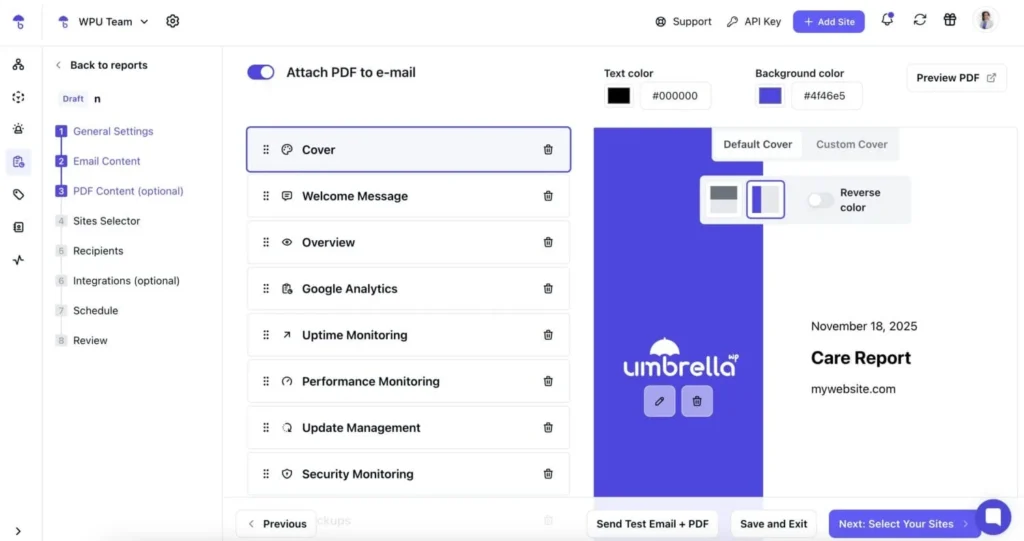
WP Umbrella’s reporting feature automatically pulls all the key information and generates professional WordPress maintenance reports that show your clients exactly what you’ve done and the value you’re delivering.
The automatic reports are:
- White-labeled and customizable with your brand’s colors, logos, domain, and email addresses.
- Formatted as an email or/and/or a professional PDF report.
- Personalized for each client and website through smart variables.
- Easy to set up and maintain on a schedule you prefer.
- Integrated with Google Analytics, so you automatically cover the stats your clients care most about.
Beyond automatically pulling all site maintenance data into one report, WP Umbrella also lets you document custom work.
You can add tasks with a title, description, completion date, and time spent (minutes, hours, or days), and even mark them as recurring work that should show up in future reports with no manual entry required.
5. One dashboard for all your sites and maintenance tasks
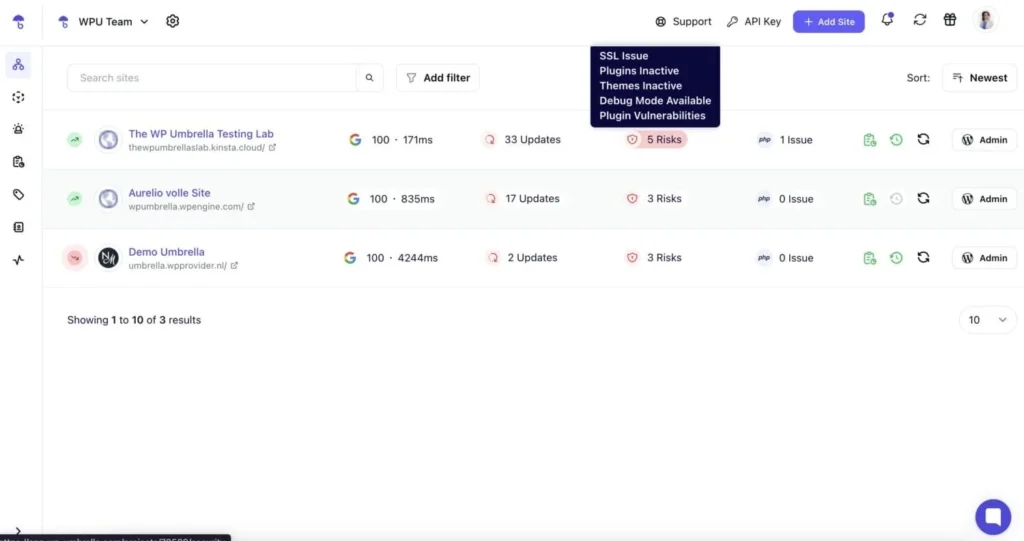
Finally, WP Umbrella’s core dashboard is where you get to manage multiple WordPress sites from one place, have a high-level view of your portfolio, and keep up with all your maintenance tasks on a daily basis.
No matter where your sites are hosted, you can manage them all from WP Umbrella’s clean, intuitive dashboard, which offers:
- 1-click admin access: No need to juggle passwords or shared credentials.
- Quick site status overview: See what matters without getting lost in unnecessary details.
- Bulk actions: Optimize databases, install plugins, and more across multiple sites at once.
- Client & team management: Permissions, tags, filters, and projects – it’s all designed to scale.
If managing multiple care plans has ever felt chaotic, this dashboard brings structure back to your workflow. It reduces stress, minimizes errors, and helps you work faster, while keeping your portfolio organized and scalable.
Is WP Umbrella a good tool for your business?
WP Umbrella is a valuable addition to the tech stack of any WordPress agency or freelancer offering care plans at scale.
Centralizing updates, backups, monitoring, security, and reporting in a single dashboard, it makes managing WordPress maintenance effortless and eliminates the need for using multiple tools for different tasks or hiring extra help.
For WordPress agencies serious about scaling and keeping clients happy, it’s worth heading over to WP Umbrella and starting a 14-day free trial.
Join the thousands already enjoying Paymattic Pro!



Leave a Reply