

How to Reduce Credit Card Processing Fees for Donations?


Table of Content
Download Paymattic – it’s Free!

Subscribe To Get
WordPress Guides, Tips, and Tutorials
We will never spam you. We will only send you product updates and tips.
Your nonprofit receives a $100 donation. After processing fees, only around $96.80 actually reaches your cause. Multiply that across hundreds of donations a month, and the lost revenue adds up fast.
Every online donation platform runs on payment processors, and every processor takes a cut. That’s not something you can avoid entirely. But it is something you can manage and, in some cases, recover so more of every gift goes where it’s supposed to.
Nonprofits who actually want to reduce credit card processing fees for donations can use a WordPress donation plugin (obviously, that plugin should support fee recovery).
This guide walks through why processing fees eat into your fundraising, what your actual options are, and how fee recovery lets donors cover the cost themselves, without asking anyone to give more than they planned to.
TL;DR
- Every card donation loses a small percentage to processing fees before it reaches your cause.
- Standard processing fees run around 2.9% + $0.30 per transaction, so a $100 gift shrinks to roughly $96.80
- That gap adds up fast across hundreds of donations, especially with recurring monthly donors
- Fee recovery lets donors opt to cover the fee themselves, so the full donation reaches your cause
- It’s not the same as surcharging donors choose it, they’re never charged without knowing
- It works best on donation forms with committed givers, and should always stay optional and clearly labeled
- Paymattic’s built-in Fee Recovery feature adds this option to any form in a few clicks.
What are credit card processing fees?
Every time someone donates by card, a payment processor (like Stripe or PayPal) charges a fee to move that money from the donor’s card to your account. This is standard across every industry; it’s how card networks and processors make money.
Most processors charge a percentage fee plus a small fixed fee per transaction. A typical structure looks like:
- 2.9% of the transaction amount
- + $0.30 per transaction
So on a $100 donation:
- Fee: $2.90 + $0.30 = $3.20
- Your organization receives: $96.80
That’s roughly 3.2% gone before the money ever touches your programs. It’s a small number on paper. It’s a real number on your year-end total.
Even a small adjustment here can reduce credit card processing fees enough to matter across a full year of donations.
Click here and explore Stripe fees for nonprofits
Why asking your donors to cover fees matter?
Asking feels like a small thing. The impact isn’t.
It protects the full value of every gift: When a donor gives $100 expecting all of it to reach your cause, fee recovery makes sure it actually does. Without it, your organization silently absorbs the gap between what was given and what was received every time, on every donation.
It adds up faster than most nonprofits expect: A few dollars per transaction looks small in isolation. Across hundreds of donations a month, or a base of recurring monthly donors, that gap turns into real, recoverable revenue money you’re currently losing by default, not by necessity.
It respects donor intent: Most people who choose to give a specific amount want that amount to count. Covering the fee is simply a way to let them follow through on that intent, instead of having it quietly reduced by a cost they never saw.
It’s a choice, not a cost increase: This is the part that matters most: fee recovery doesn’t raise your suggested donation amounts or make giving more expensive. It just gives donors a clear, optional way to close the gap themselves so your fundraising totals don’t have to.
It’s a small ask most donors are glad to make: Framed well, a simple checkbox with a clear explanation covering a transaction fee rarely feels like friction. For a donor who’s already decided to give, adding a small amount so their full gift lands is an easy yes.
The organizations that ask consistently recover a meaningful share of what processing fees would otherwise take. The ones that don’t ask lose that revenue by default, every single time, not because donors wouldn’t have covered it, but because no one gave them the option.
What is fee recovery?
Fee recovery gives donors the option to cover the processing fee themselves. On top of their donation, so 100% of the amount they intended to give actually reaches your cause.
When someone fills out your donation form, they see a simple checkbox or toggle something like “Add $3.20 to cover transaction fees so my full $100 goes to [cause name].” If they check it, they pay $103.20. You receive the full $100. The processor takes its fee out of the extra amount instead of out of the donation itself.
It’s worth being clear about what fee recovery is not. It’s not the same as surcharging charging every customer extra to cover business costs, which is a different practice with its own rules and reputation.
Fee recovery is opt-in. The donor sees the option, understands exactly what it does, and chooses it. Nobody is charged extra without knowing.
In practice, a large share of donors say yes when asked directly. Most people who choose to give want their full gift to count, and covering a small transaction fee is an easy way to make that happen.
Moreover, fee recovery is one of the most simpliest way to reduce credit card processing fees without changing the payment gateway.
When fee recovery should (and shouldn’t) be used?
Fee recovery works well in most donation contexts, but it’s not a one-size-fits-all switch. It’s worth thinking about where it fits.
It’s a good fit for:
- One-time and recurring donation forms, where donors are already committed to giving
- Organizations with an engaged donor base who care about maximizing their impact
- Nonprofits that want to protect their fundraising total without raising suggested donation amounts
Use it thoughtfully in:
- Campaigns aimed at first-time or highly price-sensitive donors, where every added step or cost can affect completion
- Any context where donor trust depends on a clear, no-surprises checkout experience
The rule of thumb: make it optional, make it clearly labeled, and never make it the default without the donor’s knowledge. Fee recovery works because it’s a choice, not a hidden charge. Take that away, and you lose the trust that makes it work in the first place.
Once you’ve decided fee recovery is the right move for your donation form, the setup itself is the easy part. Paymattic includes fee recovery as a built-in feature no separate plugin, no manual accounting workaround. Here’s how to turn it on.
Before you start: Prerequisites
To add the fee recovery option to your form, make sure you have:
- Paymattic is installed and activated on your WordPress site.
- You have created at least one payment form.
- A payment gateway, such as Stripe or PayPal, is connected to your site to process payments.
Tutorial: How to set up fee recovery with Paymattic
Paymattic is a WordPress donation and payment plugin built to help nonprofits collect more of every gift they receive.
One of the ways it does that is through its built-in Fee recovery feature, a simple toggle that lets donors choose to cover the processing fee themselves, so 100% of their intended donation reaches your cause instead of being reduced by transaction costs.
Unlike many donation platforms that take an additional platform fee on top of standard processing fees, Paymattic doesn’t cut a platform fee from your donations at all. You only deal with the processor’s fee, and Fee Recovery gives you a direct way to offset even that.
Here’s how to turn it on and add it to your donation form.
Step 1: Install & activate Paymattic Pro
Fee Recovery is a Paymattic Pro feature, so you’ll need the Pro version installed before you can turn it on.
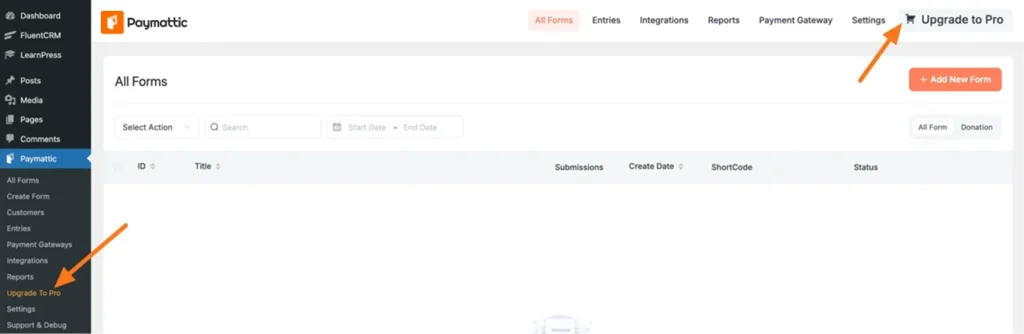
Start by getting the plugin.zip file. You can purchase Paymattic Pro directly from the website, or, if you’re already running the free version, open your Paymattic dashboard and click Upgrade to Pro to purchase from there.
Once you have the.zip file, install and activate it like any other WordPress plugin, and you’re ready to move on to setting up Fee Recovery.
Ready to get started?
Experience payments and donations for WordPress like never before. Try Paymattic now!
Step 2: Create a new form
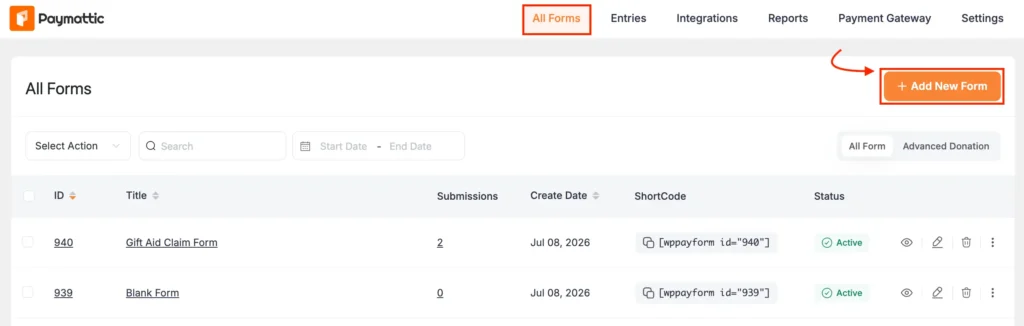
Head to All Forms from the Paymattic navbar. Click + Add New Form to build a new donation form, or open the Pencil/Edit icon on a form you already have.
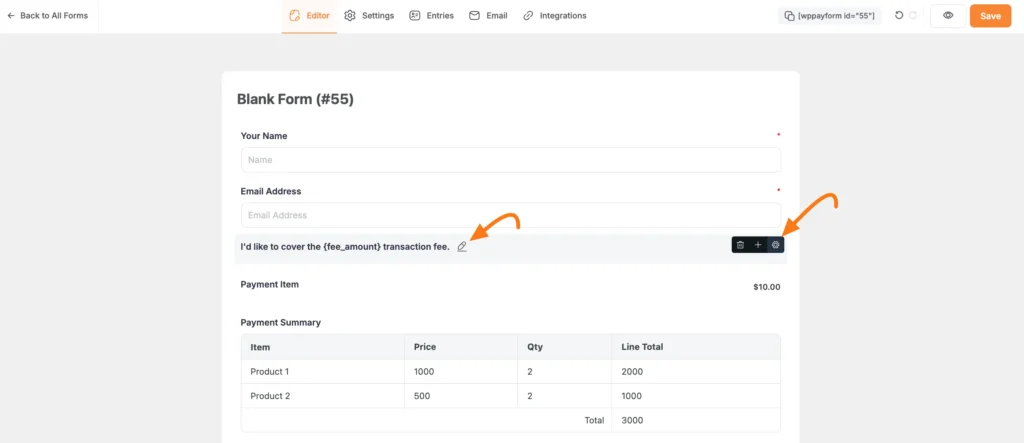
Step 3: Insert the fee recovery field
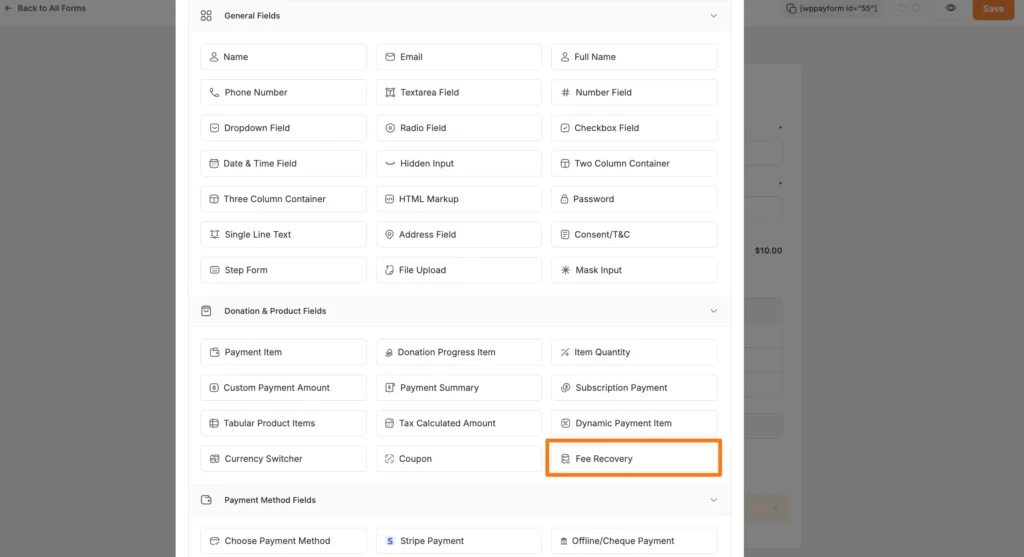
Inside the form editor, add the field one of two ways:
- Type “/” and search for Fee Recovery
- Click the Plus icon at the bottom of the editor
Select Fee Recovery from the Donation & Product Fields section. It’ll drop into your form with a default label: “I’d like to cover the {fee_amount} transaction fee.”
Step 4: Set your fee rate
Click the Settings (gear) icon next to the field to configure it.
Under the General tab, choose how the fee is calculated:
- Global Rate: One rate applies no matter which payment gateway the donor uses. Set your Fee Percentage (e.g., 2.9) and Additional Fee Amount in cents (e.g., 30 for $0.30).
- Per Gateway: Set different rates for each connected gateway. Useful if you accept payments through more than one processor with different fee structures. Click + Add More to add a gateway, or the trash icon to remove one.
Match these numbers to what your actual payment gateway charges, so the amount donors see reflects the real cost.
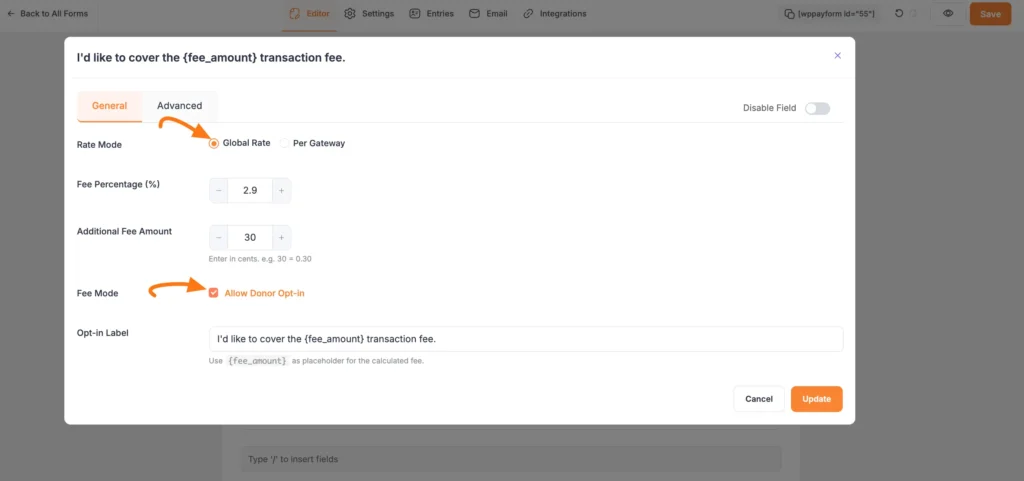
Step 5: Choose Opt-in or Automatic
Still under General, decide how the fee is presented:
- Allow Donor Opt-in: checked, donors see a checkbox and choose whether to cover the fee. This keeps the donation ethical and transparent, and it’s the setup we’d recommend for most nonprofits.
- Allow Donor Opt-in: unchecked, the fee is added automatically, with no choice. Use this only if you’re fully transparent elsewhere about how donations are processed.
You can also customize the Opt-in Label using {fee_amount} as a placeholder; it’s replaced with the live calculated amount on your form.
Step 6: Save and preview
Click Update to save your settings. On the frontend, donors will see a checkbox with the exact fee amount calculated in real time. For example, on a $10 donation at a 2.9% + $0.30 rate, they’d see an option to add $0.61 so the full $10 reaches your cause.
Here’s the preview of what your donors see on the frontend:
This form is made with Paymattic. Want to explore more Paymattic’s form? Click here.
Wrapping up
Transection fees aren’t going away but there are ways to reduce credit card process fees for your nonprofit. Understanding where that 3% goes is the first step. Giving donors the choice to cover it is the practical next one.
The nonprofits that ask consistently keep more of what they raise. The ones that don’t leave that money on the table every single donation, not because donors wouldn’t have covered it, but because no one gave them the option.
If you’re running donations through WordPress, turning that option on takes minutes. Paymattic’s Fee Recovery feature adds one field to your form, and every donation from that point forward gives donors the choice to make their full gift count.
Set up your first donation form with Paymattic and turn on Fee Recovery today, see for yourself how much more of every gift reaches your cause.
Frequently asked questions
Here are answers to some frequently asked questions regarding “How to reduce credit card processing fees for donations”
1. How do you reduce credit card processing fees for donations?
Fee recovery is the easiest way donors opt to cover the transaction fee themselves, so your full donation amount reaches your cause instead of being reduced by processing costs.
2. How much are credit card processing fees, really?
Most processors charge around 2.9% plus $0.30 per transaction. On a $100 donation, that’s about $3.20 your organization receives roughly $96.80.
3. Can nonprofits legally ask donors to cover processing fees?
Yes, as long as it’s opt-in, not automatic. Donors see the fee clearly and choose to cover it, that transparency is what makes it ethical.
4. Is it possible to avoid credit card processing fees entirely?
Not really, they’re a standard cost of card payments. But fee recovery lets donors offset the cost, so it doesn’t come out of your share.
5. Are credit card processing fees tax-deductible for donations?
That depends on your organization’s tax situation, so check with an accountant. Either way, fee recovery doesn’t change the amount your donor intended to give.
Join the thousands already enjoying Paymattic Pro!

Madhobi
This is Madhobi, a content writer at WPManageNinja with expertise in technical writing and email marketing. Outside of work, she likes traveling and exploring new places.

Leave a Reply