
Paymattic 4.6.18: Xendit Subscription, Invoice Download, Cancel Subscriptions, Conditional Render, and more!


Table of Content
Download Paymattic – it’s Free!

Subscribe To Get
WordPress Guides, Tips, and Tutorials
We will never spam you. We will only send you product updates and tips.
We’ve been cooking, and version 4.6.18 of Paymattic is out now.
The main focus of this update is expanding subscription support and giving your users more self-service control, from managing subscriptions to downloading invoices, all from within the dashboard.
This release touches several key areas:
- Recurring payments: Xendit now supports subscriptions for both payments and donations
- Customer/Donor Dashboard: Invoice downloads and subscription cancellations, self-served
- Payment gateways: New bank transfer support for Stripe, plus Authorize.net dashboard cancellations
- Donation forms: Conditional rendering for the Donation Progress Item field
- UI and formatting: Cleaner field states, proper media library integration, and dynamic currency positioning
This update is packed with new features, extended payment gateway support, and a handful of improvements that’ll make your Paymattic forms and donor dashboards feel a lot more polished.
Let’s get into everything that’s new with Paymattic 4.6.18.
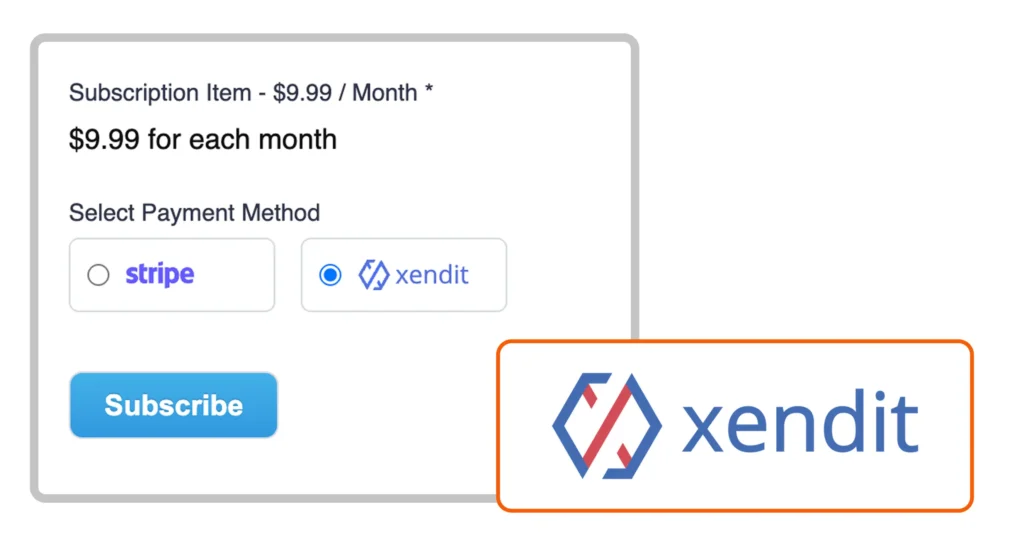
Xendit Subscription for Both Payments and Donations
Xendit users, this one’s for you. Until now, Xendit was only available for one-time transactions in Paymattic, which was great, but limited. Starting with 4.6.18, you can now set up recurring subscriptions through Xendit for both payments and donations.
Whether you’re running a membership site, collecting regular donations, or billing clients on a recurring cycle, Xendit subscriptions are now fully supported. No workarounds needed.
Use cases:
- A membership site targeting Southeast Asian users can now charge monthly fees through Xendit without switching gateways
- Nonprofits can set up recurring donation campaigns and let supporters commit to monthly giving processed via Xendit
- Agencies billing retainer clients in Xendit-supported regions can automate the monthly charge instead of sending manual invoices
- Course platforms can offer subscription-based access to content, with automatic renewals handled end-to-end from Xendit
Download Invoices from the Customer/Donor Dashboard
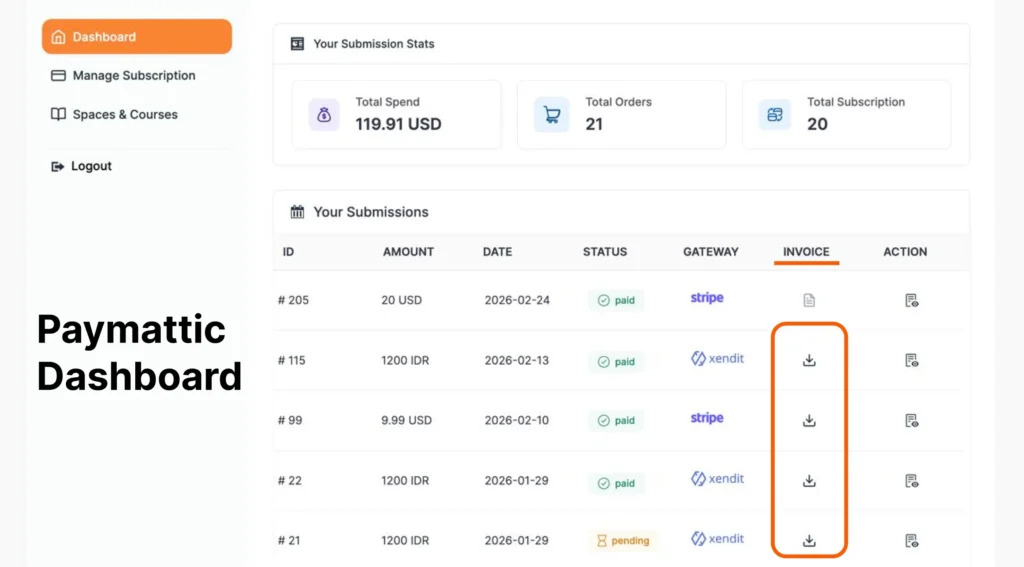
This has been a frequently requested feature, and it’s finally here. Previously, there was no way for customers or donors to download their invoice directly from their dashboard. They had to rely on emails or reach out to site admins, which was not a great experience.
With 4.6.18, a PDF invoice download option is now available right inside the Customer/Donor Dashboard. Users can log in and download their invoices on their own, anytime they need them. Less back-and-forth and more independence.
Use cases:
- A donor can pull their annual giving history at tax time without emailing your team
- A business customer can download an invoice for internal expense reporting on their own schedule
- Recurring subscribers can grab any past invoice without waiting for admin support
- Site admins handle fewer “Can you send me my invoice?” requests
- Users who missed an invoice email still have a reliable fallback right in their dashboard
Cancel Subscriptions for Xendit and Authorize.net from the Dashboard
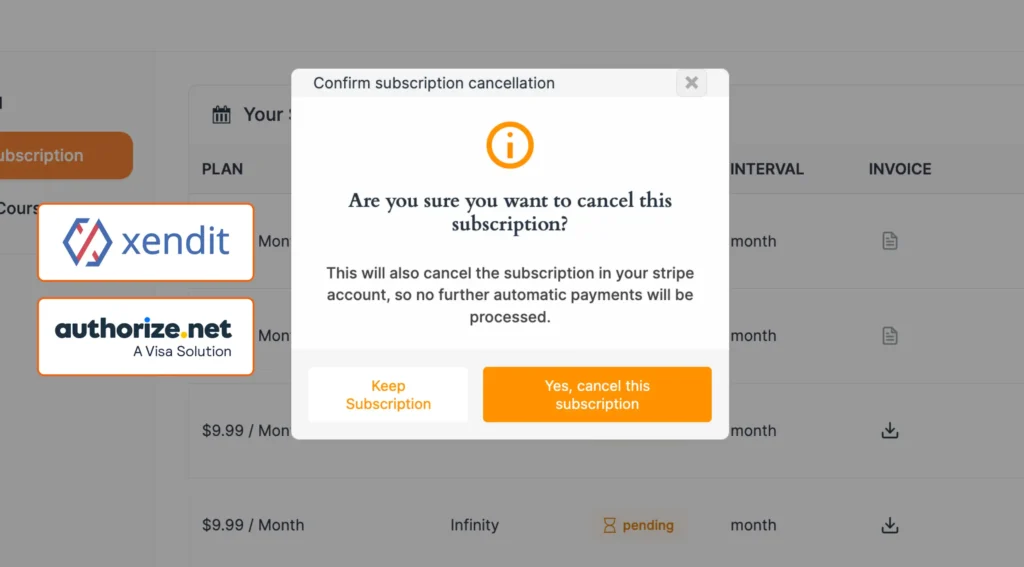
Managing subscriptions just got a lot easier for your users. Customers and donors can now cancel their active subscriptions for both Xendit and Authorize.net directly from their user dashboard.
Before this update, subscription cancellations for these two gateways had to be handled manually or through the payment gateway itself or via the site admin, which wasn’t ideal. Now it’s all self-serve, right from within the Paymattic’s Customer/Donor dashboard, keeping the experience clean and hassle-free for everyone.
Here’s how this plays out in practice:
- A donor who wants to pause their monthly giving can cancel directly from their user dashboard
- Membership site owners no longer need to log into Authorize.net or Xendit just to process a cancellation request
- Your support teams spend less time on routine cancellation tickets, freeing them up for real issues
- Users get a clean, transparent experience, and they stay in control of their subscriptions without needing to contact anyone
Conditionally Render the Donation Progress Item Field
This is a solid win for anyone building more dynamic donation forms. The Donation Progress Item field can now be conditionally rendered based on user input.
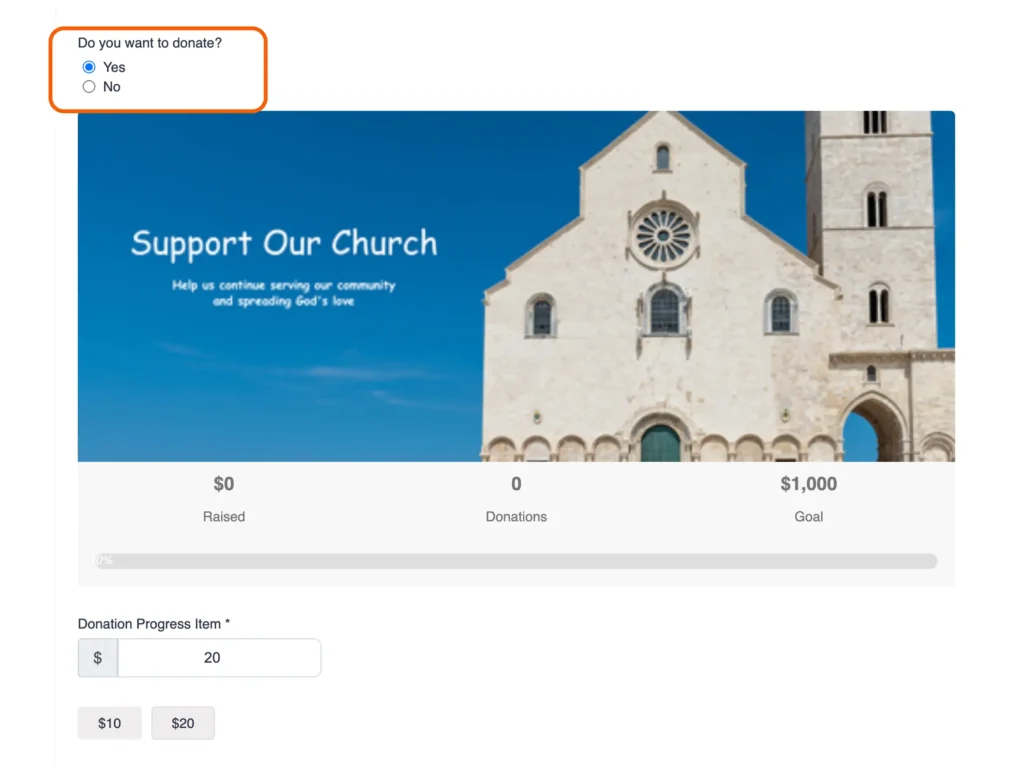
Here’s a quick example of how this works in practice:
Say you add two buttons to your form; one that says “Yes, I want to donate” and one that says “No thanks.” If the user clicks Yes, the Donation Progress Item field appears on the form. If they click No, it stays hidden. It’s that straightforward.
This gives you a lot more control over the form experience and lets you build smarter, more intentional donation flows.
Use cases:
- Show a fundraising progress bar only after a user selects a specific campaign, keeping the form clean by default
- Hide the donation goal widget for one-time donors and reveal it only when someone opts into recurring giving
- Build multi-step donation flows where the progress tracker appears only once a user has shown intent
- Tailor the form experience by campaign type and event-based drives can show progress bars, while general donation forms stay minimal
- Reduce form clutter for casual visitors while still giving motivated donors the full context they need
Improvements: Paymattic 4.6.18
Along with the new features, 4.6.18 also brings several improvements that clean up existing functionality and fix a few rough edges.
Stripe Bank Transfer Is Now Available
Bank transfers through Stripe weren’t supported in Paymattic before this update. Now they are. If you use Stripe as your payment gateway, your users can now complete payments via bank transfer — giving them more flexibility in how they pay.
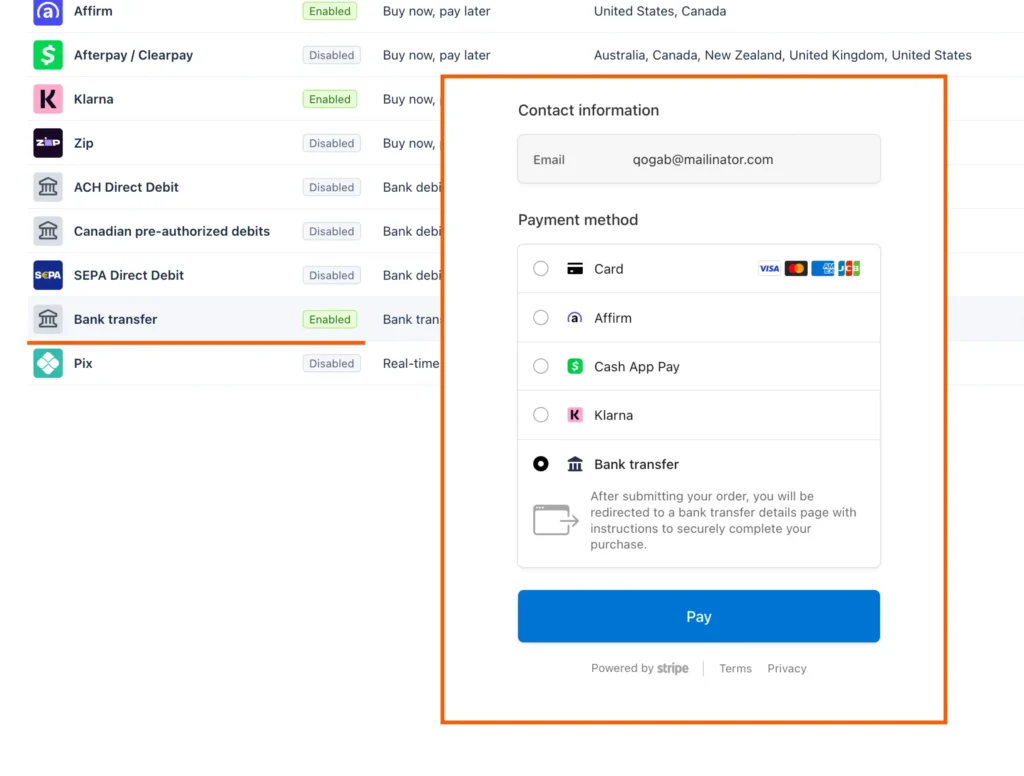
Here’s how this plays out in practice:
- Users who prefer not to share card details now have a bank transfer option at checkout
- High-value B2B transactions can go through bank transfer instead of card, and reduce processing costs on large payments
- Businesses in regions where bank transfers are the norm no longer need a workaround to accept payments via Stripe
- Subscription setups with large billing amounts become more viable without hitting card limits or triggering fraud flags
More Defined Form Field Disable Icon
The icon used to indicate a disabled form field was a bit ambiguous before — easy to misread or overlook. It’s been updated to be clearer and more immediately obvious, so there’s no confusion about which fields are active and which aren’t.
Improved WordPress Media Library Popup in Invoice Feed
Previously, when you clicked the button to upload a business icon in the invoice feed, it would open your device’s native media picker. That felt out of place and was inconsistent with how WordPress usually handles media. This is now fixed. Clicking the upload button opens the WordPress Media Library pop-up, keeping everything within the familiar WordPress experience.
Dynamic Currency Sign Position in Donor Leaderboard
This one was a subtle but noticeable issue. The currency sign in the Donor Leaderboard was hardcoded in a fixed position, which looked fine for USD but broke the formatting for currencies that place the symbol differently (like some European or Asian currencies).
Now the currency sign position is dynamic and adjusts based on the currency being used. The Leaderboard will look correct regardless of which currency your donors are paying in.
Fixes: Paymattic 4.6.18
This release also ships a round of bug fixes targeting reported issues across permissions, third-party integrations, and security. Here’s what got resolved:
- Fixes refund issue for users with Paymattic Admin permission
- Fixes FluentCRM conditional list issue with multiple checkboxes
- Fixes the Google Sheets sync issue with the second address field
- Fixes Schedule security audit
Update Paymattic Now!
Paymattic 4.6.18 is available right now. If you haven’t updated yet, head to your WordPress dashboard and grab the latest version. The new subscription support, invoice downloads, dashboard cancellations, and all the improvements above are waiting for you.
As always, if you run into anything or have questions, our support team is here to help. Thanks for using Paymattic!

Md Shahjahan
Hello, this is Jewel, CEO & Head of Ideas at WPManageNinja. I am obsessed with WordPress since 2009. My aim is to be a user-centric developer first, and a serial entrepreneur second. You will find me discussing various tech issues and trying to come up with scalable solutions on different forums when I am not busy coding.



Leave a Reply