

Stripe vs PayPal: Pick the Right One for Your Business


Table of Content
Download Paymattic – it’s Free!

Subscribe To Get
WordPress Guides, Tips, and Tutorials
We will never spam you. We will only send you product updates and tips.
Key takeaways:
Stripe is flexible and perfect if you want customization, advanced features like subscriptions, and plan to sell internationally.
On the other hand, PayPal is fast and familiar, customers trust it, and you get instant access to funds. Great for beginners and older demographics.
The smart move?
Use both.
Stripe for your main checkout (better features, lower fees) and PayPal as an alternative (boosts conversions with buyers who prefer it). Most WordPress plugins let you run them side-by-side.
Quick decision guide:
Growing fast or selling globally? → Stripe
Just starting or need money immediately? → PayPal
Want maximum conversions? → Both
Stripe vs PayPal, which to use for online payments, is a common query that most business owners often ask.
Choosing a payment processor is one of those “make or break” decisions. It’s the plumbing of your online store; if it works, you don’t think about it; if it doesn’t, everything stops. That pressure hits hardest when you’re stuck deciding between Stripe and PayPal.

We faced the exact same dilemma, just like you. Then ended up deciding to use both and, yes, they work smoothly for our online business.
Stripe and PayPal are both popular payment gateways; many of the world’s biggest stores use both. The core difference between these two gateways is pretty simple: Stripe is “developer-first,” built for those who want a custom and personalized look. PayPal is “user-first,” built for those who want a trusted name and a five-minute setup.
In this guide, we’re going to break down the fees and features, but more importantly, we’ll tell you which one is actually best for your specific business model.
Stripe vs PayPal: Quick comparison
 Feature Feature |  |  |
|---|---|---|
| Best for | SaaS, subscriptions, international businesses, custom checkouts | Small businesses, beginners, trust-focused checkouts |
| Checkout control | Full customization (API-first) | Limited customization |
| Setup duration | Moderate to advanced | Very easy (quick setup) |
| Currency conversion fee | +1% | 3–4% |
| International card fee | +1.5% | +1.5% (cross-border) |
| Standard US fee | 2.9% + $0.30 | 3.49% + $0.49 |
| Subscriptions & recurring payments | Native & highly flexible | Supported but less flexible |
| Fraud protection | Stripe Radar (advanced) | Built-in PayPal fraud protection |
| Payout speed | 2–7 business days (instant payout available for a fee) | Instant access to PayPal balance |
| Chargeback fee (US) | $15 (refunded if you win) | $20 |
| WordPress integration | Via payment plugins | Native plugins & wide plugin support |
| Scalability | Excellent for growing & complex businesses | Better for small to mid-size sellers |
Stripe: The powerhouse for customization & scale
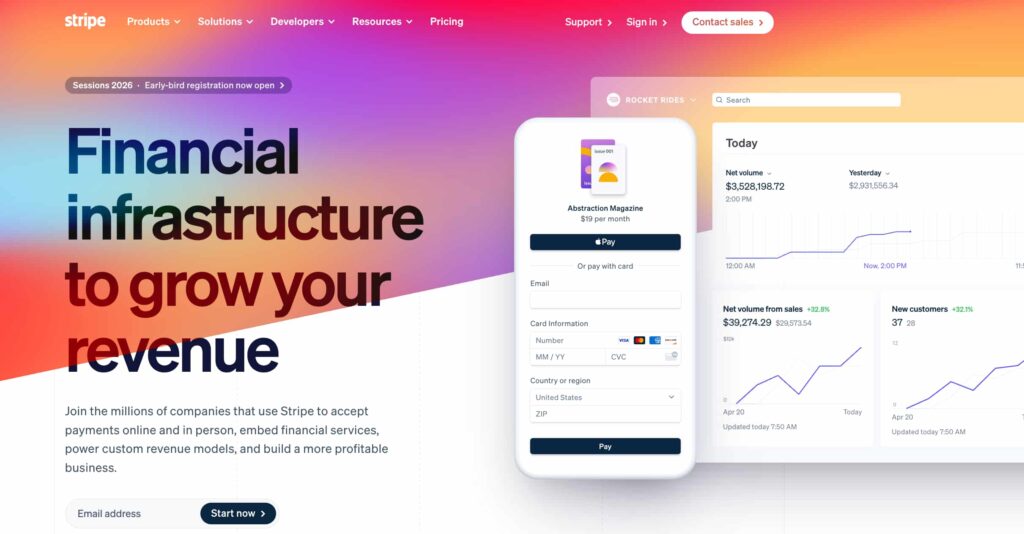
Stripe is an API-first platform designed for businesses that want to own their Stripe checkout experience. Almost 4,776,230 million websites have used Stripe to accept payment. And the number is keep growing for good reason.
One of the reasons for Stripe’s popularity is its flexibility; you can customize pretty much everything in your checkout experience. Additionally, it integrates smoothly with WordPress through payment plugins. That’s why most businesses choose Stripe for collecting online payments.
Stripe supports over 135 currencies and works in 45+ countries, which is impressive if you plan to sell internationally. The platform handles all major credit and debit cards, plus digital wallets like Apple Pay and Google Pay. That means, however your customers want to pay, Stripe’s got it covered.
Here is the complete overview of the Stripe payment gateway.
Stripe key features include:
- Accepts all major credit and debit cards
- Supports 135+ currencies
- Digital wallet support (Apple Pay, Google Pay)
- Recurring payments and subscriptions
- Advanced fraud detection with Stripe Radar
- Developer-friendly Stripe API for customization
- In-person payments with Stripe Terminal
- No monthly fees for basic use
Downsides of Stripe:
- Steeper learning curve: You’ll need some technical knowledge for full custom implementation.
- Payout timing: Standard payouts take 2-7 business days. You can enable instant payouts for a 1% fee (capped at $10), but it’s an extra cost.
- Account verification can be slow: New accounts sometimes face holds while Stripe verifies your business, especially if you’re in a high-risk industry.
Stripe fees:
- Standard rate: 2.9% + $0.30 per transaction
- International cards: Add 1.5%
- Currency conversion: Add 1%
- Disputed charge fee: $15 (refunded if you win)
Best for: SaaS companies, subscription businesses, digital product sellers, growing e-commerce brands, and anyone selling internationally.
Click here to know, How to accept Stripe payment on WordPress?
PayPal: Built for speed and recognition

PayPal is the payment method most people already have. For many customers, especially older demographics, it’s the only payment method they trust online. Almost 10.3 million live websites are reportedly offering PayPal around the world.
The best part of PayPal is, you can literally set it up in about five minutes and start accepting payments. PayPal also gives you options. Customers can pay with their PayPal balance (if they’ve got money sitting there), link a bank account, use a credit card, or even tap into financing options like Pay Later. It’s flexible in a way that meets people where they are.
PayPal key features include:
- Trusted one-click checkout with a globally known brand
- Supports transactions in dozens of currencies and countries worldwide
- Accepts major credit and debit cards alongside PayPal balance
- Digital financing options like Pay Later (Buy Now, Pay Later) and local alternatives
- Fast access to funds with global payout support
- Fraud prevention and risk monitoring are built into checkout flows
- WordPress & WooCommerce integrations
- Optional support for Venmo (in the U.S.) and other regional payment methods
Downsides:
Checkout redirects: The standard PayPal button sends customers away from your site to complete payment. You can use PayPal’s advanced checkout to keep people on-site, but it requires integration work and isn’t available everywhere.
Account holds and limitations: PayPal freezes your accounts if they detect “unusual activity” like a sudden sales spike, large transactions, or products in certain categories. Your money can be held for (21-180) days while they investigate.
Weaker reporting: The dashboard is basic. You see transactions, but not much actionable data about customer behavior or trends.
Limited currency support: Only 25 currencies, compared to Stripe’s 135+. If you’re selling globally, you’ll run into walls.
Fees: PayPal’s pricing is more complicated:
Online transactions (US):
- Standard rate: 3.49% + $0.49
- With monthly sales over $3,000: 2.99% + $0.49
- With monthly sales over $10,000: 2.59% + $0.49
PayPal checkout (on-site):
- 2.99% + $0.49 for debit/credit cards
International transactions:
- Add 1.5% for cross-border sales
- Add 3-4% for currency conversion
Disputed charge fee: $20
For low-volume sellers, PayPal can actually be more expensive than Stripe once you factor in the higher base rate.
Best for: Small businesses just getting started, casual sellers, local shops that also need in-person processing, or anyone who needs money available immediately.
Click here to know, How to accept PayPal payments on WordPress?
Stripe vs. PayPal: Key differences
We already explained these two payment gateways. Actually, both look similar at first glance, and they both are capable of smooth and secure transactions. But if you dig a little deeper, you’ll see they work pretty differently.
- Stripe vs PayPal fees
- Accepted payment types
- Countries and currencies
- Advanced billing options
- Third-Party integrations
- Security and PCI compliance
- Customer support
Stripe vs PayPal fees
On the surface, the fees look similar, but there is a difference.
Stripe’s fee structure is straightforward:
- 2.9% + $0.30 per transaction
- No monthly fees, no setup fees, no hidden costs
- International cards add 1.5%, currency conversion adds 1%
- If you’re doing high volume ($80k+/month), you can negotiate better rates
Let me give you a real example: if you sell a $50 product with Stripe, you pay $1.75 in fees, keeping $48.25.
PayPal’s fees start higher and scale down:
- Standard rate is 3.49% + $0.49
- Once you hit $3,000/month, it drops to 2.99% + $0.49
- At $10,000/month, you get 2.59% + $0.49
Chargeback fees:
- Stripe: $15 (refunded if you win the dispute)
- PayPal: $20 (not refunded)
Our recommendations: If you’re just starting out and earning under $3,000/month, Stripe is usually the cheaper option. If your sales grow, you will qualify for PayPal’s volume-based pricing, and the cost difference becomes much smaller.
Accepted payment types
Both platforms accept credit and debit cards, but the real difference is in alternative payment methods. This is increasingly important as consumer preferences evolve.
Stripe accepts:
- All major credit/debit cards (Visa, Mastercard, Amex, Discover)
- Digital wallets: Apple Pay, Google Pay, Microsoft Pay
- Bank debits: ACH transfers (US), SEPA (Europe), BECS (Australia)
- Buy Now, Pay Later: Afterpay, Klarna (through integration)
- Local payment methods: Alipay, WeChat Pay, iDEAL, Bancontact, and 40+ others
- Cryptocurrency (through Stripe’s crypto integration)
- Link by Stripe (one-click checkout for returning customers)
PayPal accepts:
- All major credit/debit cards
- PayPal balance
- Venmo (US only, but growing fast with younger demographics)
- PayPal Credit and Pay Later options
- Bank accounts linked directly to PayPal
- QR code payments (in-person)
- Local payment methods in select countries
Our take: Stripe wins on sheer variety, especially for international payment methods. But PayPal has an excellent advantage: the PayPal balance. When someone already has money sitting in their PayPal account, they’re way more likely to complete a purchase.
(I’ve run A/B tests where adding a PayPal button increased conversions by 15-20%, especially with customers over 40)
Countries and currencies
This is a big one if you’re thinking beyond your home market.
Stripe:
- Available in 45+ countries
- Supports 135+ currencies
- Automatic currency conversion at checkout
- Can present prices in customer’s local currency
- Expanding rapidly (just added several African and Asian markets)
PayPal:
- Available in 200+ countries and regions
- Supports only 25 currencies for transactions
- Wider acceptance but less currency flexibility
- Better established in emerging markets
Our recommendation: If you’re primarily US/Canada/UK/Australia-focused, either works great. If you’re going truly global with diverse markets, Stripe’s currency support gives you more flexibility.
Advanced billing options
This is where Stripe really shines, and where I think it’s head and shoulders above PayPal for certain business models.
Stripe billing:
- Built-in subscription management (Stripe billing)
- Flexible billing intervals (daily, weekly, monthly, yearly, custom)
- Automatic invoice generation
- Proration for mid-cycle upgrades/downgrades
- Trial periods with automatic conversion
- Dunning management (automatic retry logic for failed payments)
- Usage-based billing (charge based on consumption)
- Multiple subscription tiers per customer
- Automatic tax calculation with Stripe Tax
- Customer portal for self-service management
PayPal subscriptions:
- Basic subscription functionality
- Fixed billing intervals (weekly, monthly, yearly)
- Simple trial periods
- Limited customization options
- Less sophisticated failed payment handling
- Customers manage subscriptions through PayPal’s interface (you lose control)
- No built-in proration or usage-based billing
Our recommendations: If you’re running a subscription-based business, Stripe is the better choice. The flexibility and automation save you hours of manual work and reduce churn through better payment recovery. PayPal works fine for simple subscriptions, like a basic monthly membership at a fixed price.
We also collect payments for our membership sites with Stripe, and the subscription features are genuinely powerful.
Third-party integrations
Your payment processor doesn’t exist in a vacuum, it needs to work with your entire tech stack.
Stripe integrations:
- CRM system
- E-commerce
- Form builder
- Email marketing
- Customer support
- Fundraising platforms
- Inventory management
- Webhooks for custom integrations
- Native integrations with most major SaaS platforms
PayPal integrations:
- Form builder
- E-commerce
- Most major WordPress plugins
- Accounting software integrations
- Email marketing platforms
- Generally “supported” but often as a secondary option
Our recommendations: Stripe was built for integration from day one. The API is well-documented, webhooks are reliable, and developers actually like working with it. This functionality really matters when you need custom functionality. PayPal also works, but they’re usually less polished.
I’ve run into situations where a WordPress plugin supports both, but the Stripe integration has way more features than the PayPal one.
Security and PCI compliance
Both platforms are secure. They can handle security responsibly to protect your online payment.
Stripe’s security approach:
- PCI level 1 compliant
- Stripe.js and Elements handle card data collection
- Card information never touches your server
- Two-factor authentication for dashboard access
- Stripe Radar for machine learning-based fraud detection
- 3D Secure 2 authentication support
- Tokenization keeps card data secure
- Regular security audits and updates
PayPal’s security approach:
- Also PCI Level 1 compliant
- Buyer and seller protection programs
- Encrypted transactions
- Two-factor authentication
- Fraud detection and monitoring built-in
Our recommendations: Both are secure enough that you shouldn’t lose sleep over safety.
Customer support
The last area where we want to focus is customer support. Both these platforms are similar in that category. With the following ways, they’re providing support.
Stripe:
- Email support (response usually within hours)
- Live chat for urgent issues
- Phone support for some account types
- Extensive documentation and guides
- Active developer community
- Generally responsive and helpful
- Premium support available for high-volume accounts
PayPal:
- Phone support available
- Email/ticket system
- Message center in dashboard
- Help documentation
- Community forums
Our experience with support: We’ve contacted them many times over the years. Both supports are usually excellent. Responses are quick, knowledgeable, and actually solve problems. They understand technical issues and can help accordingly.
Stripe vs PayPal: Final thoughts before you decide
When it comes to deciding between Stripe vs PayPal, both are excellent payment processors.
Stripe is modern, flexible, and built for businesses that want control and scalability. It’s perfect if you’re growing fast, selling internationally, or running subscriptions.
PayPal is trusted, familiar, and gets you up and running faster than anything else. That instant brand recognition genuinely drives conversions, and for many customers.
So, the final decision in the Stripe vs PayPal debate really comes down to your business model and audience.
You can simply go with both of them. Most businesses (like us) run both side-by-side and let customers pick their preference; capturing both audiences is absolutely worth it.
Whatever route you go, our advice is to test everything thoroughly before you launch. Another thing must remember, keep an eye on those fees as you grow, as nothing’s permanent. Additionally, always switch processors or add new options down the road as your business evolves.
At the end of the day, the best payment processor is the one that reliably gets money from your customers into your bank account. With minimum friction, maximum trust, and zero headaches.
Now go set up those payment buttons and start making some sales!
Frequently asked questions
Here are some questions people often ask about Stripe & PayPal.
1. Can I use both Stripe and PayPal on my WordPress site?
Absolutely! Most WordPress plugins (such as Paymattic) let you run both simultaneously. Just enable them in your payment settings, and customers can choose their preferred method at checkout.
2. Which is cheaper: Stripe or PayPal?
For most small businesses, Stripe is a more cost-effective option. It charges a flat 2.9% + $0.30. While PayPal starts at 3.49% + $0.49. PayPal’s fees drop once you hit $3,000/month in sales. In this scenario, Stripe naturally emerges as the winner.
3. Do I need coding skills to set up Stripe & PayPal?
Not, actually. If you’re using WordPress with plugins like Paymattic, it has a built-in integration system that works with just a few clicks.
4. Which payment processor has better security?
Both are PCI Level 1 compliant (the highest security standard), so they’re equally safe. The real difference is fraud prevention. Stripe Radar uses machine learning across billions of transactions and gives you more control over fraud rules. PayPal’s fraud detection is solid, too, but less customizable.
Join the thousands already enjoying Paymattic Pro!

Madhobi
This is Madhobi, a content writer at WPManageNinja with expertise in technical writing and email marketing. Outside of work, she likes traveling and exploring new places.


Leave a Reply