

Accept Stripe Payment to Grow Your Online Business


Table of Content
Download Paymattic – it’s Free!

Subscribe To Get
WordPress Guides, Tips, and Tutorials
We will never spam you. We will only send you product updates and tips.
Key Takeaways:
Stripe is a widely used payment gateway that helps businesses accept Stripe payments securely for both one-time and recurring transactions worldwide. Connecting Stripe with WordPress becomes even easier when you use a plugin like Paymattic, which lets you create payment and donation forms without complex setup or extra add-ons.
With Stripe’s trusted infrastructure and Paymattic’s simple form builder, you can start accepting payments quickly, improve your checkout experience, and grow your online business with confidence.
Once you have decided to start an online business and accept payment for it, all you need is a payment processor to complete the transaction. A payment gateway helps you transfer money from the customer’s account to your business account. However, you must decide which payment method you prefer.
There is a variety of payment processors available in WordPress, but which one is right for you will depend on the kind of business you are running. It doesn’t matter whether your business is big or small; you can afford a Stripe payment gateway to collect payments online.
In this blog, we will talk about how you can accept Stripe payments to grow your online business.
But first, let’s take a quick look at the basics of the Stripe payment gateway.
What is Stripe payment gateway?

Stripe is a global payment provider that ensures easy and secure transactions. It is best suited for a business that makes online sales because most of its unique features are made for online transactions. With a minimal transaction fee, this payment method supports 135+ currencies. It allows users to save credit and debit cards for an easy checkout experience.
This payment gateway does not require any setup or monthly fees, it is only charged for every successful transaction. Moreover, you can use this payment processor to obtain financing, send invoices, and for business payment-related needs.
How to accept Stripe payments?
Accepting payment with Stripe is very simple just follow these three steps mentioned below:
- Create a Stripe account
- Provide business details
- Link a bank account
Create a Stripe account – First, you have to create a Stripe account with your name, date of birth, email address, and more.
Provide business details – Now it’s time to provide your business details such as the address of your company, legal structure, and other business details.
Link a bank account – Finally, link a business account in which you will receive payments from Stripe.
That’s all! With these easy-peasy steps, you are ready to accept Stripe payment.
The benefit of using Stripe payment gateway
Stripe is the most trusted payment gateway for both merchants and customers. Along with that, there are other factors that you can consider when choosing Stripe for your online business. Here, look at some benefits of using the Stripe payment gateway.
- Set up procedure of this payment method is very easy and quick.
- Suited for all small and medium-sized business organizations.
- This system is able to accept payment without delay or errors.
- Supports multiple currencies. 135+ globally!
- This flat-rated payment method has no setup, cancellation, or monthly fees.
- Does not require any hidden charge from the business owners and customers.
- Able to give the highest security on online transactions.
- Provides 24/7 customer support through live chat, email, or mobile phone.
We have already discussed some core benefits of the Stripe payment gateway. Now, let’s discover why users connect Stripe to WordPress.
Why you should connect Stripe payment gateway to WordPress
Whether you are running an online business or a fundraising campaign, you have to accept payments. For this now need to connect a reliable payment gateway with your WordPress website.
However, if you are not connecting any payment gateway to your website, then your customers may get confused about how they can complete their payment. At this point, there is a high chance that users may click away from your website and never come back. So, to get relief from this unwanted hassle, you can choose Stripe. As it is one of the most popular methods, it can make it effortless for a business owner to accept payment online.
When it’s about collecting payment online, first you have to make a payment form. Now it’s your choice to decide which form builder you want to use. It doesn’t matter which software you choose; the most important part is which makes it easy.
WordPress has tons of options, but among them, you can go with Paymattic because of its easy and smooth interference. Besides, Stripe comes free with Paymattic. Want to know more about this amazing plugin?
Well, keep reading.
Subscribe Newsletter
Subscribe to our newsletter for updates, exclusive offers, and news you won’t miss!

Paymattic WordPress payment and donation plugin
Meet Paymattic! It is one of the most robust WordPress payment and donation plugin. It provides almost every unique feature and functionality for its users to create web forms and collect online payments.
To make any form it has a gutenberg style editor, pre-built form templates, 35+ input fields, form layout, unlimited customization, and more options.
This plugin lets you collect payment painlessly with the help of its user-friendly payment features. Some notable features involved in receiving online payment are mentioned below:
- Subscription payment
- One-time simple payment
- Currency settings
- 14 payment gateways
- Integration with multiple platforms
- Customer profile
- Coupon configurations
- Details report and more.
Ready to get started?
Experience WordPress payment and donation like never before. Try Paymattic now!
Integrate Stripe to WordPress with Paymattic
Integration process of Stripe is super easy with Paymattic. Just follow the steps mentioned below:
- First, install and activate Paymattic. Then go to Paymattic dashboard > Payment gateway.
- After that, select Stripe from the left navigation bar.
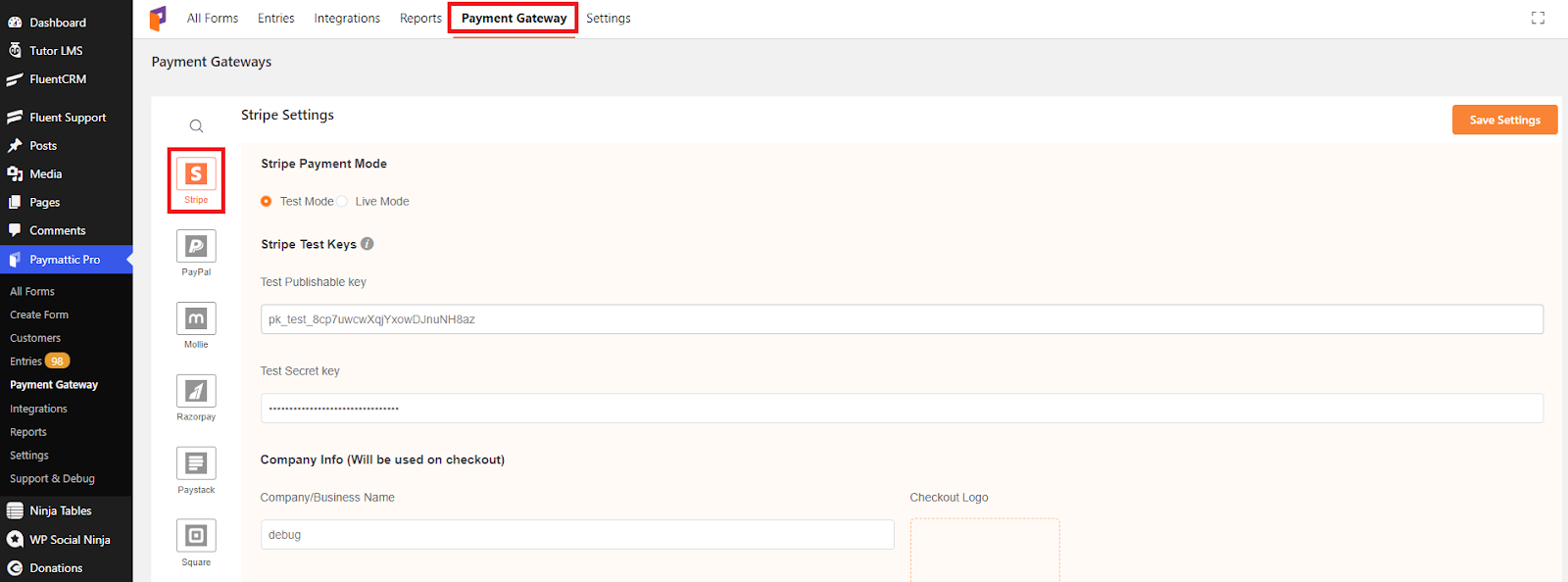
- Then fill up the Stripe settings page with the required information. Click on the Save setting button to complete the integration.

- Now it’s time to create a payment form and connect Stripe with it.
- To create a form go to Paymattic dashboard > All Forms > Add New Forms.
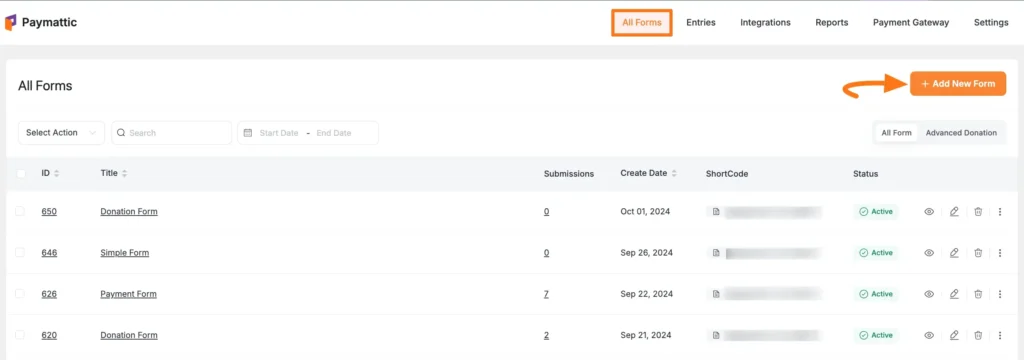
- Select a blank form and add all your required fields.
- Then add Card Element (Stripe) from the Payment Method fields.
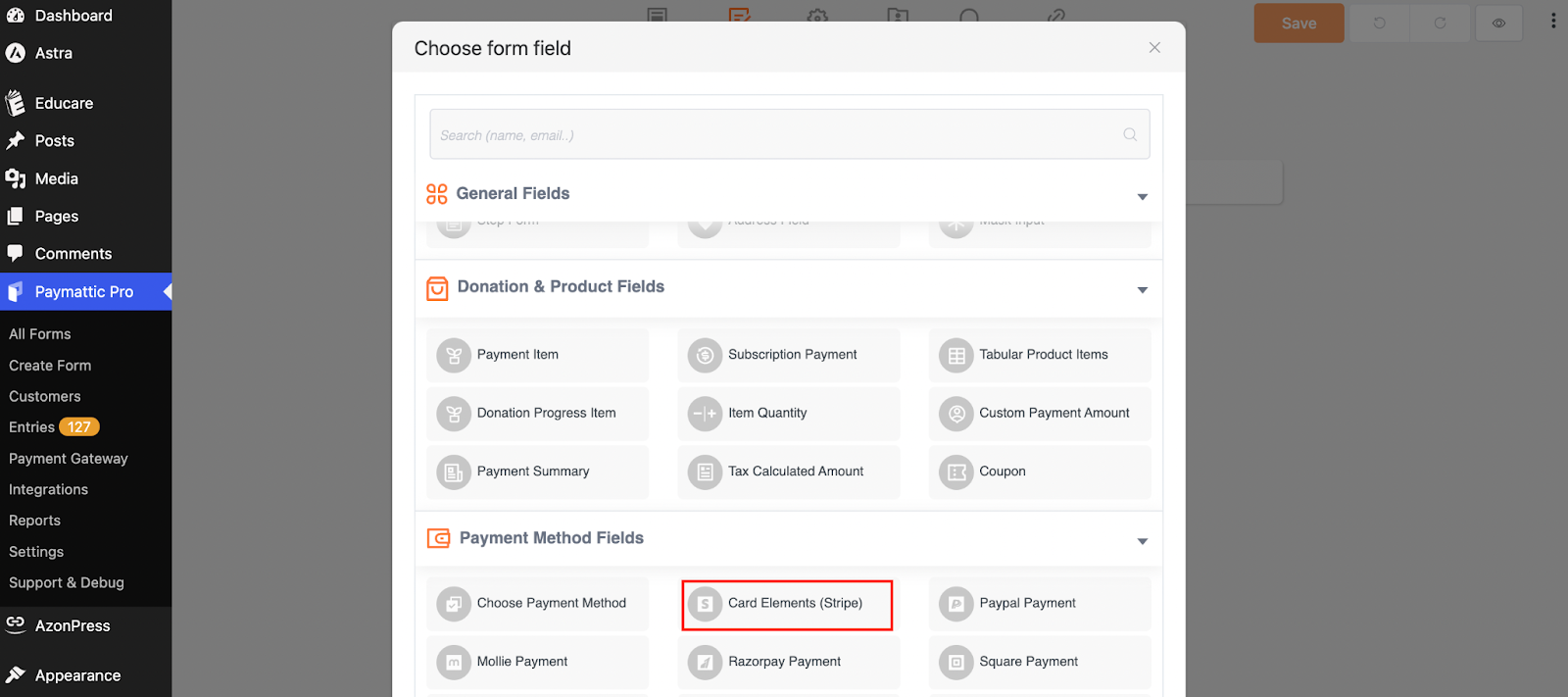
Finally, click on the Save button. That’s all! Your form is ready. Now you can accept Stripe payments through your form.
Click here and learn from our step-by-step guide on Stripe integration with WordPress.
Start accepting Stripe payments today
Connect Stripe payment gateway with your webform to collect payments easily and conveniently. With Paymattic you are able to accept donations and payments without taking extra hassle. You can do even more with this amazing plugin. Just try Paymattic and experience the magic!
Join the thousands already enjoying Paymattic Pro!
FAQs: Accept Stripe payment on WordPress
Here are some frequently asked questions regarding accept Stripe payment on WordPress.
1. Can I accept Stripe payments on WordPress without coding?
Yes, you can accept Stripe payments on WordPress without writing any code. Using a WordPress payment plugin like Paymattic allows you to connect Stripe, create payment forms, and start collecting payments through a simple interface.
2. Is Stripe free to use with WordPress?
Stripe does not charge any setup or monthly fees. You only pay a transaction fee when a payment is processed. Most WordPress plugins that support Stripe work with Stripe’s standard pricing, though some plugins may offer premium features.
3. Can I accept recurring payments with Stripe on WordPress?
Yes, Stripe supports recurring and subscription-based payments. When integrated with WordPress through a compatible plugin, you can collect membership fees, subscriptions, or recurring donations easily.
4. Is Stripe secure for accepting payments on WordPress websites?
Stripe is a highly secure and PCI-compliant payment gateway. When you accept Stripe payments on WordPress, sensitive card details are handled by Stripe, helping keep customer payment information protected.
5. Which WordPress plugin is best to accept Stripe payment?
Several plugins support Stripe, but the best option depends on your use case. If you need a lightweight solution for payments and donations without extra add-ons, Paymattic is a popular choice for accepting Stripe payments on WordPress.

Madhobi
This is Madhobi, a content writer at WPManageNinja with expertise in technical writing and email marketing. Outside of work, she likes traveling and exploring new places.






Leave a Reply