
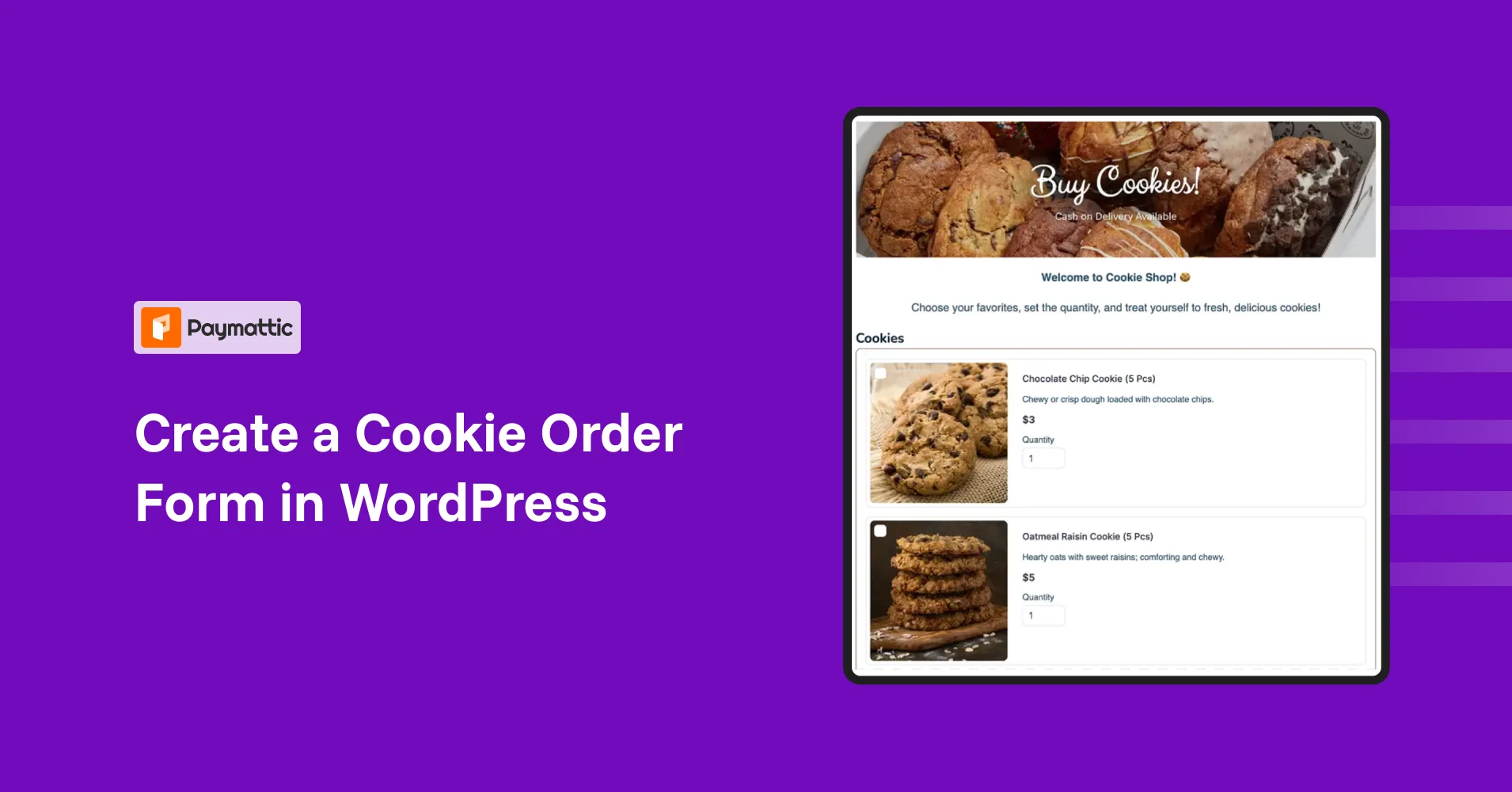
How to Create a Cookie Order Form in WordPress?


Table of Content
Download Paymattic – it’s Free!

Subscribe To Get
WordPress Guides, Tips, and Tutorials
We will never spam you. We will only send you product updates and tips.
Key takeaways:
A cookie order form lets bakery and small business owners accept online orders in a simple, organized way. Instead of managing orders through DMs, calls, or generic forms, customers can select their cookies, add special instructions, provide delivery details, and pay all in one place.
This blog contains:
– What a cookie order form is and why it’s useful.
– Discover the benefits of using a cookie order form on WordPress.
– Learn about Paymattic, a WordPress plugin that makes creating order and payment forms easy.
– Follow step-by-step instructions to build your own cookie order form with Paymattic.
You posted a photo of your bakery item on your restaurant’s social page. Within an hour, your DMs were flooded with “Can I order a dozen?” “Do you ship?” “I need these for Saturday, is that possible?”
At first, it feels exciting, but managing orders across multiple platforms can quickly become confusing. Important details get missed, payments are scattered, and keeping track of everything becomes stressful.
A better way to get rid of this hassle is to add a cookie order form to your restaurant website. With a dedicated form, customers can choose their cookies, enter their details, and pay in one place, making the ordering process simple and organized.
In this guide, you’ll learn how to create a cookie order form on WordPress using Paymattic, so you can easily accept and manage cookie orders from your website.
What is a cookie order form?
A cookie order form is a structured online form placed on your website that allows customers to place cookie orders easily. Instead of asking customers to send messages through social media, call you, or use a basic contact form, it provides a dedicated space where they can clearly submit their order details in one place.
Through this form, customers can choose the type of cookies they want, select quantities, add special instructions, and provide their contact and delivery information. Many cookie order forms also allow customers to complete their payment during the ordering process, making the experience smoother for both the business owner and the customer.
In short, a cookie order form simplifies the entire ordering process. It keeps all order information organized, reduces back-and-forth communication, and helps small bakery or home-based cookie businesses manage orders more efficiently.
Why use a cookie order form?
Using a cookie order form on your WordPress website helps you manage orders more efficiently and creates a smoother experience for your customers. Here are some key benefits:
- Keeps all orders organized: Instead of managing orders through DMs, calls, or emails, all orders are collected in one place.
- Makes ordering easier for customers: Customers can quickly select cookies, choose quantities, and submit their order without back-and-forth messages.
- Collects all necessary information: The form gathers important details like customer contact information, delivery address, and special instructions.
- Accepts payments online: Customers can pay directly when placing their order, reducing the chances of unpaid or canceled orders.
- Saves time for business owners: A structured order form reduces manual communication and helps you process orders faster.
- Creates a more professional experience: Having an order form on your website makes your cookie business look more organized and reliable.
Once you understand the benefits and how it can simplify managing orders, the next step is choosing the right tool to create your form easily. That’s where Paymattic comes in, a powerful WordPress plugin designed to help you build fully functional order and payment forms on WordPress.
Subscribe Newsletter
Subscribe to our newsletter for updates, exclusive offers, and news you won’t miss!

Meet Paymattic: A simple WordPress payment solution
Paymattic is a WordPress payment and donation plugin designed to help businesses collect payments directly from their websites. It allows you to create payment forms, order forms, and donation forms without needing complex eCommerce setups.
With its user-friendly interface and flexible form builder, Paymattic makes it easy for small businesses, creators, and nonprofits to accept payments, manage orders, and automate transactions, all within WordPress.
Key features of Paymattic:
- 13+ global payment gateways covering the whole world.
- Supports 155+ currencies.
- Supports both one-time or recurring payments.
- Offers a detailed customer dashboard to manage subscriptions.
- Offers a detailed report dashboard.
- Integrates with major tools.
- Offers a built-in drag-and-drop form builder with 35+ custom input fields.
- PCI-DSS compliance and built with security best practices.
- Advanced fraud protection with Honeypot, ReCAPTCHA V2 and V3, and Cloudflare Turnstile.
- Offers hooks, filters, and extensive documentation for custom development.
Ready to get started?
Experience WordPress payment and donation like never before. Try Paymattic now!
Steps to create cookie order form with Paymattic
Creating a cookie order form with Paymattic is simple and doesn’t require any coding knowledge. Follow the steps mentioned below, to quickly set up an order form that lets customers choose cookies, enter their details, and complete their payment directly from your website.
Step 1: Install and activate Paymattic
To install and activate Paymattic Pro, first download the Paymattic Pro plugin (.zip file) to your device. To get the zip file, first purchase the pro plugin from here.
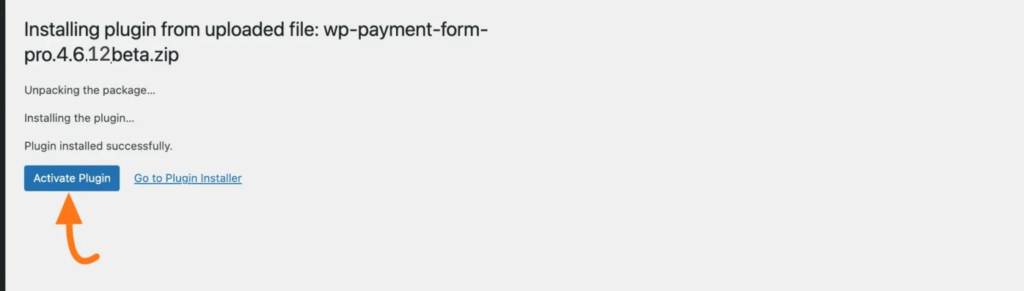
Once you get the zip file, go to the Plugins section from your WordPress Dashboard, and click on Add New Plugin. Now, upload the zip file and click the “Install Now” button. Then, to activate, click on the Activate Plugin.
Step 2: Create a new order form
Paymattic allows you to create a form in two ways: either by using a prebuilt form template or by building one from scratch.
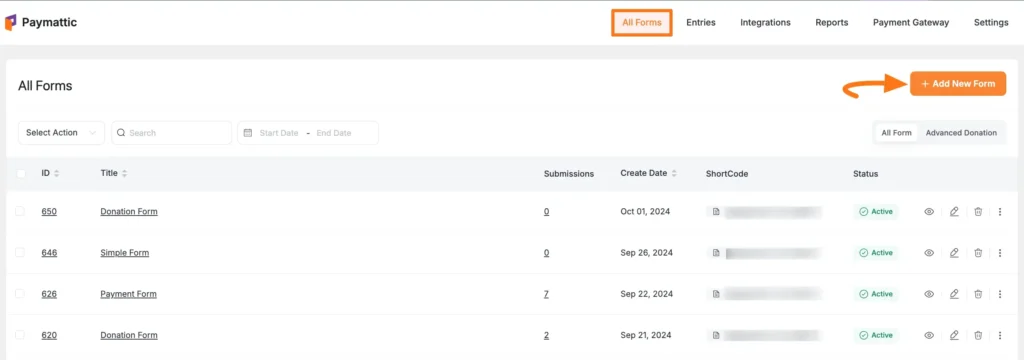
If you want to build one from scratch. Then, go to the Paymattic dashboard > Add New Forms > Blank Form. Here you will find all form fields, and input the necessary fields on your form.
To make the ordering process smooth and user-friendly, we’ll use a multi-step form. This allows customers to complete the form step by step, preventing it from looking long or overwhelming, and makes it easier to enter all necessary information in an organized way.
Click here to learn the full process of creating a multi- step payment form with Paymattic
Step 3: Add cookie products, pricing, and quantity options
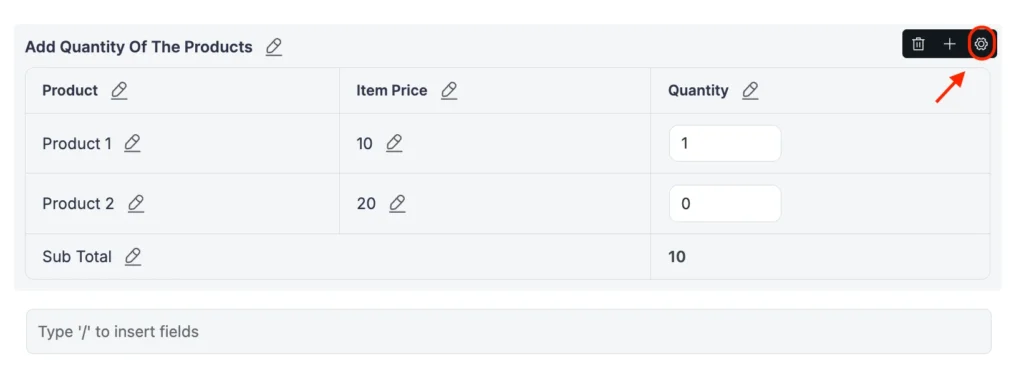
After adding the customer information fields, the next step is to display your bakery items on the form so customers can view them and place their orders. Paymattic provides a Tabular Product Item field that allows you to list products along with their images, prices, and quantity options.
- To add this field, go back to the Form Fields section and select the Tabular Product Item field. Once added, click on the Settings option to customize the field by adding your cookie products, setting prices, and adjusting the quantity options according to your offerings.
- Now a pop window will appear on you screen, customize the fields with the you product details. First, here you will get three different templates to showcase your products, choose one based on your preference. These are: Table Template, Grid Template, and Single Line Template.
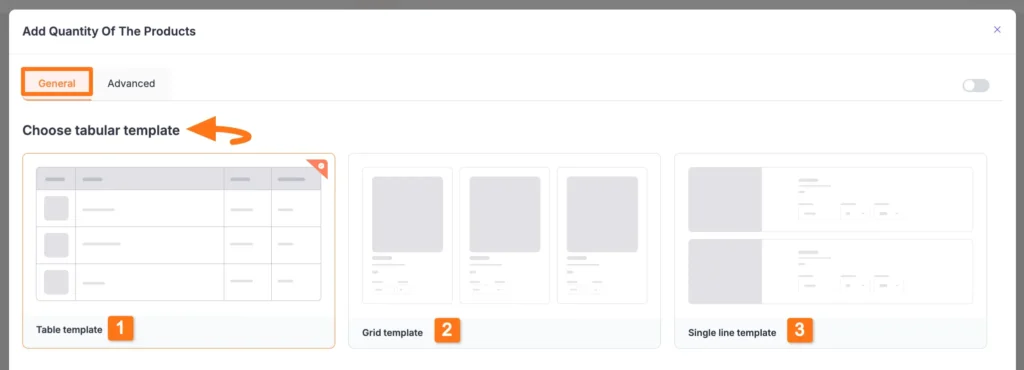
- For this blog, we;re taking single line template. The Single Line template has the same settings as the Grid Template. The difference is that it showcases each product in a single line and displays all products vertically one by one.
After selecting the templates, you can configure several settings to organize and display your products properly.
- Enable Product Display Options – You can enable options like product images, product filters, and product categories. Images help customers easily recognize items, filters make it easier to browse products on the front end, and categories allow you to organize different types of cookies or bakery items.
- Manage Product Settings – In this section, you can add new products, edit product details, disable a product temporarily, or delete it if needed. You can also set product prices, create variations with different pricing options, and rearrange items using drag-and-drop to keep the table organized.
- Show Subtotal – By enabling the Subtotal option, customers can see the total cost of the products they select directly below the table, making the ordering process clearer before checkout.
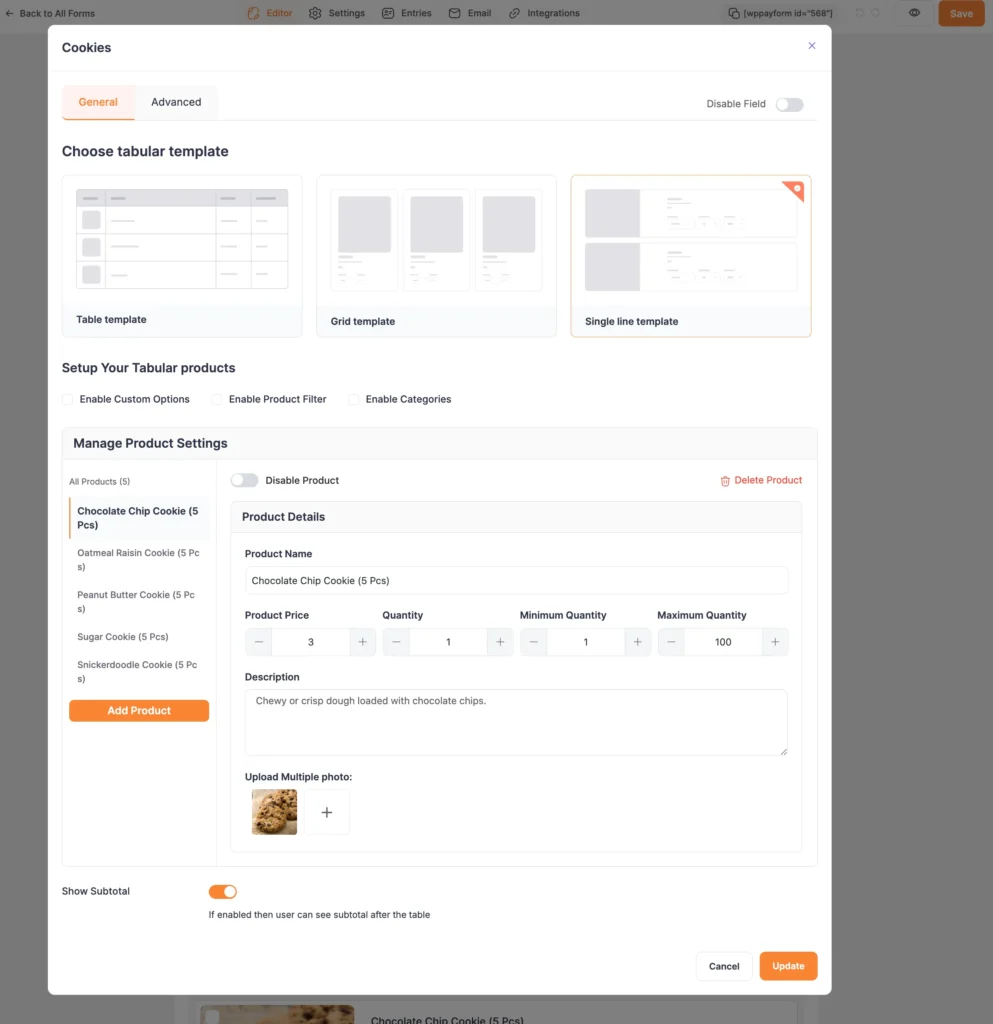
Once you finish, click the Update button to save all your configurations. This way, you can easily add the Tabular Product Items fields in Paymattic Forms!
Step 4: Set up your preferred payment methods
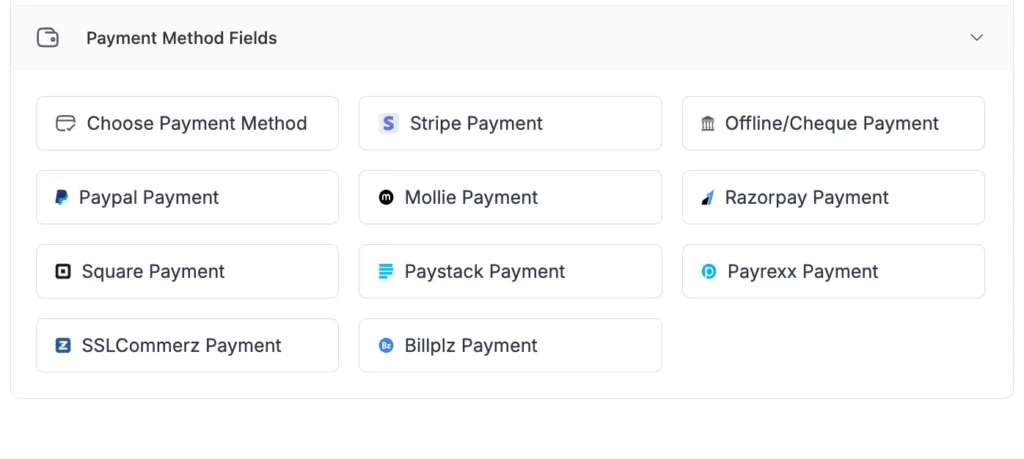
Since you’re creating an order form, it’s important to provide customers with an easy way to complete their payment. Paymattic supports 14 payment gateways, allowing you to choose the option that best fits your location and business needs.
To add a payment method to your form, go to the Payment Method Fields section and select the payment gateway you want to include.
Step 5: Preview the form and publish it on your website
Before publishing the form on your website, it’s a good idea to preview it to make sure everything looks correct. On the form editor page, you’ll find an eye icon in the top navigation bar. Click on this icon to preview the form and see how it will appear to your customers.
Once you’re satisfied with the layout and fields, you can publish the form on your website.
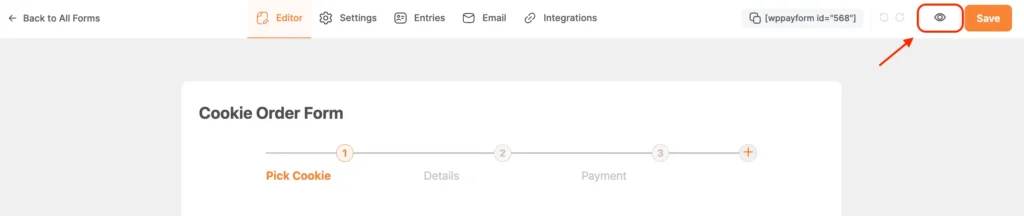
To publish the form, copy the shortcode located next to the preview button and paste it into the page or post where you want the form to appear.
Once added, the cookie order form will be displayed on your website. Here is the final look of the cookie order form created with Paymattic.
Ready to create your cookie order form?
Creating a cookie order form on your WordPress website is a simple yet powerful way to streamline your bakery orders, reduce manual work, and provide a smooth experience for your customers. With a structured form, you can collect all the necessary details, showcase your products professionally, and accept payments directly online.
Using Paymattic, you can build a fully customizable cookie order form without any coding, add multiple products, set up payment methods, and even create a multi-step form to make the ordering process easy and engaging. Start using a cookie order form today to save time, stay organized, and make it easier for customers to order from your bakery.
Join the thousands already enjoying Paymattic Pro!
Frequently asked questions
Here are some frequently asked questions about “How to create a cookie order form in WordPress.”?
1. Can I create a cookie order form without coding?
Yes! Using Paymattic, you can create a fully functional cookie order form in WordPress without any coding knowledge. Its drag-and-drop builder makes setup easy and intuitive.
2. How do I accept payments through the cookie order form?
Paymattic supports multiple payment gateways like PayPal, Stripe, and others. You can integrate your preferred payment method so customers can pay directly while placing their order.
3. Can I add multiple products and variations to the order form?
Absolutely. Using Paymattic’s Tabular Product Item field, you can add multiple products, images, pricing, quantity options, and even set up product variations like size or flavors.
4. Is it possible to create a multi-step cookie order form?
Yes, Paymattic allows you to create multi-step forms, which makes the ordering process smoother for customers by breaking the form into easy-to-complete steps.
5. Can I use this cookie order form for other baked goods or products?
Yes! While this guide focuses on cookies, the same Paymattic order form can be used for cakes, pastries, or any other products you sell. You can customize product names, images, prices, and categories to fit your business.

Madhobi
This is Madhobi, a content writer at WPManageNinja with expertise in technical writing and email marketing. Outside of work, she likes traveling and exploring new places.





Leave a Reply