


Best Ways to Receive Payments from Clients: Get Paid Faster


Table of Content
Download Paymattic – it’s Free!

Subscribe To Get
WordPress Guides, Tips, and Tutorials
We will never spam you. We will only send you product updates and tips.
If you’ve ever chased a client for payment, sent polite reminders, resended invoices, or wondered if the money will actually arrive, you already know how draining it can be.
And the frustrating part is that most of the chaos isn’t about the money itself. It’s about the process.
I’ve talked to dozens of freelancers and small business owners who use four or five different tools just to get paid: one for invoicing, one for accepting card payments, another for tracking who’s paid, and a separate platform to send payment links. It works barely, but it’s exhausting.
In this guide, I’ll walk you through the best ways to receive payments from clients, what actually works (and what doesn’t), and how to simplify the entire process, especially if you’re running your business on WordPress.
TL;DR
– Receiving payments from clients is less about the payment itself and more about having a clear, straightforward process in place
– Most payment issues come from process problems like delayed invoicing, unclear terms, and too many disconnected tools
– Freelancers and businesses typically rely on methods like bank transfers, PayPal/Stripe, invoicing tools, and payment links, each with its own trade-offs
– The smoother the payment experience is for the client, the faster you get paid
– A step-by-step system (clear terms, proper tracking, quick invoicing, easy payment options, and timely follow-ups) helps reduce delays and confusion
– Simple mistakes like slow invoicing, limited payment options, or poor tracking can directly impact cash flow
– Centralizing the entire payment workflow into one system reduces friction and improves efficiency
– Tools like Paymattic help WordPress users manage payments, forms, and records in one place for a more organized and faster payment process
Why receiving client payments can be challenging?
We all know the tools exist, the technology works, and sending money across the globe has never been technically easier. So why do so many freelancers and small business owners still struggle to get paid on time?
Here are the real pain points I see come up again and again:
Delayed payments: Bank transfers take days. Clients forget, and payment links expire. Without automation, every unpaid invoice requires a manual follow-up, and that follow-up often feels awkward, especially with long-term clients.
Manual invoicing chaos: If you’re still creating invoices in a spreadsheet or Word doc, emailing them as PDFs, and manually marking them as paid, you’re spending hours each month on a task that should take minutes. It also makes errors more likely.
Too many tools for one process: A typical setup might look like this: you use a plugin for invoices, Stripe for card payments, PayPal for international clients, and a Google Sheet to track everything. Each tool has its own login, fee structure, and learning curve. That’s a lot of overhead for something that should be simple.
Transaction fees and limitations: PayPal charges up to 3.49% + a fixed fee per transaction. Stripe takes 2.9% + 30 cents. Wire transfers have flat fees that hurt small invoices. These fees add up quickly, especially if you’re running a high volume of smaller payments.
Client friction: The more steps a client has to take to pay you, the less likely they are to do it promptly. If they need to create an account, find a payment link buried in an email, or navigate a confusing checkout, some of them simply won’t. Not out of bad faith, just friction.
Popular methods to receive payments from clients
Before I recommend anything, let me walk through the most common payment methods freelancers and small business owners actually use with an honest look at what works and what doesn’t.
Bank transfers (ACH / Wire)
Bank transfers are the old reliable. You share your account details, the client initiates a transfer, and a few days later, the money arrives. For large invoices, especially with corporate clients, this is still a common expectation.
Pros:
- Direct deposit into your account
- No third-party holding your funds
- No platform fees for receiving
- Trusted by corporate and enterprise clients
Cons:
- Can take 3–5 business days to clear
- No automation or reminders built in
- No payment tracking or digital receipts
- Requires sharing sensitive bank details
- International wires carry high flat fees
Best for: Large, one-time payments from established clients who prefer traditional processes.
Payment platforms (PayPal, Stripe, Square)
Many popular payment solutions are the go-to options for most freelancers. They’re fast to set up, widely recognised, and clients are usually comfortable using them. But they come with trade-offs.
Pros:
- Widely recognised and trusted by clients
- Quick to get started, setup takes minutes
- Clients can pay with cards, wallets, or their account balance
- Stripe offers strong developer tools for custom setups
Cons:
- Fees on every transaction (2.9%–3.49% + fixed fee)
- Funds can be held or accounts frozen without clear reason
- PayPal redirects clients away from your website
- No built-in invoicing or form collection
- Limited customisation and branding options
Best for: One-off payments from clients already on these platforms. Not ideal as your only solution.
Invoicing tools
Dedicated invoicing software provides a professional paper trail, itemised bills, due dates, and tracking of payment status. For service businesses, this looks polished to clients and helps with accounting.
Pros:
- Professional-looking, itemised invoices
- Payment status tracking in one place
- Can attach files, notes, and service breakdowns
- Some tools offer automatic payment reminders
Cons:
- Extra monthly subscription cost on top of your gateway
- Manual follow-up is still often needed
- Completely separate from your website and brand
- Clients still have to click a link in an email
- No embedded or on-site payment experience
Best for: Businesses that need detailed billing records and work with clients who expect formal invoices.
Payment links
Many platforms, including Stripe, Square, and PayPal, let you generate a one-time payment link. Share it via email or chat, and the client pays through a hosted page. Fast and low-friction for quick jobs.
Pros:
- Extremely quick to create and share
- No website or form setup needed
- Works well for fast, one-off jobs
Cons:
- Generic, unbranded hosted pages
- No customisation or form fields
- Not repeatable or embeddable on your site
- Can’t collect project details alongside payment
- Feels informal for ongoing or high-value clients
Best for: Quick, one-off jobs where you need to get paid fast, and branding isn’t a priority.
Subscribe Newsletter
Subscribe to our newsletter for updates, exclusive offers, and news you won’t miss!

Steps to collect payment from clients
Once you have a payment method in place, collecting payments becomes much easier when you follow a consistent process. Having a clear payment system not only saves time but also helps you get paid faster and avoid confusion with clients.
Here’s a simple step-by-step approach you can follow:
1: Set clear payment terms from the beginning
Before starting any work, make sure all payment-related terms are clearly defined. This can be part of your proposal, contract, or agreement.
Outline details like:
- Total pricing or billing structure
- Payment deadlines
- Accepted payment methods
- Any upfront deposits or milestone payments
When expectations are clear from the start, collecting payments becomes much smoother.
2. Track your work accurately
Keeping proper records ensures your payment requests are accurate and justified.
For product-based businesses, track what you sell, when, and at what price. For service-based work, log hours, completed tasks, and any extra expenses. This makes your billing more transparent and builds trust with clients.
3. Send invoices promptly
Once the work is completed or the product is delivered, send your invoice without delay.
Timely invoicing plays a big role in how quickly you receive payment. The longer you wait, the higher the chances of delayed payments. Keeping your invoicing consistent helps maintain a steady cash flow.
4. Make it easy to complete the payment
The easier it is for clients to pay, the faster you’ll receive your money.
Offer multiple payment options, such as cards, bank transfers, and digital wallets. With Paymattic, you can connect multiple gateways and let clients choose their preferred method directly from your website, no redirects or extra steps.
5. Follow up on pending payments
If a payment is overdue, don’t hesitate to send a polite reminder. In many cases, delays happen simply because clients forget. A short, friendly follow-up can speed up the process without harming your relationship.
6. Record and confirm the payment
Once you receive the payment, update your records immediately. Whether you use accounting software or a spreadsheet, keeping track of payments is essential. You can also send a quick confirmation or receipt to the client. This adds professionalism and ensures both sides are aligned.
Best ways to receive payments from clients in WordPress
If your business runs on a WordPress website, whether you’re a coach, consultant, agency, or freelancer with a portfolio site, there’s a much cleaner way to handle all of this in one place. So, what is actually the best ways to receive payment from clients without juggling tools?
That solution is Paymattic.
Meet Paymattic
Paymattic is one of the best WordPress payment plugins that lets you accept one-time payments, recurring subscriptions, and donations directly on your website.
Instead of sending clients to external platforms like PayPal or Stripe-hosted pages, you can embed a fully branded payment form right on your site. Clients can enter their details, choose a service, and complete the payment, all in one place.
You stay in control of the entire experience, from the form fields and pricing options to the design and branding. It keeps everything consistent and professional, while making the process easier for your clients.
In practical terms, this means you’re no longer relying on separate tools for forms, payments, invoicing, and tracking. With Paymattic, everything works together in one place, so you spend less time managing tools and more time running your business.
The key features of Paymattic include:
- 13+ global payment gateways covering customers worldwide
- Supports 157+ currencies
- Accept both one-time and recurring payments
- Detailed customer dashboard to manage subscriptions
- Advanced reporting dashboard for tracking transactions
- Integrates with 15+ major tools
- Smooth payment and donation form builder with 35+ custom input fields
- Automatic email notifications for confirmations, receipts, and updates
- Generate and send PDF invoices or receipts for every transaction
- PCI-DSS compliant and built with security best practices
- Advanced fraud protection with Honeypot, reCAPTCHA v2 & v3, and Cloudflare Turnstile
- Developer-friendly with webhooks, filters, and REST API support
Ready to get started?
Experience payments and donations for WordPress like never before. Try Paymattic now!
Accept clients’ payment on WordPress with Paymattic
Collect client payments directly on your WordPress site with ease. Paymattic lets you set up a complete client payment system on your WordPress site in just a few steps.
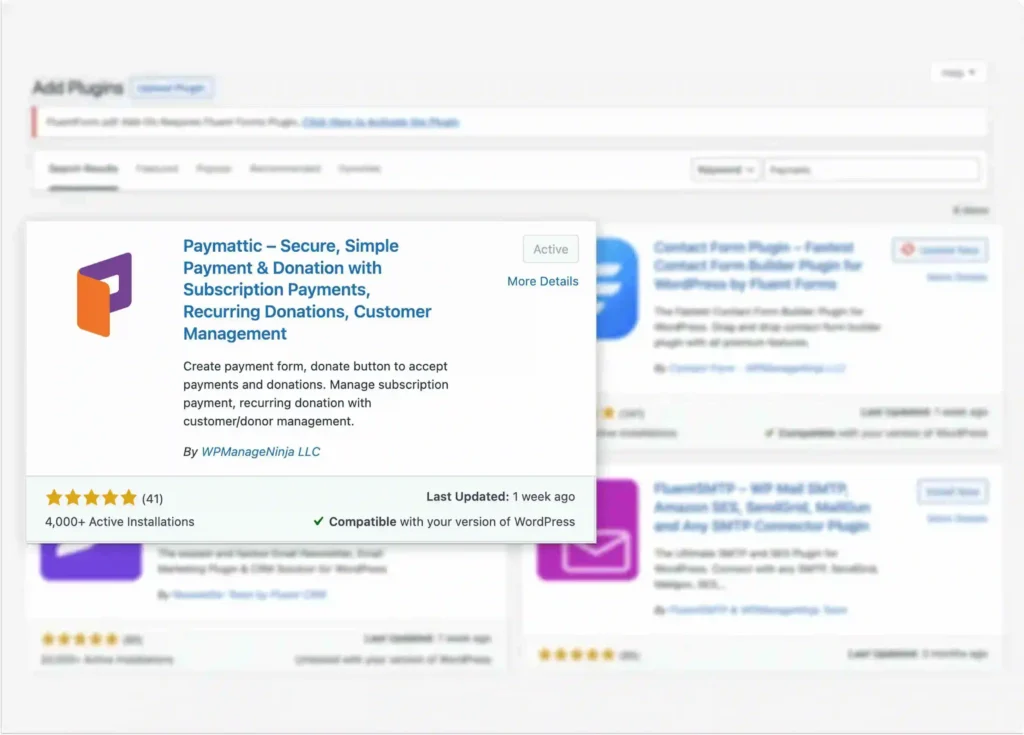
Step 1: Install and activate Paymattic
Go to your WordPress dashboard → Plugins → Add New
Search for Paymattic, then install and activate the plugin.
You can start with the free version and upgrade later if you need advanced features.
Step 2: Configure payment gateway
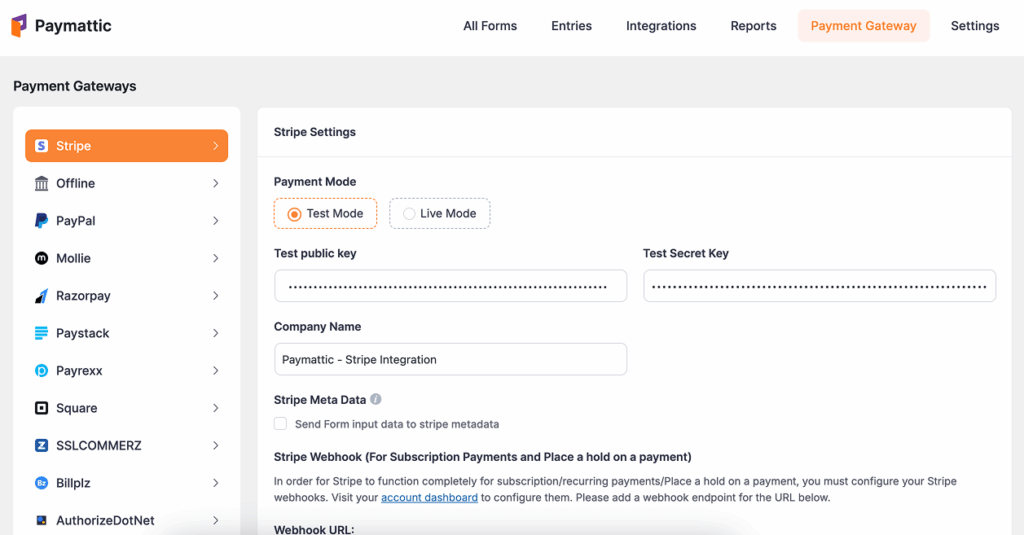
Now, to accept international payments, you have to configure a payment gateway to collect payments from your customers.
For this, go to Paymattic dashboard > Payment Gateway. Here you will find all the available payment methods. Select your preferred payment system and insert the API credentials for your merchant account. Then click on the Save Settings button.
Step 3: Create a payment form
To create a payment form with Paymattic, navigate to Paymattic → All Forms → Add New Form. Here you’ll find two options: either you can:
- Start from scratch
- Choose a pre-built template,
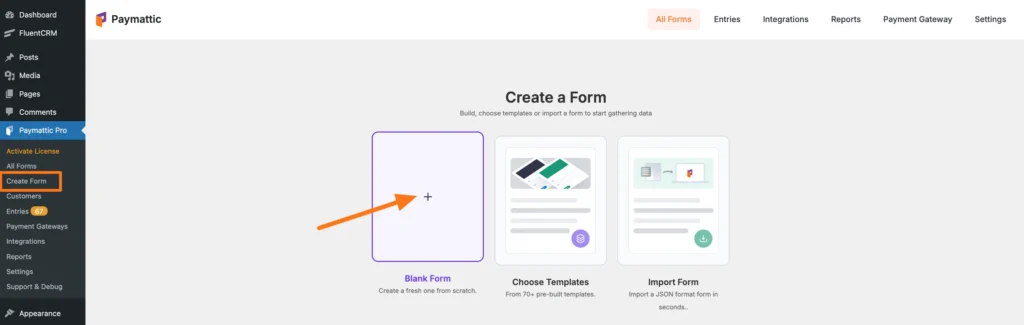
For this blog, we’re going with a blank form. After selecting the blank form, add essential fields like:
- Payment amount
- Name
- Service selection
- Payment method
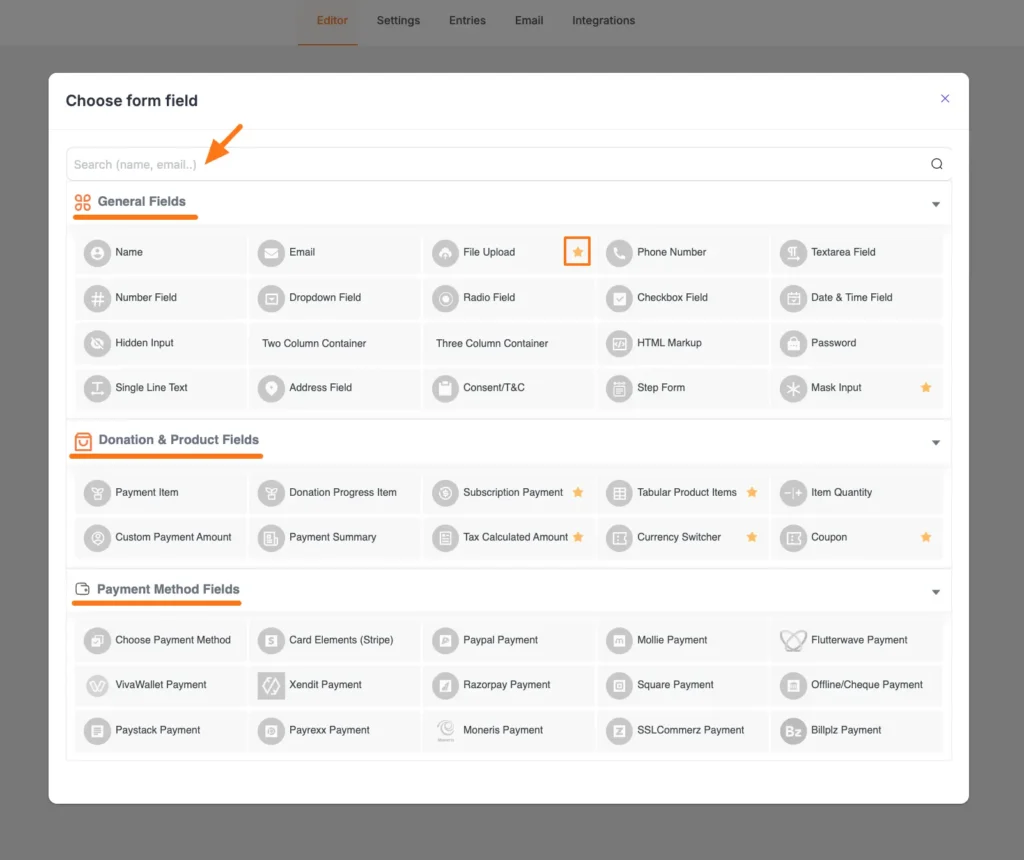
After adding all form fields, click on the Save button.
Click here to learn the step by step proccess of “How to Create Online Payment Form With Paymattic‘
Step 4: Preview the form before publishing
Paymattic allows you to preview your form before publishing it. To preview your form, go to All forms and click on the preview option below your form name.
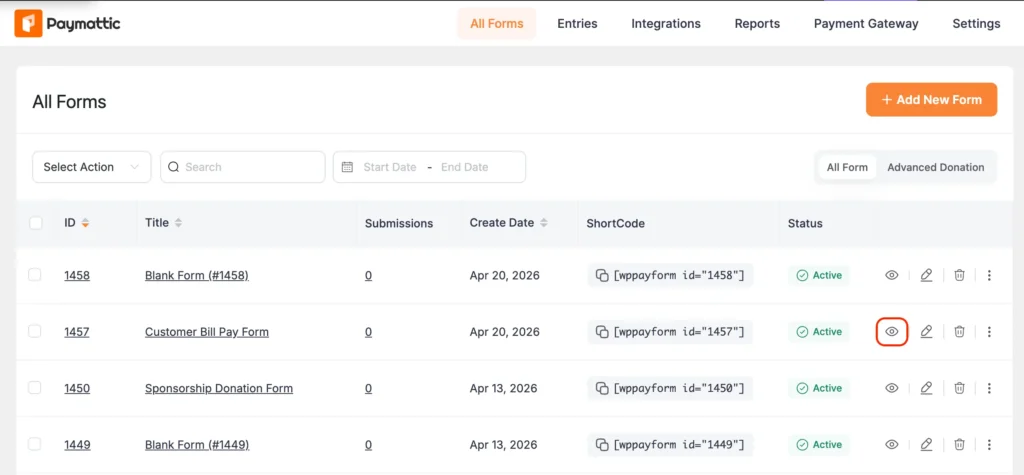
Here is the demo of your client payment form, created with Paymattic.
Common mistakes to avoid when receiving payments from clients
I’ve seen smart, capable freelancers lose time and money because of avoidable payment setup mistakes. Here are the ones I’d flag most:
Using too many disconnected tools: If your invoicing tool, payment gateway, and client communication are all separate, things fall through the cracks. A client pays, but it doesn’t sync to your invoice. A reminder goes out after the client has already paid. Consolidating into one tool, especially one that lives inside your website, removes most of that mess.
Not making payment instructions clear: If clients are unsure how to pay you, delays are almost guaranteed. Vague instructions, missing links, or complicated checkout steps can slow down the entire process. Always make it obvious what the client needs to do next, and keep the payment process as simple as possible.
Offering only one payment method: Some clients prefer credit cards, others use PayPal. Some international clients can only use local gateways. Offering only one option means some people will drop off at checkout. Paymattic supports multiple gateways simultaneously, so you can cover all your bases without extra work.
Not keeping proper payment records: Without proper tracking, it becomes difficult to know who has paid, who hasn’t, and what has already been completed. This can lead to missed payments or unnecessary back-and-forth with clients. Using a centralized system helps you maintain clear records and stay organized, especially during tax season or financial reporting.
Final verdict: What’s the best ways to receive payments from clients?
There’s no single “best” payment method that works for every business. The right answer depends on your volume, your client base, and how much setup you’re willing to do.
That said, if I had to give a direct recommendation based on what I’ve seen actually work for freelancers and small businesses, especially those running WordPress sites, Paymattic is the clearest all-in-one answer.
- Beginners: Use Paymattic for its simplicity.
- Growing businesses: Use Paymattic for automation. Recurring billing, email confirmations, and payment tracking without the extra tools.
- Agencies: Use Paymattic for client-friendly payments. Branded forms, multiple gateways, and a professional checkout experience your clients will actually trust.
- Coaches and course creators: Use Paymattic to sell courses, memberships, and sessions all from one form.
Ready to get started? Install Paymattic free from the WordPress plugin directory, set up your first payment form, and give your clients a checkout experience that actually works. Visit Paymattic’s website to learn more.
Join the thousands already enjoying Paymattic Pro!
Frequently asked questions
Here are answers to some frequently asked questions regarding “the best ways to receive payments from clients”.
1. What is the best ways to receive payments from clients?
The best way to receive payments from clients is to use a system that combines payment collection, tracking, and automation in one place. This reduces manual work and helps you get paid faster. For example, instead of using separate tools for invoicing and payments, using a unified solution can simplify the entire process.
2. Which payment methods should I offer to clients?
It’s best to offer multiple payment options, such as credit/debit cards, bank transfers, and digital wallets. Different clients prefer different methods, and giving them flexibility makes it easier and faster for them to pay you.
3. How can I get clients to pay faster?
To get paid faster, set clear payment terms upfront, send invoices or payment requests immediately after completing the work, and make the payment process as simple as possible. Offering easy payment options and sending polite follow-up reminders also helps reduce delays.
4. Is it better to use PayPal, Stripe, or bank transfer?
Each option has its pros and cons. PayPal and Stripe are faster and more convenient for online payments, while bank transfers are often preferred for large transactions. The best approach is to offer a mix of options so clients can choose what works best for them.
5. How do I manage and track client payments efficiently?
The easiest way to manage and track payments is by using a centralized system that records transactions, tracks payment status, and sends confirmations automatically. This helps you stay organized, avoid missed payments, and maintain accurate records for your business.

Madhobi
This is Madhobi, a content writer at WPManageNinja with expertise in technical writing and email marketing. Outside of work, she likes traveling and exploring new places.

Leave a Reply