

Stripe Test Card Numbers For Testing Transactions


Table of Content
Download Paymattic – it’s Free!

Subscribe To Get
WordPress Guides, Tips, and Tutorials
We will never spam you. We will only send you product updates and tips.
If you run a business online or sell online courses with Stripe payment, the most unwanted thing you ever want to encounter is a failed transaction.
Driving customers to the checkout page is challenging enough, but convincing them to try again after a failed attempt is even harder.
Before you launch your payment form for accepting real payments, it’s crucial to run a test transaction using Stripe’s dummy card numbers.
Not only for successful payment, you should test every possible scenario, such as a card declined, insufficient balance, card expired, etc.
So, in this guide, we’ll walk through everything about Stripe test card numbers, why they’re important, and how to set up and test your transactions.
Key takeaways
- Stripe test card numbers let you simulate real payment scenarios- successful charges, declines, expired cards, insufficient funds – without moving any real money.
- The most commonly used test card is 4242 4242 4242 4242 (Visa), which always succeeds. Use any future expiry date and any 3-digit CVC.
- Stripe’s testing environment is now called a sandbox, not “test mode.” Every Stripe account gets one automatically.
- Test cards are region-specific too. If your customers are international, test with cards from their actual regions, not just the US default.
- If you’re writing test code rather than testing through a form, use PaymentMethod tokens like
pm_card_visainstead of raw card numbers. Stripe recommends this for PCI compliance. - You can’t use these numbers for real purchases. They only work with test API keys inside a sandbox.
- Testing every scenario, not just the successful one, catches issues before they cost you real customers and real sales.
What are Stripe test card numbers?
Think of Stripe test card numbers as fake credit cards that actually work, but only in your testing environment.
They’re basically dummy card numbers that are designed specifically for testing payment functionality without processing real money.
These aren’t just random numbers either. The beauty of Stripe testing credit card numbers lies in their ability to mimic real-world payment situations. They allow developers and business owners to simulate various payment scenarios in a safe testing environment.
Each test credit card number is designed to trigger specific responses. Want to see what happens when someone’s card gets declined? There’s a number for that. Curious about how your system handles expired cards? Yes, there’s one for that, too.
You can also conduct tests for successful payments, insufficient funds, and even specific error codes that might occur with actual customer payments.
When you’re building or maintaining an online store, subscription service, or course platform that accepts credit card payments, you should utilize these numbers and thoroughly test your payment flow.
But you can’t use this temporary credit card number for online purchases. These are only for testing purposes.
Quick note on terminology: Stripe now calls its testing environment a sandbox rather than “test mode.” You’ll see both terms floating around online, but sandbox is the current name, and every Stripe account comes with one by default.
Why do you need to test Stripe transactions?
Let me tell you a story. A friend of mine launched his online course last year without properly testing his payment system. Everything looked great until the first customer tried to buy.
The payment failed, but instead of a nice error message, she got some cryptic technical jargon that scared her away. He lost that sale and probably a few more before he figured out what was wrong.
That’s exactly why testing with Stripe test credit card numbers isn’t optional; it’s survival.
Online customers are very impatient. If your Stripe checkout doesn’t work perfectly the first time, they’re gone. And good luck getting them back.
I’ve seen statistics showing that 45% of people won’t retry a failed payment on the same site. And that’s brutal!
But it gets worse. Real customers don’t all use perfect credit cards. Some have expired cards they forgot to update. Others hit their credit limit right when they’re trying to buy from you. Some banks are super strict about online purchases and decline them for security reasons.
If you don’t test these scenarios with temporary credit card numbers beforehand, you’re basically crossing your fingers and hoping for the best. That’s not a business strategy; that’s gambling.
Stripe test card numbers allow you to test scenarios, including 3D payments or 2D payments.
Testing also helps you catch those weird edge cases that only happen in the real world. Like what happens when someone enters their ZIP code wrong? Or when their bank requires extra authentication?
These things matter, and the Stripe test transaction lets you figure them out safely.
Subscribe Newsletter
Subscribe to our newsletter for updates, exclusive offers, and news you won’t miss!

List of Stripe credit card test numbers
Alright, here’s where things get practical. Stripe gives us a bunch of different card numbers for testing, and each one does something specific. To run a Stripe test transaction, you need to have a Stripe dummy card or a testing card for Stripe.
I’m going to break these down by region because payment processing works differently around the world.
Quick heads up: you can use any valid future date for expiration and any CVC code (3 digits for most cards, 4 for Amex). For example, just use 12/28 as the expiry date and 123 as the CVC code to keep things simple.
Here’s a complete categorized list of Stripe testing credit card numbers organized by regions and card types:
Stripe test card numbers (Americas):
| Country | Number | Brand |
| United States (US) | 4242 4242 4242 4242 | Visa |
| Argentina (AR) | 4000 0003 2000 0021 | Visa |
| Brazil (BR) | 4000 0007 6000 0002 | Visa |
| Canada (CA) | 4000 0012 4000 0000 | Visa |
| Ecuador (EC) | 4000 0021 8000 0000 | Visa |
| Mexico (MX) | 4000 0048 4000 8001 | Visa |
| Panama (PA) | 4000 0059 1000 0000 | Visa |
Stripe test card numbers (Europe and Middle East)
| Country | Number | Brand |
| United Arab Emirates (AE) | 4000 0078 4000 0001 | Visa |
| United Arab Emirates (AE) | 5200 0078 4000 0022 | Mastercard |
| Austria (AT) | 4000 0004 0000 0008 | Visa |
| Belgium (BE) | 4000 0005 6000 0004 | Visa |
| Denmark (DK) | 4000 0020 8000 0001 | Visa |
| Finland (FI) | 4000 0024 6000 0001 | Visa |
| France (FR) | 4000 0025 0000 0003 | Visa |
| Ireland (IE) | 4000 0037 2000 0005 | Visa |
| Italy (IT) | 4000 0038 0000 0008 | Visa |
| Luxembourg (LU) | 4000 0044 2000 0006 | Visa |
| Norway (NO) | 4000 0057 8000 0007 | Visa |
| Sweden (SE) | 4000 0075 2000 0008 | Visa |
| United Kingdom (GB) | 4000 0082 6000 0000 | Visa |
| United Kingdom (GB) | 5555 5582 6555 4449 | Mastercard |
Stripe credit card test numbers for Asia Pacific
| Country | Number | Brand |
| Australia (AU) | 4000 0003 6000 0006 | Visa |
| China (CN) | 4000 0015 6000 0002 | Visa |
| Hong Kong (HK) | 4000 0034 4000 0004 | Visa |
| India (IN) | 4000 0035 6000 0008 | Visa |
| Japan (JP) | 4000 0039 2000 0003 | Visa |
| Malaysia (MY) | 4000 0045 8000 0002 | Visa |
| Singapore (SG) | 4000 0070 2000 0003 | Visa |
| Thailand (TH) | 4000 0076 4000 0003 | Visa (credit) |
| Thailand (TH) | 4000 0576 4000 0008 | Visa (debit) |
Commonly used Stripe test cards
As we mentioned earlier, Stripe dummy credit card numbers work differently for every scenario. Successful payment, declined payment, wrong CVC number, or expiry date; each has a specific number or fake card number for testing purposes.
Here are the most commonly used Stripe testing credit card numbers for different purposes:
| Scenario | Card number | Error code |
|---|---|---|
| Successful payment | 4242 4242 4242 4242 | — |
| Requires 3D Secure authentication | 4000 0025 0000 3155 | — |
| Generic decline | 4000 0000 0000 0002 | card_declined |
| Insufficient funds | 4000 0000 0000 9995 | card_declined |
| Lost card decline | 4000 0000 0000 9987 | card_declined |
| Stolen card decline | 4000 0000 0000 9979 | card_declined |
| Expired card | 4000 0000 0000 0069 | expired_card |
| Incorrect CVC | 4000 0000 0000 0127 | incorrect_cvc |
| Incorrect card number | 4242 4242 4242 4241 | incorrect_number |
| Processing error | 4000 0000 0000 0119 | processing_error |
| Exceeding velocity limit | 4000 0000 0000 6975 | card_declined |
A couple of things worth knowing as you test these:
Lost card and stolen card declines behave the same on the surface (payment gets rejected), but Stripe logs them differently on the backend. If you’re building any kind of fraud reporting or admin dashboard, testing both separately actually matters.
The incorrect card number test isn’t a real API-side decline; it fails the Luhn check before Stripe even processes it, so it’s a good one to test your form-level validation against, not just your payment logic.
For CVC testing specifically, you need to actually provide a CVC value. If you leave that field blank, Stripe skips the check entirely and it can’t fail, so the test won’t do what you expect.
Stripe Payment Gateway: A Complete Beginner’s Guide
PaymentMethod tokens: a safer way to test in code
If you’re testing through a form (like the Paymattic checkout we’ll walk through next), the card numbers above are exactly what you need. But if you’re writing test code directly, say, calling the Stripe API from a script rather than filling out a form, Stripe actually recommends against typing raw card numbers into your code.
The reason is PCI compliance. Even in a sandbox, code that handles raw card numbers can carry over bad habits into your live integration. Instead, Stripe provides PaymentMethod tokens like pm_card_visa that represent the same test cards without ever touching an actual card number.
Here’s how the common ones map:
| Scenario | Card number | PaymentMethod token |
|---|---|---|
| Successful payment (Visa) | 4242 4242 4242 4242 | pm_card_visa |
| Successful payment (Mastercard) | 5555 5555 5555 4444 | pm_card_mastercard |
| Card declined | 4000 0000 0000 0002 | pm_card_visa_chargeDeclined |
| Insufficient funds | 4000 0000 0000 9995 | pm_card_visa_chargeDeclinedInsufficientFunds |
You’d use a token like this in an API call:
curl https://api.stripe.com/v1/payment_intents \
  -u "YOUR_SECRET_KEY:" \
  -d amount=500 \
  -d currency=usd \
  -d payment_method=pm_card_visa
If you’re testing interactively through a payment form, stick with the test card numbers. If you’re writing test scripts or automated tests, reach for the tokens instead.
How to use Stripe test card numbers
Now, let’s break down how you can test these Stripe dummy transactions. To do this, first of all, you’ll need a WordPress payment plugin that supports Stripe payment for accepting online payments.
We’ll take Paymattic for this. It’s one of the best WordPress plugins to accept payments and donations globally. Another major reason for choosing Paymattic is, it provides a total of 14 payment gateways, and Stripe is completely free.
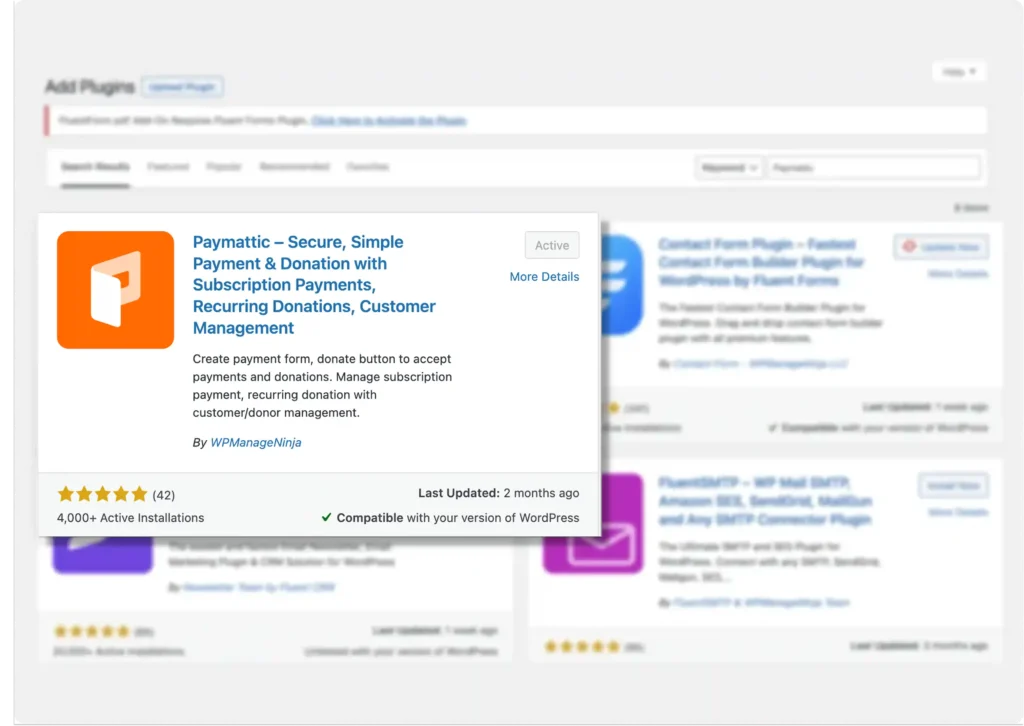
So, first go to your WordPress dashboard and install Paymattic. Here is the process:
- Go to your WordPress admin dashboard
- Click on Plugins → Add New
- Search for Paymattic and install the plugin
- Click on the Activate button
You can also download the Free Paymattic plugin from here 👇
After installing Paymattic, it’s time to configure Stripe so that you can test those dummy card numbers.
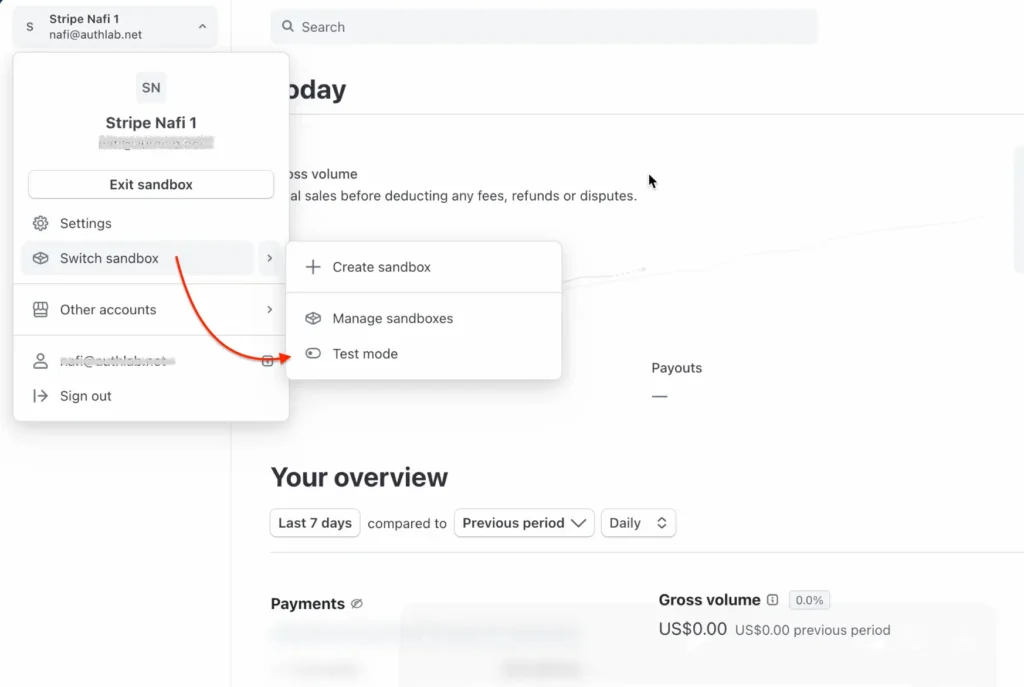
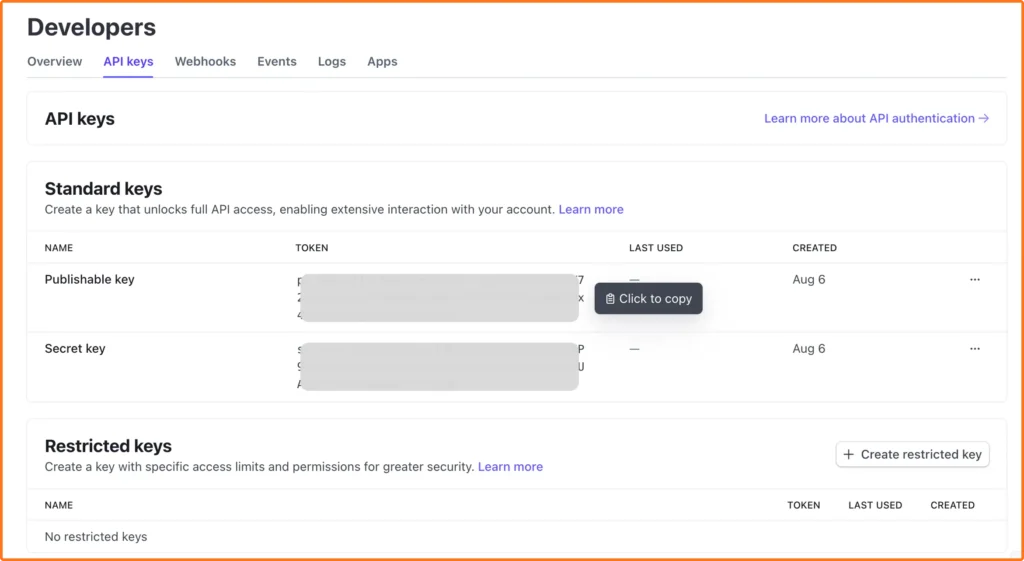
To configure Stripe, you need the API credentials first. To get the APIs, log in to your Stripe dashboard. From the top left corner, click on your profile > Switch to sandbox > Test mode.
Stripe uses sandboxes as isolated testing environments now, so everything you do there stays separate from your live account.
You can find the API keys here. Copy the Publishable key and Secret key.
Now connect your Stripe account to the Paymattic dashboard.
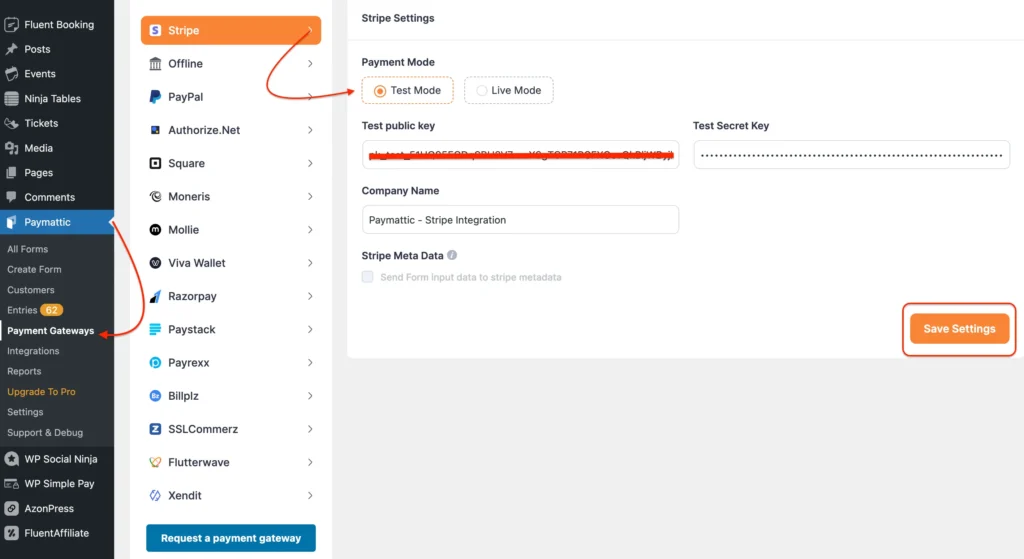
- Navigate to Paymattic > Payment Gateways.
- You can find all the available payment gateways here.
- Choose Stripe, make sure the test mode is on, and you’re connected in sandbox mode with the API keys.
- Paste the Test Public Key and Secret Key here.
- Hit Save Settings.
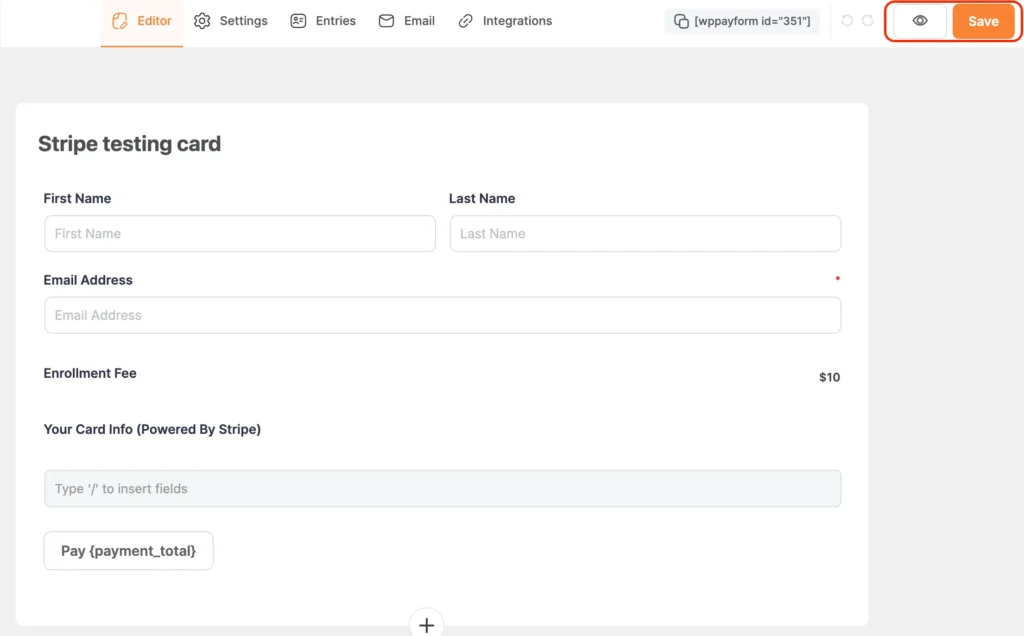
Now, to perform a test transaction with Stripe test card numbers, create a payment form with Paymattic.
Don’t need to be fancy; just create a basic payment form with a simple “Buy Now” button and a fixed price.
After creating your form, click on “Save” and hit the “EYE” button to preview your form.
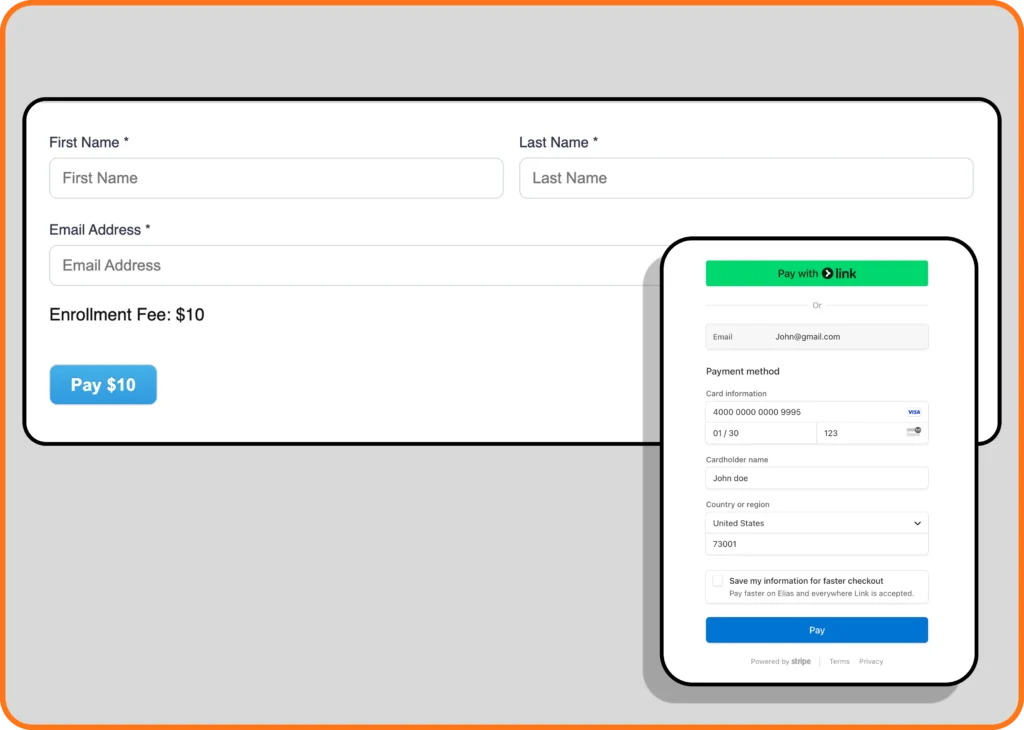
Fill out the form and proceed to payment. Here, Paymattic provides a direct checkout option so you won’t be redirected to the Stripe dashboard for testing credit card numbers. Try every scenario and test transactions using these Stripe test card numbers.
Try these fake credit card test numbers for other regions as well, and make sure everything is working perfectly.
If everything goes well, that means you’re ready to go with your payment form.
The whole testing process might take an hour or two, but it’ll save you weeks of headaches later.
Wrapping up
Every payment that fails on your live site is money walking out the door. And the worst part? Most of these failures are completely preventable if you just take the time to test properly.
Your customers aren’t beta testers. They’re not going to stick around while you figure out why your payment form is broken. They’ll find someone else who has their act together and buy from them instead.
The good news is that testing doesn’t have to be complicated. You don’t need to test everything on day one. Start with the basics: successful payments and basic declines. Then gradually test complex stuff like international transactions and authentication requirements.
These Stripe credit card test numbers are free tools that can save your business thousands of dollars in lost revenue. Use them. Your future self (and your customers) will thank you.
FAQs on Stripe test cards
Why did my Stripe test card get declined?
Check you’re using test API keys in a sandbox, a future expiry date, and a card meant to succeed (not an intentional decline card like 4000 0000 0000 0002).
Can I use Stripe test cards on a live website?
No. Test cards only work when your integration is using test API keys inside a sandbox. If you try them on a live payment form with live keys, the transaction will simply fail; Stripe never processes real charges with test card numbers.
Do Stripe test cards expire?
No, the test card numbers themselves don’t expire. You can reuse 4242 4242 4242 4242 indefinitely. Just make sure the expiry date you enter for the card is set sometime in the future.
What’s the difference between a test card and a PaymentMethod token?
A test card number (like 4242 4242 4242 4242) is what you’d type into an actual payment form. A PaymentMethod token (like pm_card_visa) represents the same test card but is meant for use directly in code or API calls.
Can I test international payments with Stripe test cards?
Yes. Stripe provides region-specific test cards for the Americas, Europe and the Middle East, and Asia Pacific, so you can simulate how a payment from a specific country behaves.
Is the CVC or ZIP code checked on test cards?
Only if you provide one. If you leave the CVC or postal code field blank while testing, Stripe skips that check entirely.
Join the thousands already enjoying Paymattic Pro!

Tipu Deb
Hey! Tipu here, working as a Marketing Strategist at WPManageNinja & Paymattic. A nature lover and a person who is addicted to exploring historical events. In my leisure, you’ll find me playing with different musical instruments.
Leave a Reply