

How To Accept Credit Card Payments Online on WordPress


Table of Content
Download Paymattic – it’s Free!

Subscribe To Get
WordPress Guides, Tips, and Tutorials
We will never spam you. We will only send you product updates and tips.
Think about this for a second: a customer lands on your site, likes what they see, adds it to their cart, and reaches for their card at checkout. Then they realize you only take bank transfer or a payment app they’ve never used.
So, they close the tab and you never even find out they were there.
That moment happens more often than most small business owners realize. According to the Federal Reserve’s latest consumer payment survey, debit and credit cards now make up 62% of all payments in the U.S. (32% credit, 30% debit).
If your checkout doesn’t have a card option sitting right there, you’re quietly turning away the majority of people who actually want to pay you.
In this guide, I’ll walk you through the different ways to accept credit card payments online, what it actually costs, and the fastest WordPress setup (yes, it can be free).
Key Takeaways:
- Credit and debit cards make up 62% of all U.S. payments, so skipping card payments online means losing the majority of ready-to-buy customers.
- Paymattic, paired with Stripe, is free for one-time credit card payments online, with no added markup on top of Stripe’s standard rate.
- There are four main ways to accept credit card payments online: hosted checkout forms, payment links, virtual terminals, and e-commerce platform integrations.
- Typical online processing rates run 2.9% to 3.5% plus a small per-transaction fee, whichever gateway you use; that part is never free.
- Security and PCI compliance are largely handled by your payment gateway. You just need SSL on your own site.
- Setup takes about ten minutes: install Paymattic, connect Stripe, and you’re ready to accept payments.
Why accept credit card payments for your small business?
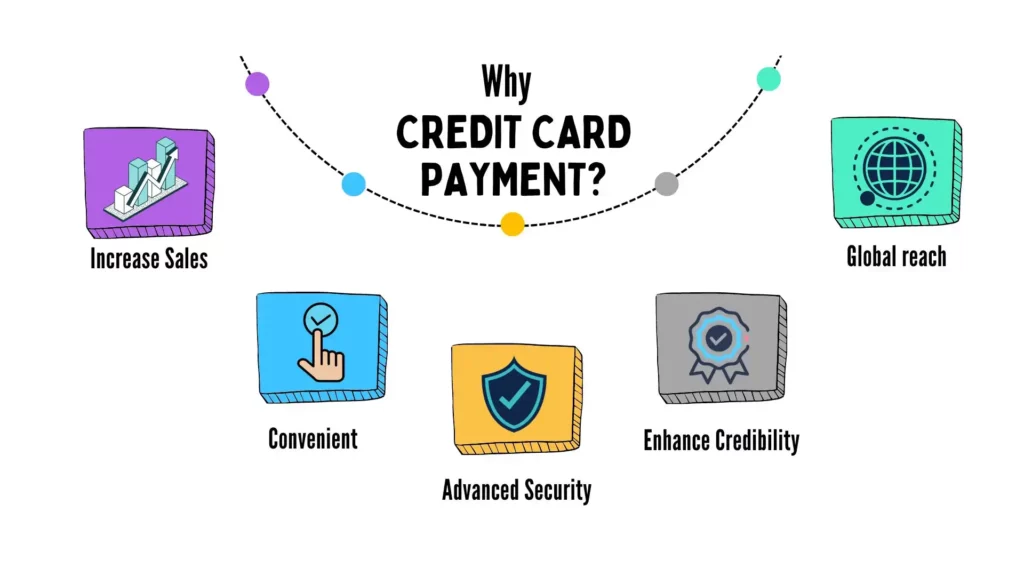
Accepting credit card payments for small businesses is crucial for several reasons. As it’s ranked among the most popular and trustworthy payment methods, consumers feel much more secure while using it.
Card payments aren’t just common nowadays; they’re the default most people reach for first. That matters more than it sounds, because the payment method you don’t offer is the sale you don’t get to make.
Here’s what actually changes once you start accepting credit card payments:
Increase sales: Customers who prefer paying by credit card or debit card will buy from you instead of going to a competitor who takes it. That alone shows up directly in your conversion rate and cuts down on cart abandonment.
Convenience: Nobody wants to dig up their bank details or figure out a payment app mid-checkout. A card is already in their wallet or saved in their browser, and that friction-free moment is often the difference between a completed sale and an abandoned cart.
Security: Modern card processing runs on encryption and real-time fraud detection, which is a big part of why customers trust it more than manual bank transfers. If you want the deeper mechanics of how this fraud protection works, here’s a full breakdown of credit card fraud and how businesses stop it.
Credibility: If you operate a small business and accept credit card payments on your website, it can enhance your credibility and build trust. Customers feel confident in businesses that offer secure and reliable payment options.
Global reach: Cards work across borders in a way that cash and local bank transfers don’t. Accepting credit card payment opens your business up to customers well outside your immediate market.
Ways to accept credit card payments online
There isn’t just one way to do this, and the right setup depends on how your business actually sells.
Hosted checkout or payment form: A secure payment form where customers enter their card details directly on your site. This is what Paymattic builds for you on WordPress: no separate checkout page to manage or code yourself.
Payment links: A one-time link you send by email or text. Useful if you’re collecting a deposit, a donation, or a single payment and don’t want to build out a full checkout flow for it.
Virtual terminal: lets you manually key in a customer’s card details, which comes in handy for phone orders or mail-in requests.
E-commerce platform integration: if you’re running a full online store, your payment gateway plugs straight into your cart and checkout process.
For most small businesses running on WordPress, a simple hosted checkout form connected to a gateway like Stripe covers everything you’d realistically need, without the overhead of a full e-commerce build.
Subscribe Newsletter
Subscribe to our newsletter for updates, exclusive offers, and news you won’t miss!

The right payment plugin to accept credit card payments
Once you’ve decided you want to accept credit card payments online, the next question is usually: how do I actually do this on WordPress without hiring a developer?
The simplest route is to install a payment plugin. Paymattic is a lightweight payment and donation plugin for WordPress built specifically for this purpose, and what people are always surprised by is that accepting credit card payments through it is free.
No hidden markup on top of what Stripe already charges.
It supports 14 region-based payment gateways, including Stripe, PayPal, Square, Authorize.net, Mollie, Moneris, and Xendit, so wherever your customers are, there’s likely a gateway that fits. You can also accept online payments through several of these gateways without touching a line of code.
If you want the extra layer of fraud protection, it’s worth integrating a 3D Secure gateway like Stripe, which adds an OTP verification step for card-not-present transactions. It’s a small addition that meaningfully cuts down on chargebacks.
Pro tip: Accept Payment With 2D Payment Gateways for Faster Checkout
WordPress payment plugin comparison
Paymattic isn’t the only option, and it shouldn’t be the only one you look at. Here’s how the main payment plugins for WordPress actually stack up:
| Plugin | Best for | Stripe fee (free tier) | Recurring payments | Setup difficulty |
|---|---|---|---|---|
| Paymattic | Small businesses and nonprofits wanting payments and donations in one plugin | Free, no added markup on Stripe’s rate | Available on Pro | Low, guided setup |
| WP Simple Pay | Simple, single-purpose Stripe payment forms | Free plan available | Requires Pro | Complex |
| FluentForms | Teams already using WPForms for other forms | Needs Pro plan + Stripe addon | Supported on higher tiers | Medium |
| WooCommerce | Full online stores selling physical products | Free plugin, gateway fees apply | Via extensions | Higher, more moving parts |
If all you need is a clean way to collect one-time or recurring credit card payments without running a full store, Paymattic will get you there fastest. If you’re selling a catalog of physical products, WooCommerce or FluentCart is worth the extra setup time.
How to accept credit card payments online
Here’s the actual walkthrough to receive credit card payments using Paymattic and Stripe, which is free to set up and takes less time than a coffee break.
Including the four giant credit cards: Visa, Mastercard, American Express, and Discover, Stripe accepts credit cards from other popular brands as well.
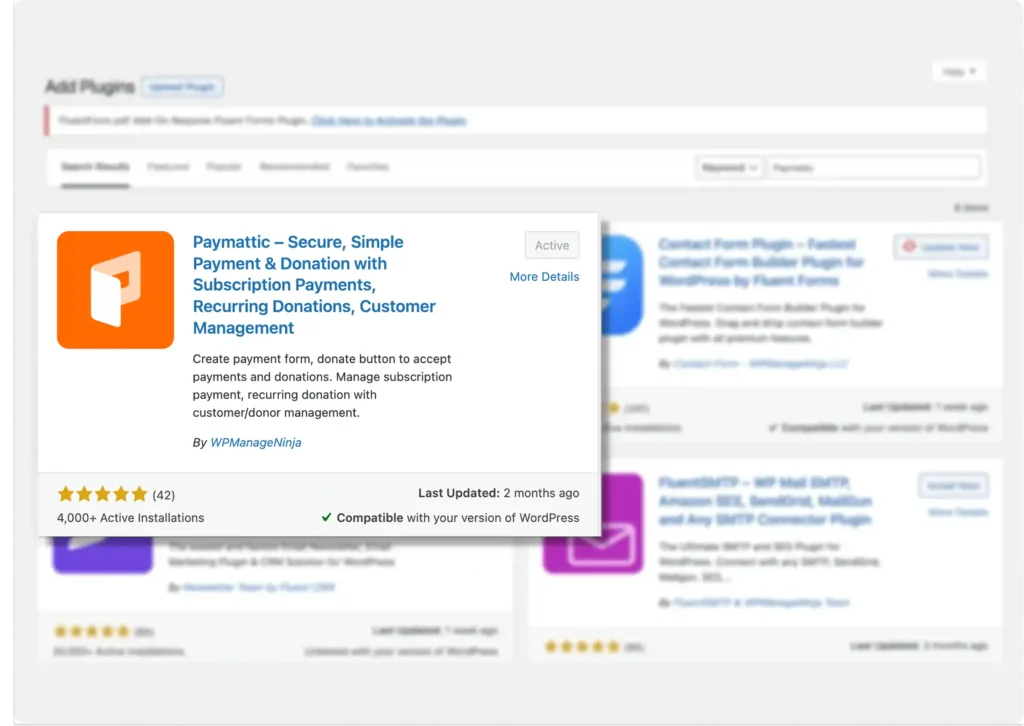
Install the Paymattic payment plugin for WordPress
To receive credit card payments, installing the right payment plugin is the first and most significant step.
- Go to your WordPress admin dashboard
- Click on Plugins → Add New
- Search for Paymattic and install the plugin
- Click on the Activate button
Integrate Stripe on WordPress
After installing Paymattic, it’s now time to integrate Stripe into it. Integrating the Stripe payment gateway into Paymattic is pretty easy.
- Go to Paymattic > Payment Gateway
- From the left navigation bar, click on Stripe
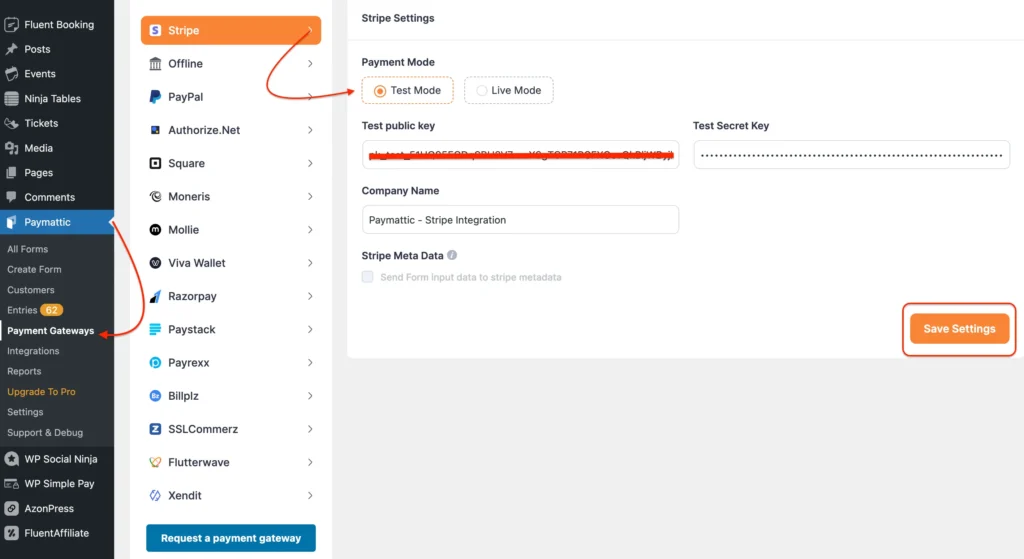
You’ll need to fill out the credentials, more specifically the Stripe API keys, here. You can have the information on your Stripe dashboard.
- Log in to the Stripe dashboard and click on the Developer tab
- Navigate to API keys
- Get your Publishable key and the Secret key here
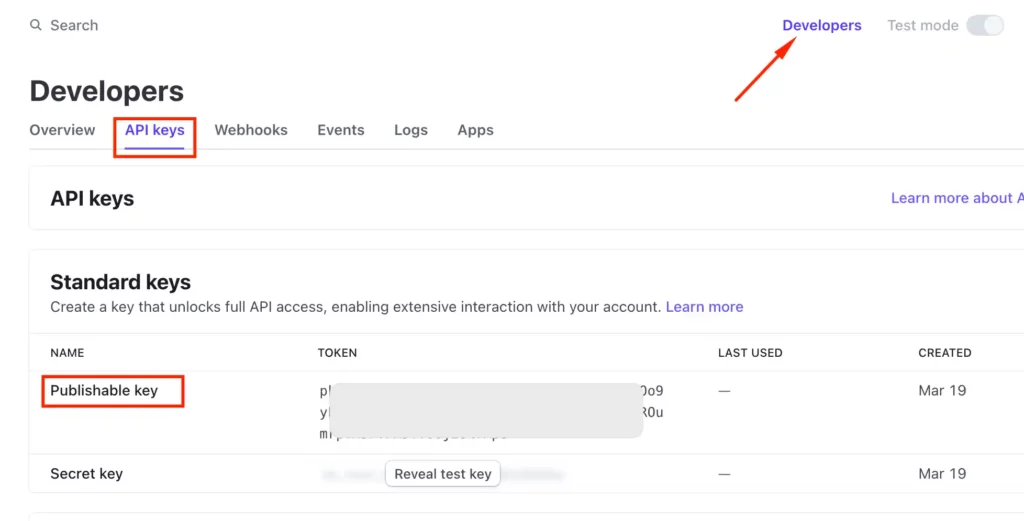
Switch the test mode to “on” from the top-right corner to test payment with Stripe. Keep the switch turned off if you want to access live data.
- Copy and paste the keys in the required field of Paymattic
- Fill in the other information
- Click on Save Settings
That’s all you need to do to configure Stripe in Paymattic and start accepting credit card payments online on your WordPress website.
Accept subscription payment
One of the best things about accepting payment by credit card through Paymattic is that you can easily accept subscription payments or recurring donations. All you need to do is configure the Stripe Webhooks.
- Go to Paymattic → Payment Gateway → Stripe to get your webhook URL
- Visit the Stripe dashboard to add webhooks
- Go to Developers → Webhooks
- Click on the Add an endpoint button
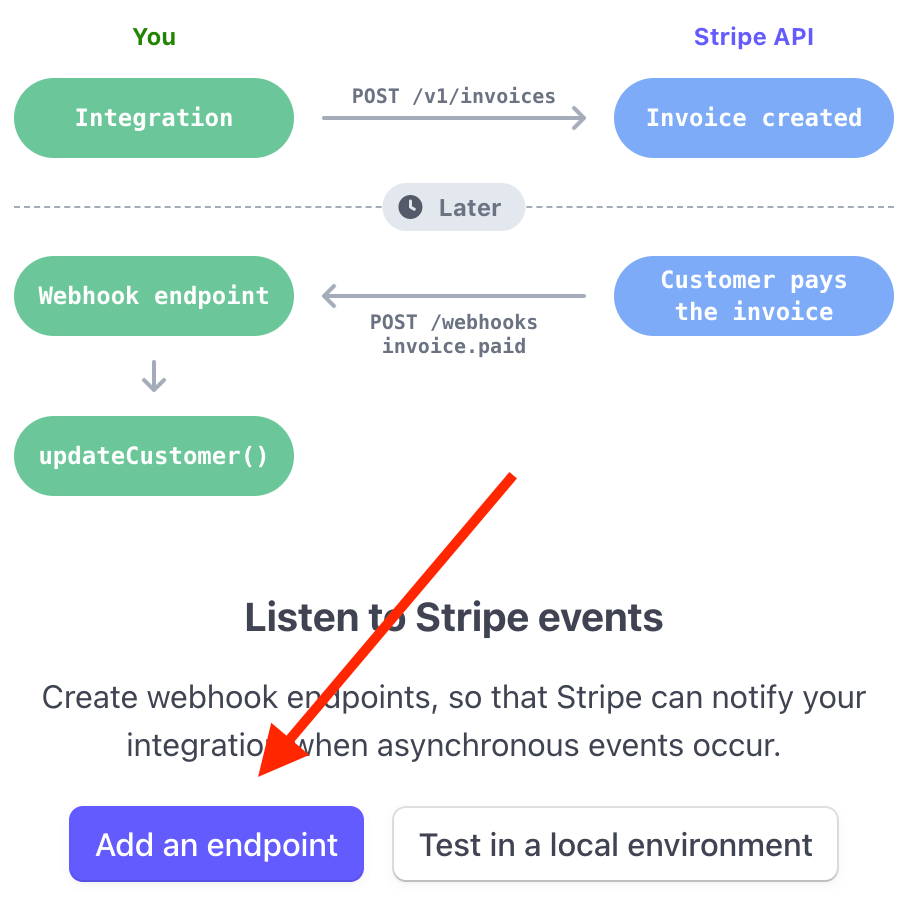
- Paste the Webhook URL in the Endpoint URL field.
- Set a description for the Webhook
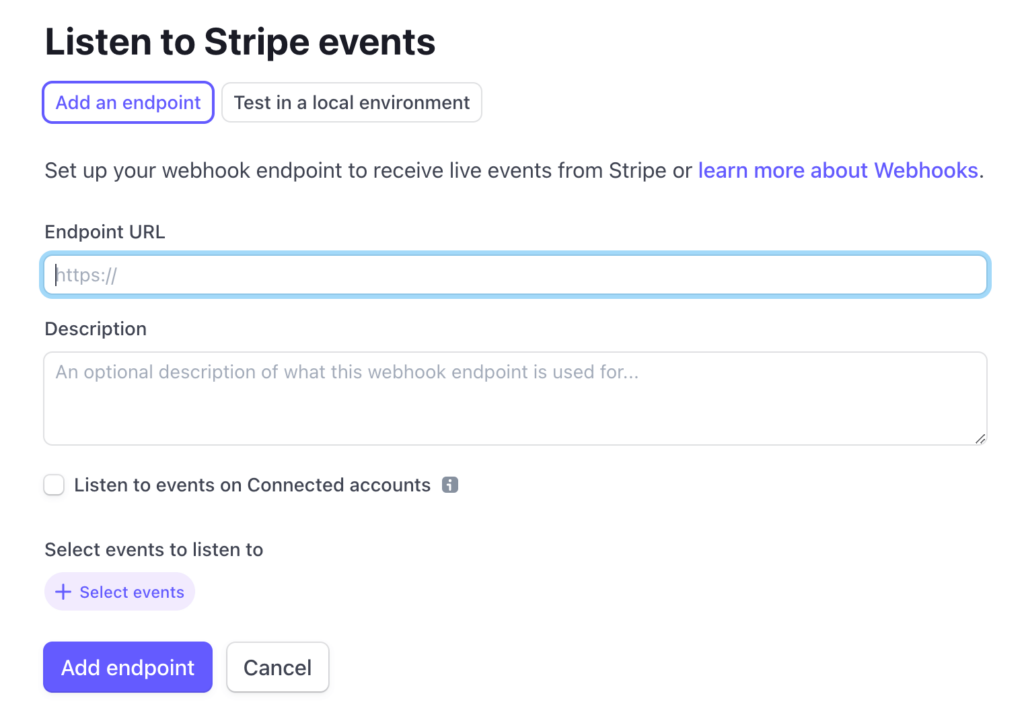
Click on the Add endpoint, and you’re all set to accept subscription payments on your WordPress website.
[Note: Paymattic offers a one-time payment through credit card for free. But to accept subscription payments, you need to upgrade to the pro version, which costs less than a cup of coffee ($4.99/month).]
That’s why we mentioned that this is the cheapest way to accept credit card payments online for small businesses.
See it in action: a live credit card payment form
Reading about setup steps is one thing; seeing an actual working form is another. Here’s a live credit card payment form built with Paymattic, so you can see exactly what your customers would experience at checkout.
Try submitting a test transaction yourself (the test card numbers work here) to see the full flow from form to confirmation. It’s the fastest way to know whether this setup fits your business before you commit to it.
What does it cost to accept credit card payments online?
Paymattic is free to use, and it doesn’t charge any platform fee, but when you accept payment by credit card, the payment processing fee is there. That part always comes from the card network and issuing bank, not the plugin.
Here’s how the main options compare:
| Provider | Typical online rate | Monthly fee |
|---|---|---|
| Stripe | 2.9% + 30 cents | $0 |
| PayPal | 2.9% + 49 cents (recurring) | $0 |
| Square | 2.9%-3.3% + 30 cents | $0-$165 depending on plan |
| Paymattic + Stripe | Stripe’s standard rate, nothing added on top | Free, Pro is needed only for recurring |
For most small businesses, the cheapest way to accept credit card payments online is a free plugin paired with a low-fee gateway like Stripe. You skip the monthly software cost entirely and only pay the per-transaction fee, no markup, no minimums.
A Complete Overview of Stripe Payment Gateway
Wrapping up
When you receive credit card payments, you’re not only offering your consumer a smooth purchase journey but also expanding your customer base. You can reach a global audience by integrating a popular payment method.
Starting from building trust, improving credibility and the checkout experience, to making secure transactions, you can take care of all of that just by introducing credit cards payments into the checkout systems.
Frequently Asked Questions
Here are answers to some frequently asked questions on how to accept credit card payments for small business on a WordPress website.
Q. How can I accept credit card payments for free?
A: You can accept credit card payments for free using Paymattic. Because its free version offers the Stripe payment gateway, which doesn’t add any extra fees or charges.
Q. Do I need WooCommerce to accept credit card payments on WordPress??
A: No. While WooCommerce is popular, you can do this with lighter plugins like Paymattic or other payment form plugins.
Q. Is it safe to accept credit card payments on my WordPress site??
A: Yes, if you use a trusted payment gateway. Gateways like Stripe, PayPal, and Authorize.Net handle encryption and PCI compliance, so sensitive card details never touch your server.
Q. Do I need an SSL certificate to accept credit card payments?
A: Yes. An SSL certificate ensures that your site is secure and helps build customer trust when entering card details.
Q. Can I accept recurring or subscription payments with a credit card?
A: Yes. Many payment plugins like Paymattic support recurring billing, allowing you to sell memberships, courses, or subscription-based products.
Q. What is the cheapest way to accept credit card payments online?
A: The cheapest option is usually Stripe or PayPal, which both charge around 2.9% + $0.30 per transaction in the U.S. For small businesses, using a free plugin with these gateways keeps costs minimal, no monthly fees, just per-transaction charges.
Join the thousands already enjoying Paymattic Pro!

Tipu Deb
Hey! Tipu here, working as a Marketing Strategist at WPManageNinja & Paymattic. A nature lover and a person who is addicted to exploring historical events. In my leisure, you’ll find me playing with different musical instruments.
2 responses to “How To Accept Credit Card Payments Online on WordPress”
-
We’re a group of volunteers and opening a new scheme in our
community. Your site provided us with valuable information to
work on. You’ve done a formidable job and our whole community will be grateful to you.-
Thank you so much. Hope this article helped you.
-



Leave a Reply