

Set Credit Card as Preferred Payment Method


Table of Content
Download Paymattic – it’s Free!
Subscribe To Get
WordPress Guides, Tips, and Tutorials
We will never spam you. We will only send you product updates and tips.
If your customers hit checkout and can’t pay the way they want, they leave. It’s that simple.
Setting up the right payment method isn’t just a technical checkbox. It’s one of the most powerful decisions that shape how your customers feel about buying from you.
According to a report, nearly 70% of online shopping carts get abandoned, and a clunky or unclear checkout experience is one of the biggest reasons. The fix isn’t always a redesign or a new marketing strategy.
Sometimes, it’s as simple as setting up the customer’s preferred payment method.
When you set up debit or credit card payment as the default option, your customers rarely give a second thought.
They see the familiar card fields, enter their details, and check out. That kind of frictionless experience builds trust, speeds up the transaction, and directly affects your conversion rate.
In this guide, you’ll learn what a preferred payment method actually means, how it varies by region, and exactly how to set a credit card as your preferred payment method using Paymattic on WordPress.
What is a preferred payment method?
A preferred payment method is exactly what it sounds like. It’s the payment option that gets selected by default when someone goes to pay. Instead of making your customers choose from a list every single time, you set one method at the front, and everything flows from there.
For businesses, this matters more than most people realize. When you define a preferred method of payment on your platform or website, you reduce friction at checkout.
Fewer clicks, fewer decisions, fewer abandoned carts.
Think of it this way: if you run an online store and 80% of your customers pay by credit card, why would you make them hunt for that option every time? You wouldn’t. You’d put it front and center.
A preferred payment gateway also helps you plan better. You know which payment processor you’re relying on, which fees to expect, and how your cash flow will behave.
Preferred payment methods for different regions
Not every customer reaches for the same thing at checkout. Payment habits vary significantly by region, and choosing the right gateway as your preferred payment method can mean the difference between a completed sale and a lost one. Here’s a look at some of the most reliable options by region.
Asia
In Asia, payment infrastructure is fragmented but fast-growing. If you’re targeting Indian customers, Razorpay is hard to beat. It supports credit cards, debit cards, UPI, and net banking, making it a comprehensive choice for businesses operating in the Indian market.
For Southeast Asia, Xendit covers Indonesia, the Philippines, and Thailand with strong local payment method support. And if you’re dealing with Chinese customers or a broader Asia-focused audience, Alipay is a name you simply can’t ignore.
Africa
Africa’s digital payment scene has grown remarkably over the past few years. Paystack is the go-to gateway for businesses operating in Nigeria, Ghana, and South Africa.
It’s developer-friendly, well-supported, and widely trusted by both merchants and customers across the continent.
Europe
For European businesses, Mollie stands out as a clean, well-designed gateway that supports cards, iDEAL, SEPA, and a range of local methods across the EU.
If you’re based in Switzerland or serve a Swiss audience specifically, Payrexx is worth looking into for its strong local compliance and multi-currency support.
North America
In the US and Canada, Authorize.Net has been around long enough to earn serious credibility. It supports credit card payments, e-checks, and digital payments and works across the US, Canada, UK, and Australia.
For Canadian businesses specifically, Moneris is a solid domestic option with deep roots in the local market.
Global and multi-region
If your audience spans multiple countries, you need a gateway built for scale. Stripe payment method supports businesses in 40+ countries and is one of the most developer-friendly processors available, making it an excellent choice for card transactions.
PayPal reaches 200+ countries and carries enormous brand trust, which is why PayPal, as a preferred payment method, remains a top choice for international buyers.
The key takeaway here is this: your preferred payment method should match where your customers actually are, not just where you are.
Pick a gateway that your audience already trusts, supports local payment habits, and makes it easy for you to accept credit card payments and debit card payments without unnecessary complexity.
Paymattic offers 14+ payment gateways, including all the mentioned gateways, so that your customers can make payments with their preferred gateway.
Set the credit card as the preferred payment method
Now let’s get into the practical part. If you run a WordPress site and want to accept credit card payments through a clean, reliable payment form, Paymattic is one of the easiest ways to do it.
Here’s how to get set up step by step:
Install Paymattic
Start by heading to your WordPress dashboard.
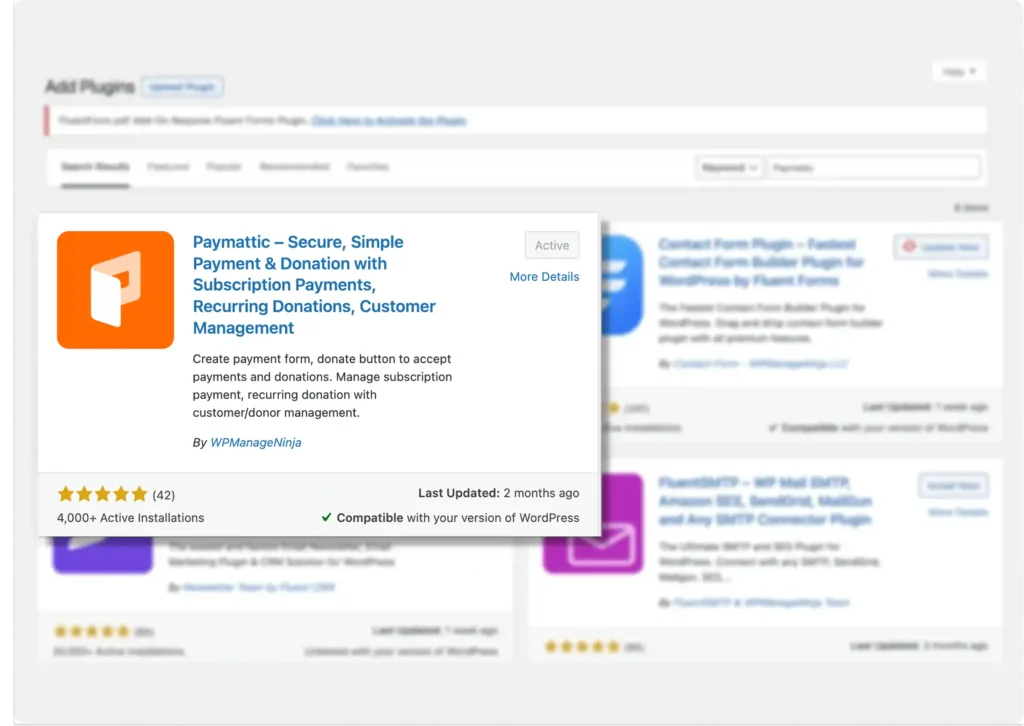
Go to Plugins > Add New and search for “Paymattic.” Install it and activate it.
Configure payment gateways
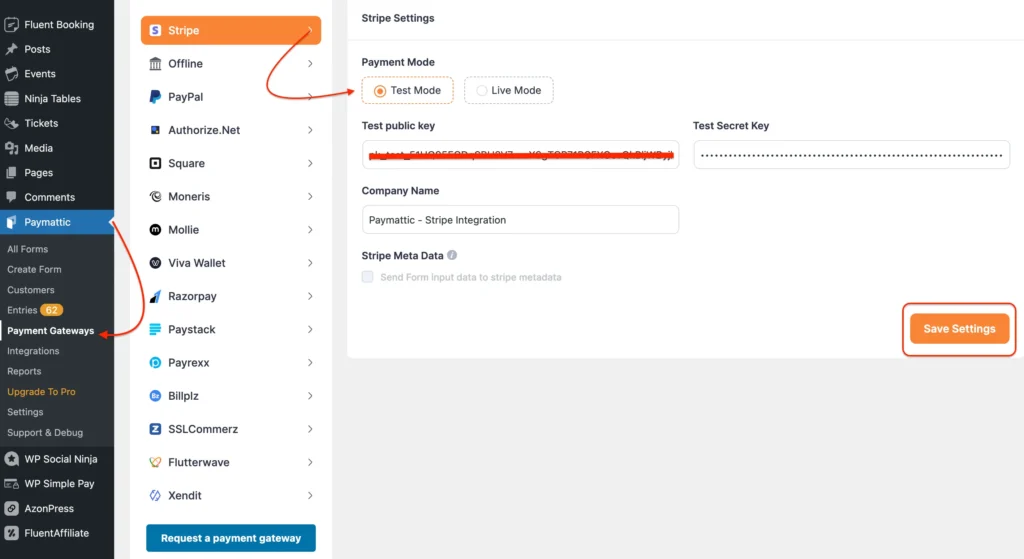
Once it’s active, you’ll see the Paymattic menu appear in your dashboard sidebar. From there, go to Payment Gateways to configure your payment processor.
Paymattic supports multiple gateways, including Stripe, PayPal, and several others. To set up a credit card as your preferred payment method, Stripe is the recommended choice. It’s reliable, widely accepted, and handles everything from one-time payments to subscriptions.
Payment Gateways ➡️ Stripe ➡️Provide the Stripe API Keys ➡️Click Save Settings.
Create a payment form
Go to Paymattic > Add New Form. You can start from a pre-built template or build from scratch. For a basic payment form designed to accept credit card payments, a simple template works well.
Add the necessary fields: name, email, and payment amount at a minimum. If you’re running an online store or selling fixed-price items, you can set the payment amount to a specific value. If you’re a nonprofit collecting donations, you can allow custom amounts.
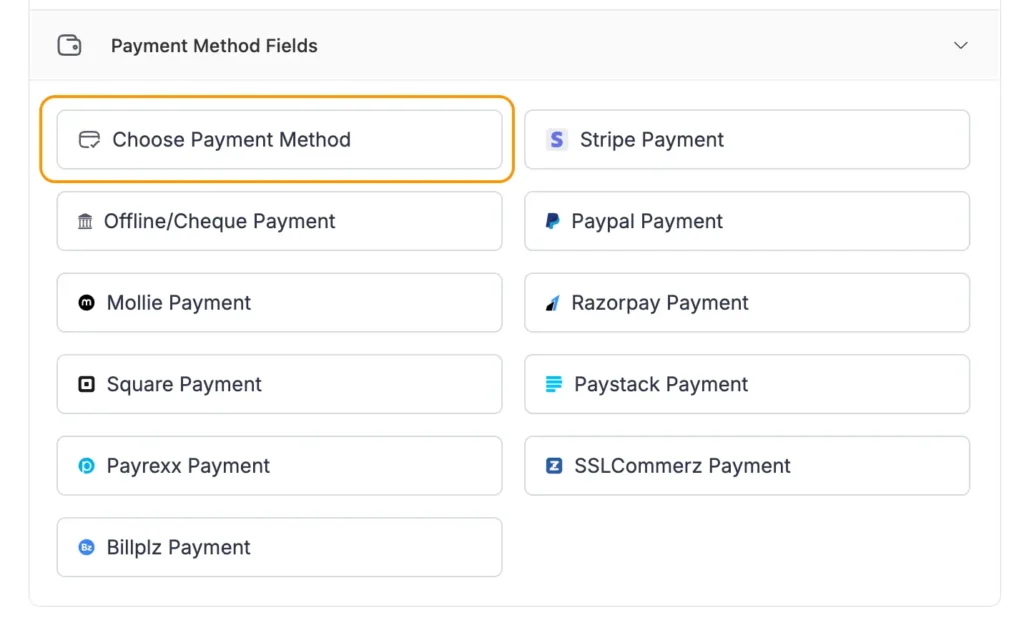
Once your fields are in place, pick the “Choose Payment Method” element for the form. This is where Paymattic lets you control which options appear and which one sits at the top as the default.
Set Stripe as the default payment
Inside the “Choose Payment Method” field, you’ll see options to enable or disable specific gateways: Stripe, PayPal preferred payment, and others you’ve connected.
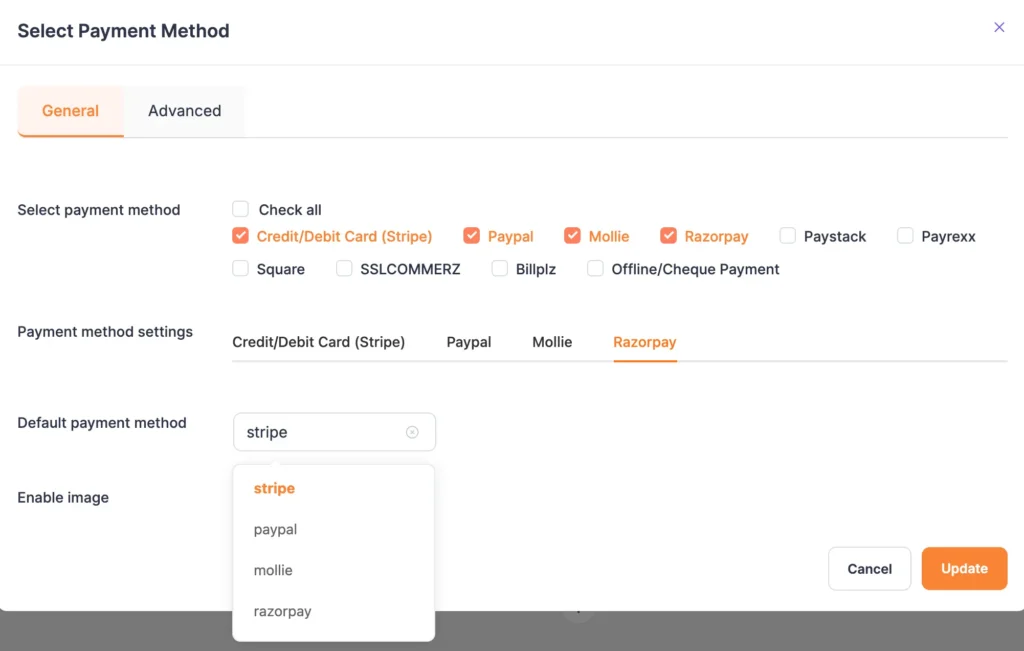
To set credit card payment as the preferred method, make sure Stripe is enabled and set as the “Default payment method.”
In Paymattic’s settings, you can also control whether other options like PayPal, Square, etc. appear alongside Stripe or whether you want Stripe alone for a streamlined checkout experience. If your audience is primarily card users, keeping it to just Stripe removes unnecessary noise at checkout.
Click on Update and Save your form once everything looks good.
Test the form and launch
Before you publish anything, test it. This step gets skipped way too often, and it costs businesses real money when something breaks in production.
Paymattic works with Stripe’s test mode, which lets you run a full transaction without charging anyone. Use Stripe test card numbers to simulate successful payments, failed payments, and edge cases like insufficient funds or expired cards. This way, you know exactly what your customers will experience.
If you’ve also enabled PayPal as a secondary option, use PayPal test card numbers to run the same kind of checks on that side. A thorough test now means fewer support headaches later.
Once testing looks clean, embed the form on your checkout page, product page, or donation page using Paymattic’s shortcode.
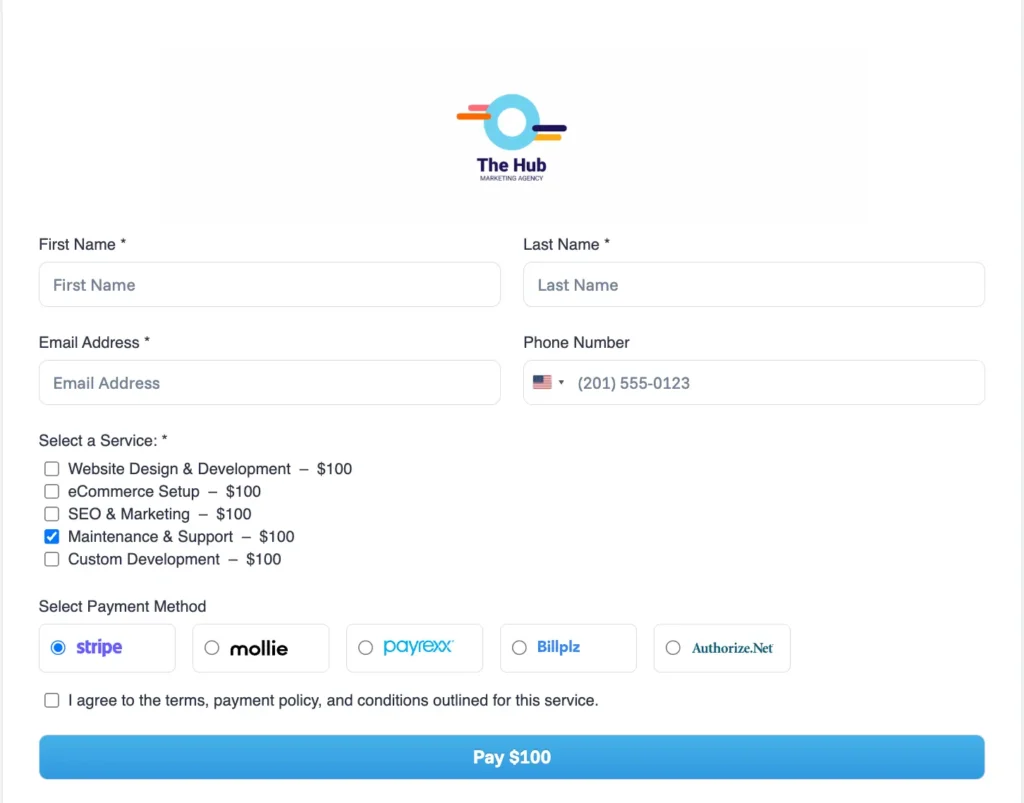
Publish it, and you’re ready to accept real money, offering credit cards as the preferred payment method.
Wrapping up
Most businesses spend months optimizing their product pages, ad copy, and email sequences, and then leave the checkout experience as an afterthought.
But the checkout is where intent turns into revenue. If that moment feels confusing or untrustworthy, everything you did before it goes to waste.
Setting credit card as your preferred payment method is one of the simplest ways to clean up that experience.
It removes decision fatigue, signals professionalism, and meets your customers where they already are. Most people have a card ready. Most people trust card payments. So make it the default, and stop making them work for it.
Join the thousands already enjoying Paymattic Pro!

Tipu Deb
Hey! Tipu here, working as a Marketing Strategist at WPManageNinja & Paymattic. A nature lover and a person who is addicted to exploring historical events. In my leisure, you’ll find me playing with different musical instruments.
Leave a Reply