
Skip to content
Get Paymattic Pro at Special Discount!
Save Up to 50%
paymattic logo
  • Pricing
  • FeaturesExpand
    • Features

      Explore all the features available in Paymattic.

      Payment Features

      Essential payment features to manage your transactions

      Donation Features

      Simplest donation features to run your fundraising campaigns

      See all features

      Get a glimpse of all the advanced features available in Paymattic

  • Use CasesExpand
    • Use Cases

      Paymattic offers versatile solutions for your versatile needs.

      Small Business

      Simplify payments, manage customers, and get revenue.

      Nonprofit

      Get donations, manage donors, and grow your funds.

      Membership

      Get paid memebers, manage them, and set specific roles.

      LMS

      Enroll students and sell courses with integrations.

  • Integrations
  • ResourcesExpand
    • Resources

      Everything you need to get the most out of Paymattic plugin.

      Free Plugin

      Explore all the powerful features available in Paymattic Free.

      Free VS Pro

      Compare the Paymattic Free plugin with Paymattic Pro.

      Blogs

      Get insights, tips, and guides to help your campaigns grow.

      Gateways

      Explore all the global payment gateways supported by Paymattic.

      • Documentation
      • Rest API Doc
      • Change Log
      • Contact Us
      • Get Support
      • Login
      • Report Security Issue
  • Demo
Grab Discount
Get Paymattic Pro at Special Discount!
Save Up to 50%
paymattic logo

How can we help you?

Popular Search subscriptionstripetherecurringuser

Getting Started with Paymattic

  • Paymattic Introduction 
  • How to Install and Activate Paymattic in WordPress

Form Editor

  • Add Multiple Column Containers in Forms
  • Create a Form from Scratch with Paymattic
  • How to Create a Step Form with Paymattic
  • How to Create Your First Payment Form in a Minute and Accept Payments with Paymattic?
  • How to Create WordPress Donation Form with Simple Form Templates?
  • How to Edit, Duplicate, or Delete Paymattic Forms
  • How to Use Conditional Logic in Form Fields with Paymattic?
  • How to Create PDF Feed for Form Submissions?

General Input Fields

  • How to Use the General Fields
  • How to Use the Payment Method Fields
  • How to Use the Donation & Product Fields 

Donation and Product Fields

  • Dynamic Payment Item Field 
  • Add Payment Summary Field in Forms 
  • How to Add Currency Switcher in WordPress Form?
  • How to Add Payment Item Fields in WordPress with Paymattic?
  • How to Add Subscription Payment Item Fields in Paymattic?
  • How to Add Tabular Product Item Fields in WordPress with Paymattic?
  • Add Donation Progress Item in Paymattic
  • How to Add Item Quantity Field in WordPress with Paymattic? 
  • How to Add Custom Payment Amount Field in WordPress with Paymattic?
  • How to Add Tax Calculated Amount Field in WordPress with Paymattic?
  • How to Add Coupon Field in WordPress with Paymattic
  • Donation Leaderboard in Paymattic 

Payment Methods

  • Configure Authorize.net in WordPress through Paymattic
  • How to Add Flutterwave Payment Gateway in Paymattic?
  • How to Integrate Xendit Payment Gateway in WordPress with Paymattic?
  • How to Integrate Square with Paymattic in WordPress?
  • How to Configure Billplz in WordPress with Paymattic?
  • How to Configure Stripe Payment Gateway in WordPress with Paymattic?
  • How to Configure PayPal in WordPress with Paymattic?
  • How to Set PayPal IPN in WordPress with Paymattic?
  • How to Integrate Mollie in WordPress with Paymattic?
  • How to Integrate Razorpay with Paymattic in WordPress
  • How to Integrate Paystack in WordPress with Paymattic?
  • How to Integrate Payrexx in WordPress with Paymattic
  • How to Integrate SSLCOMMERZ with Paymattic in WordPress?
  • How to Collect Offline Payment in WordPress with Paymattic
  • How to integrate Moneris Payment Gateway in Paymattic
  • How to Integrate Viva Wallet With Paymattic?

Global Settings

  • How to Add User Dashboard Module in Paymattic?
  • How to Configure Cloudflare Turnstile Security with Paymattic?
  • How to Configure reCAPTCHA in WordPress with Paymattic
  • How to Change Currency Settings in WordPress with Paymattic
  • How to Manage User Roles in WordPress with Paymattic?

Integrations

  • How to Integrate FluentCommunity in WordPress with Paymattic 
  • How to Integrate Google Sheets in WordPress with Paymattic?
  • How to Integrate Fluent Support with Paymattic in WordPress?
  • How to Integrate Webhook in WordPress with Paymattic?
  • How to Integrate Zapier with Paymattic in WordPress?
  • How to Integrate Slack in WordPress with Paymattic?
  • How to Integrate Telegram with Paymattic in WordPress?
  • How to Integrate Twilio with Paymattic in WordPress?
  • How to Integrate ActiveCampaign in WordPress with Paymattic?
  • How to Integrate Mailchimp in WordPress with Paymattic?
  • How to Integrate FluentCRM in WordPress with Paymattic
  • How to Create a User Registration Form with Paymattic in WordPress?

Learning Management System (LMS) Integrations

  • How to Integrate LifterLMS in WordPress with Paymattic?
  • How to Integrate LearnDash in WordPress with Paymattic?
  • How to Integrate Tutor LMS in WordPress with Paymattic?

Form Settings

  • Customize Form-Specific Payment Settings
  • How to Create Custom CSS/JS in WordPress with Paymattic? 
  • How to Set Form Scheduling and Restriction Settings in WordPress?
  • How to Customize Form Design Settings in WordPress with Paymattic?
  • How to Configure Confirmation Settings in WordPress?

Email Notification Settings

  • How to Setup Email Notifications in Paymattic WordPress Plugin?
  • How to Enable Email Notification For Subscription Cancel

Manage Form Entries

  • Manually Cancel Any Subscription
  • How to Manage Subscriptions in WordPress with Paymattic
  • How to Disable IP Address Logging in WordPress with Paymattic?
  • How to View Single Submission Data and Manage Payments in Paymattic
  • How to View and Manage All Form Entries in WordPress with Paymattic
  • How to Enable Stripe Payment Hold in Paymattic 
  • How to Refund Payments in Paymattic

Reports & Analytics

  • How to View the Reports and Payment Analytics in WordPress?

FAQ

  • Add First & Last Name Fields Separately
  • Date Formats Customization
  • How to Fix Not Sending Email Confirmations Issue in WordPress?

Customer Profile

  • How to View Customer Profile in WordPress with Paymattic?

Import - Export

  • How to Import-Export Forms with Paymattic
  • How to Export Form Entry/Entries with Paymattic  

Change Log

  • Change Log
View Categories
  • Home
  • Docs
  • Payment Methods
  • How to Integrate SSLCOMMERZ with Paymattic in WordPress?

How to Integrate SSLCOMMERZ with Paymattic in WordPress?

SSLCOMMERZ is the largest Bangladesh-based payment gateway and aggregator that offers 30+ payment options including all types of debit cards, credit cards, prepaid cards, mobile banking, E-Wallets, and EMI. This article will guide you through configuring SSLCOMMERZ on your WordPress Site with the Paymattic plugin.

Remember, to get access to the SSLCOMMERZ payment gateway, you need the Paymattic Pro Plugin.

Configuring SSLCOMMERZ Payment Method  #

To learn how to configure the SSLCOMMERZ payment gateway through Paymattic, follow the steps with screenshots below –

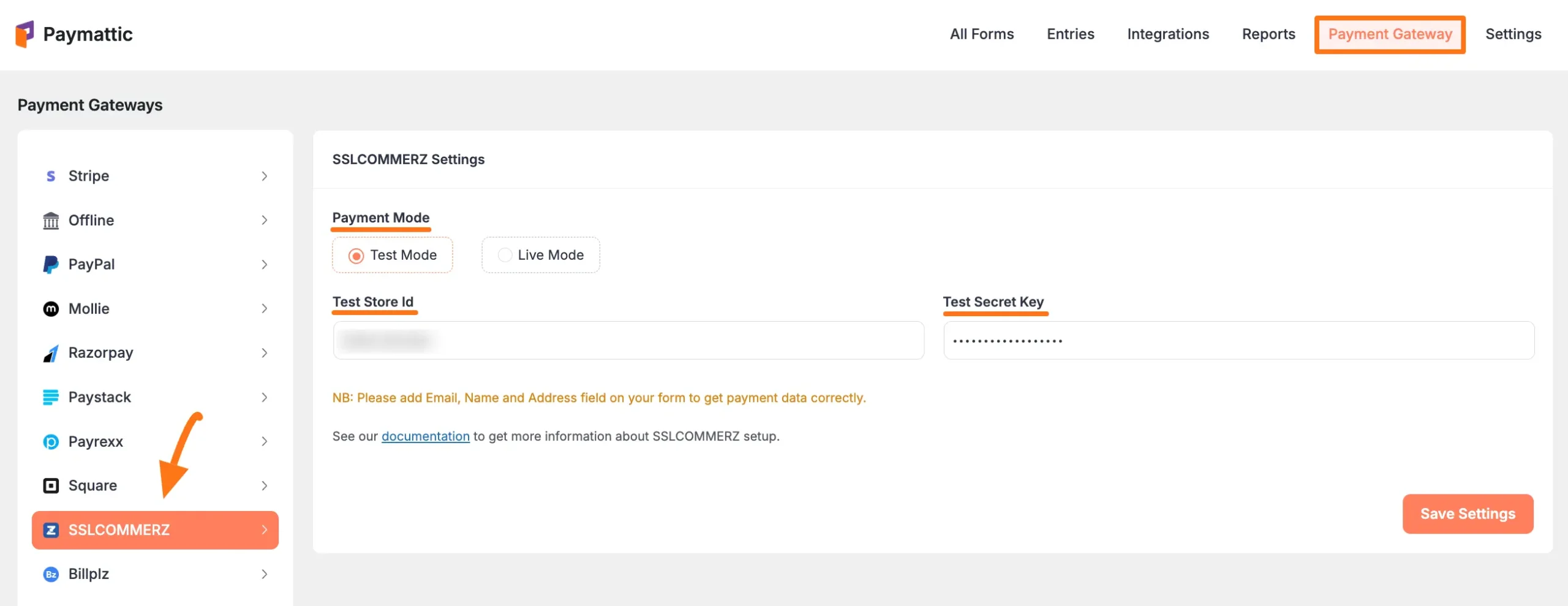
First, go to Payment Gateway from the Paymattic Navbar, click the SSLCOMMERZ tab from the left sidebar, and the SSLCOMMERZ Settings page will open.

Select any Payment Mode between Test (for test payments) and Live ( for real payments) as both options follow the same configuration process, e.g., I choose the Test Mode.

Then, you need to obtain the Store ID and Secret Key from your SSLCOMMERZ Account.
Get the Store ID & Secret Key from SSLCOMMERZ #

To learn how to get the Store ID and Secret key from your SSLCOMMERZ, follow the steps below – 

First, open a merchant account with SSLCOMMERZ by clicking here.

Remember, you must add your Email, Name, and Address field on your SSLCOMMERZ Signup Form to get payment data correctly.

But, if you already have an existing account, contact the SSLCOMMERZ manager manually through the official channel to get your Store ID and Store Password/Secret Key.

Once you open the account, you’ll receive a welcome email with all your account details including Store ID and Secret Key similar to the screenshot below. Simply copy them.
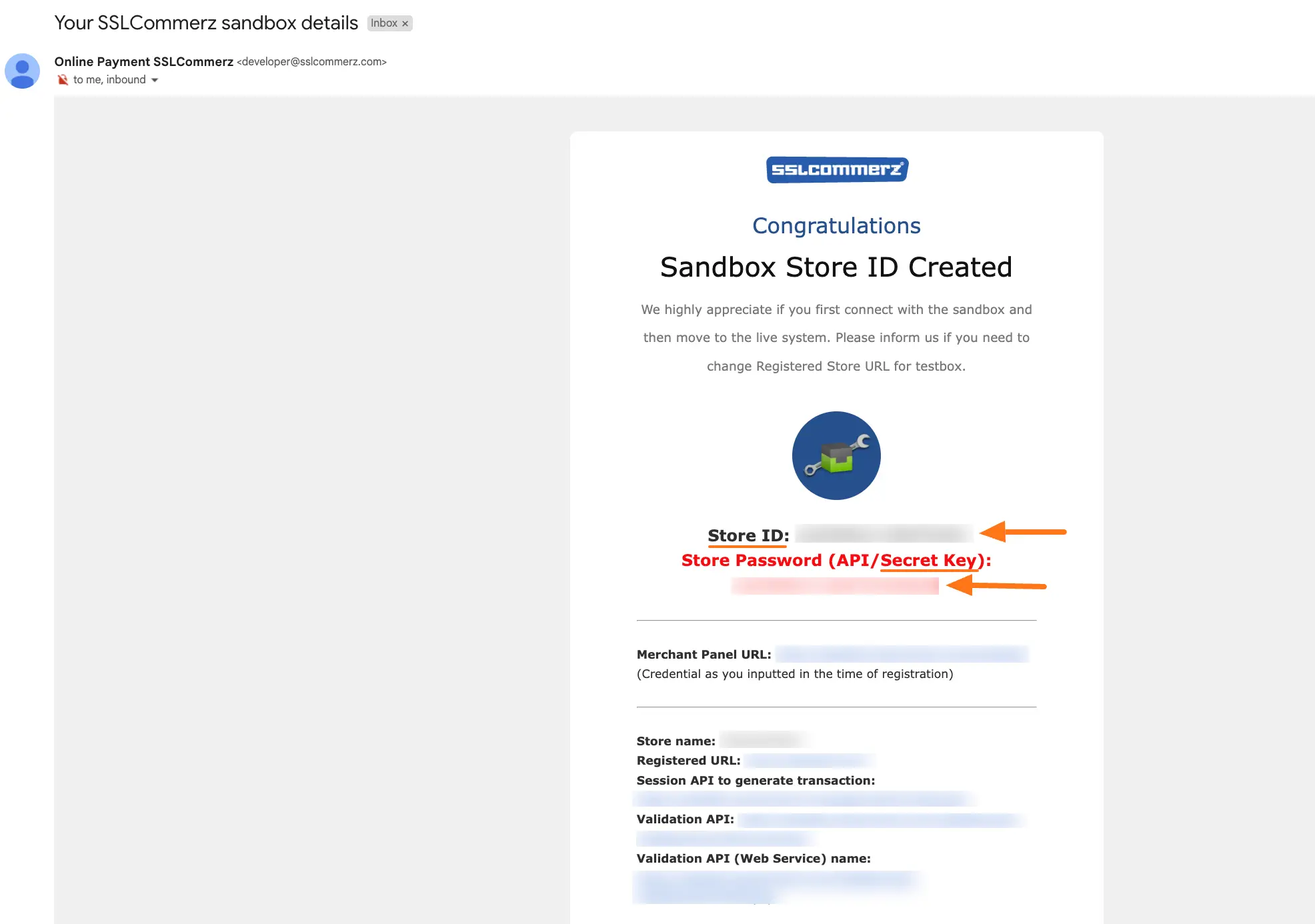
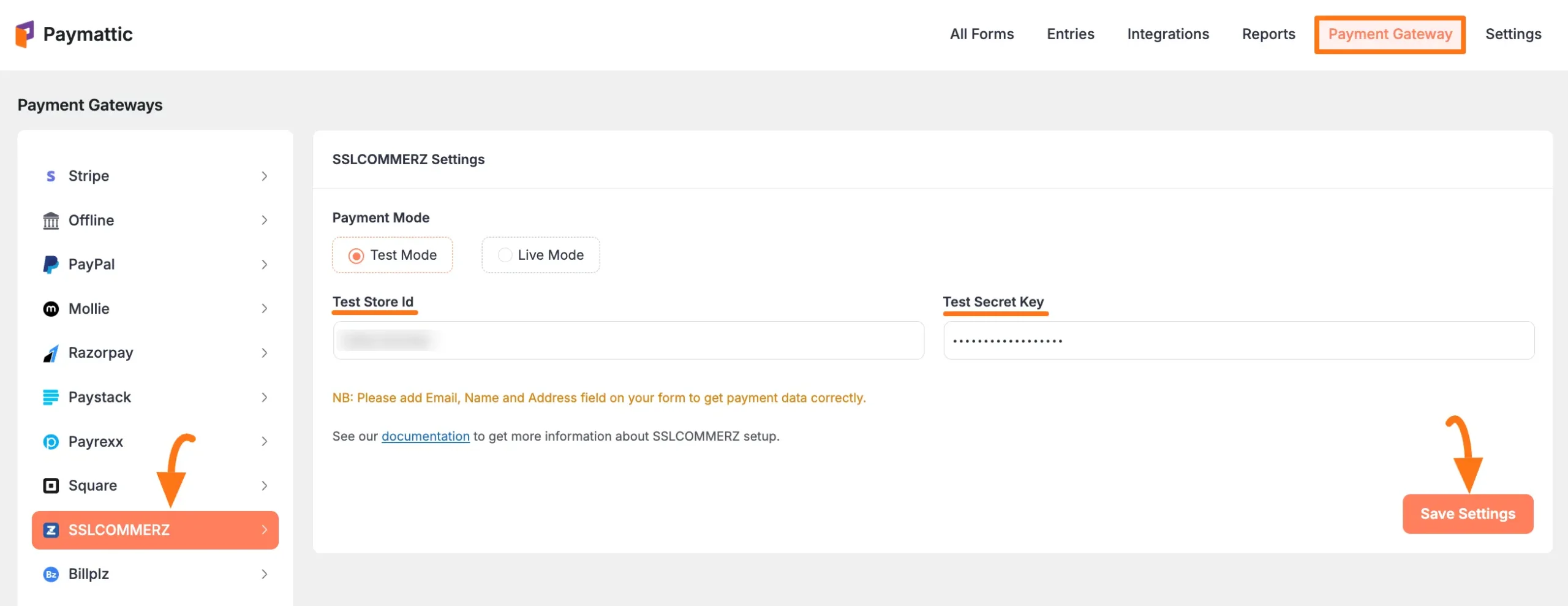
Go back to Payment Gateway from the Paymattic Navbar, click the SSLCOMMERZ tab, and paste the copied Store ID and Secret key into the respective fields.

Finally, press the Save Settings button and your SSLCOMMERZ account will be integrated with Paymattic for your WordPress Site.
Add SSLCOMMERZ in Forms #

Once you finish setting up your SSLCOMMERZ payment gateway, you can easily add this payment method to any of your existing Payment Form.

If you do not have any existing forms, read Create a Form from Scratch or Create a Form using Templates documentation.

To learn the detailed process of adding a payment method to an existing form, read this Documentation.

But, remember, the added SSLCOMMERZ payment method in your Form will not function unless you complete the configuration process properly.

If you have any further questions, concerns, or suggestions, please do not hesitate to contact our @support team. Thank you.

What are your Feelings

Share This Article :

  • Facebook
  • X
  • LinkedIn
  • Pinterest
Still stuck? How can we help?

How can we help?

Updated on October 4, 2024
How to Integrate Payrexx in WordPress with PaymatticHow to Collect Offline Payment in WordPress with Paymattic

Powered by BetterDocs

Table of Contents
  • Configuring SSLCOMMERZ Payment Method 
    • Get the Store ID & Secret Key from SSLCOMMERZ
  • Add SSLCOMMERZ in Forms
Paymattic - WordPress Payment and donation plugin.

Simplest WordPress Payment and Donation Management

Get Paymattic Pro to unlock all the advanced features

Get Paymattic
paymattic monotone light logos

Paymattic is a lightweight yet super powerful WordPress plugin designed for handling global payments, donations, subscriptions, and customers. Zero code needed.

Subscribe to Newsletter

Footer Newsletter
We won't spam you. Unsubscribe at any time.
Explore
  • Pricing
  • Features
  • Integrations
  • Paymattic Free
GET HELP
  • Blog
  • Support
  • Documentation
  • API Documentation
  • Account Login
  • Report Security Issue
Resources
  • Demo
  • Free vs Pro
  • Payment Gateways
  • Brand Guideline
  • Affiliate
Company
  • Sister Brands
  • About Us
  • Terms & Conditions
  • Privacy Policy
  • Contact Us

Follow us on:

Copyright ©2026 Paymattic. A Brand of WPManageNinja™

Start Your Paymattic Journey
at Zero Cost 🚀

Just download, install, and start collecting money from all around the globe with Paymattic.

Plugin Download Form
ChatGPT Icon Google AI Mode Perplexity AI Icon Grok AI Icon Claude AI Icon
  • Pricing
  • Features
    • Features

      Explore all the features available in Paymattic.

      Payment Features

      Essential payment features to manage your transactions

      Donation Features

      Simplest donation features to run your fundraising campaigns

      See all features

      Get a glimpse of all the advanced features available in Paymattic

  • Use Cases
    • Use Cases

      Paymattic offers versatile solutions for your versatile needs.

      Small Business

      Simplify payments, manage customers, and get revenue.

      Nonprofit

      Get donations, manage donors, and grow your funds.

      Membership

      Get paid memebers, manage them, and set specific roles.

      LMS

      Enroll students and sell courses with integrations.

  • Integrations
  • Resources
    • Resources

      Everything you need to get the most out of Paymattic plugin.

      Free Plugin

      Explore all the powerful features available in Paymattic Free.

      Free VS Pro

      Compare the Paymattic Free plugin with Paymattic Pro.

      Blogs

      Get insights, tips, and guides to help your campaigns grow.

      Gateways

      Explore all the global payment gateways supported by Paymattic.

      • Documentation
      • Rest API Doc
      • Change Log
      • Contact Us
      • Get Support
      • Login
      • Report Security Issue
  • Demo